
Waifu2x-Extension-GUI: Upscaling Is Guessing, Carefully
Summary
Waifu2x-Extension-GUI enlarges and cleans up images using a model trained on pictures rather than a rule for interpolation. That distinction explains both what it does brilliantly and where it invents things that were never there.
Recommend- Name
- Waifu2x-Extension-GUI
- Version
- 3.141.01
- Pricing
- Free
- Open source
- Open source
- Operating system
- Windows
- Updated
- 2026-10-14 22:00
The difference between stretching and reconstructing
Make an image larger with the ordinary method and you get a bigger version of the same information. Each new pixel is calculated from the pixels around it by a rule — take the average of the neighbours, weight them by distance, and place the result. Nothing is added. Enlarge a photograph that way and it becomes soft, because softness is exactly what averaging looks like when the gaps get bigger.
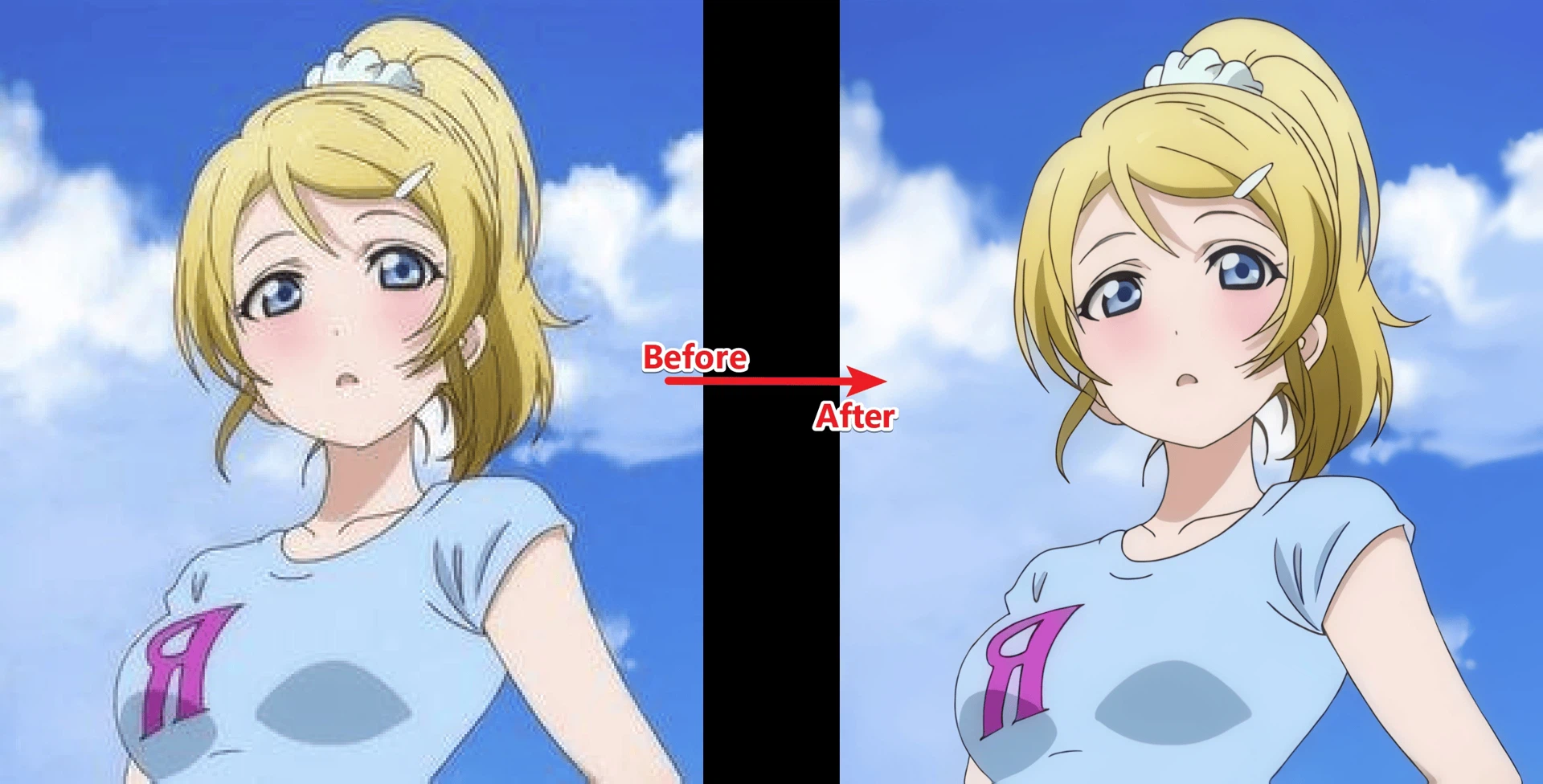
Waifu2x-Extension-GUI does something different in kind. It uses a model that has been trained on a very large number of images, so that when it places new pixels it is not averaging but proposing what a picture of this kind usually looks like at this point. Edges stay edges instead of blurring into ramps; texture reappears where the original had only a suggestion of texture. It is free, the source is public, and it runs on Windows.
Both operations are reconstructions, and that word is doing real work
The program is usually described as doing two things, enlarging and denoising, and they are the same operation viewed from two directions. Enlarging asks what should fill the space between known pixels; denoising asks what the pixel would have been without the grain. Both are questions about information that is not in the file, and both are answered from prior knowledge rather than from the data itself.
This is not a criticism, it is the explanation of the tool's behaviour. It is why the results are astonishing on line art, on illustrations and on the kind of image that has clean edges and flat regions — those are the cases where the prior is strong and the guess is easy to get right. It is also why results are less reliable on photographs of faces, foliage or fabric, where the model has to invent texture and can invent the wrong texture convincingly.
Choosing a model is choosing an assumption
The program offers several models and the choice is not cosmetic. Each has been trained on a different diet of images, and each therefore carries a different opinion about what the world looks like. A model trained mostly on illustrations will produce crisp, confident lines from a drawing and slightly plastic results from a photograph. A model trained for photographic material will keep grain and skin plausible and can soften the hard edges of a diagram.
So the useful procedure is not to find the best model but to try two on the same image and compare at full size. What to look for is not sharpness — every model can be sharp — but whether the invented detail is consistent with the rest of the picture. Wrong texture announces itself as a region that looks busier than its neighbours, and it is much easier to see when you know it is a guess.
Batch processing is the reason the tool exists for most people
Doing this to one image is a curiosity. Doing it to four hundred is a workflow, and the workflow is what people actually need: an archive of scanned material, a folder of screenshots destined for a document, a set of frames extracted from video. A queue that accepts a folder, applies one model and runs unattended turns an evening of manual work into a background task.
The cost of batch work is the multiplication of mistakes, and with this kind of tool the mistake is quiet. An oversized enlargement of four hundred images does not fail; it succeeds slowly, fills a disk, and produces files nobody can use. So the procedure worth following is the dull one: process a handful, look at them at full size, confirm the model and the settings, and only then commit the folder.
What the interface is, and is not
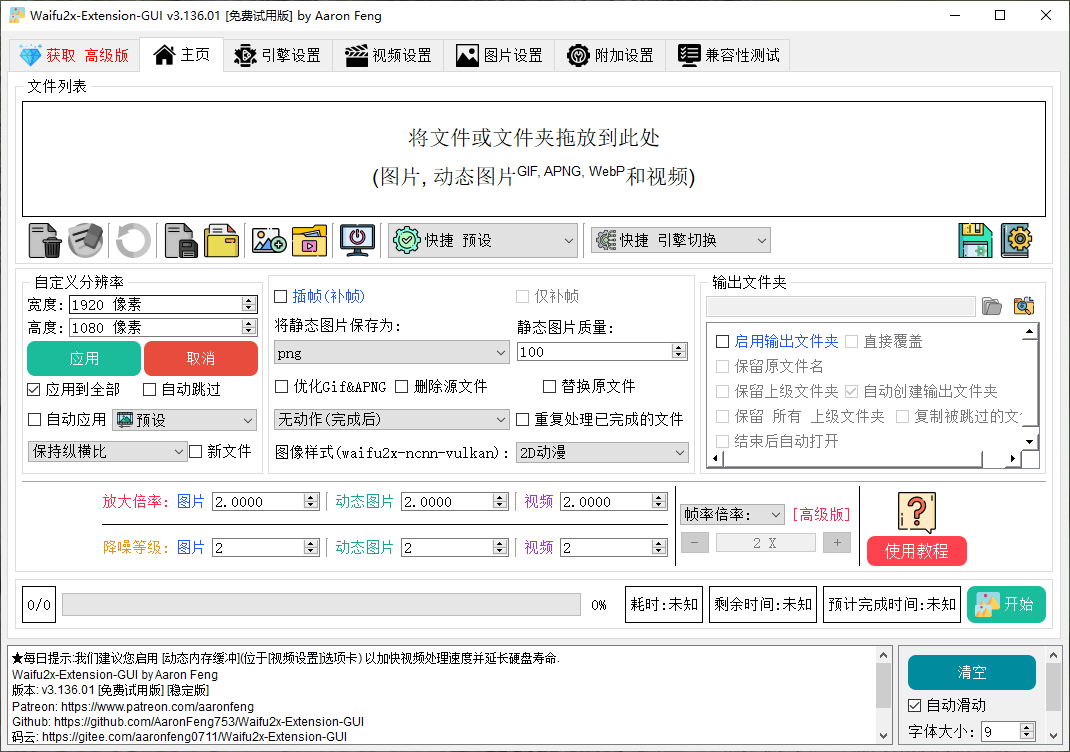
The graphical shell around the model is the reason this program exists as a separate thing at all: the underlying technique has been available to people comfortable on a command line for a long time, and a window with a file list, a model menu and a start button is what made it usable by everybody else. That is a real contribution and it should be described as one.
What it is not is a magic improvement filter. Grain in a photograph is often information rather than damage, and removing it is a decision with consequences. Sharpening, which usually accompanies this kind of processing, cannot create detail that was never captured and can only exaggerate edges that already existed. The tool is at its best when the input is genuinely deficient — a small image that needs to be printed, a screenshot taken at the wrong size — and at its least useful when the input is fine and the intention is to make it better somehow.
Open source, and why it matters here specifically
An open project with an active community and regular updates is the ordinary description of a healthy tool, and in this category it counts for more than usual. The field moves quickly, models are replaced, and hardware support changes; a project that is maintained keeps working, and one that is not becomes a folder of dependencies that no longer resolve. Being able to report a problem and discuss it in the open is also how the model choice gets better over time.
Verdict
Waifu2x-Extension-GUI is the right tool for anyone with images that are too small, too noisy, or produced at a size nobody thought about at the time. Its strength is that it reconstructs rather than stretches; its limitation is the same fact seen from the other side, because reconstruction is inference and inference can be confidently wrong. Choose the model by comparing two results at full size, test on a few files before queueing hundreds, and treat the output as a plausible new image rather than a recovered original. Understood that way, it is one of the more useful free tools available for rescuing material that would otherwise be unusable.