
KeePass 2.61.1 locks the whole vault into one file and types the password for you
Summary
KeePass keeps every account inside a single encrypted database and asks you to remember one master key. Version 2.61.1 arrived on 1 May 2026 with a list of fixes, and Auto-Type fills forms by simulating keystrokes.
Recommend- Name
- KeePass
- Version
- 2.61.1
- Pricing
- Free
- Open source
- Open source
- Operating system
- WindowsLinuxmacOS
- Website
- https://keepass.info/
- Updated
- 2026-10-23 21:28
KeePass has been going since 2003, written by Dominik Reichl, and its model has not changed in twenty years: every account goes into one database file, the pile is locked with a master key, and a person only has to remember that one key. Version 2.61.1 came out on 1 May 2026, and its change list is almost entirely repairs.
One file, one master key
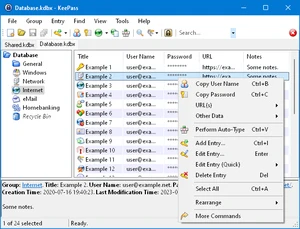
Opening the database means typing the master key once, and the accounts, passwords, addresses and notes inside all come out. The whole database is encrypted, not just the password fields: user names, notes and attachments sit inside the ciphertext too. The algorithm is a choice of AES, ChaCha20 or Twofish, all three long standing and repeatedly analysed.
The master key is not used directly as the encryption key. Its parts are hashed with SHA-256 and then run through a key derivation function, either AES-KDF or Argon2. The point of that step is to slow guessing down: every attempt costs a tunable amount of computing and time, which raises the price of a dictionary attack or a brute force sweep. While the program runs, passwords stay encrypted in memory as well, so a process dumped to disk does not spill them.
Two version lines running side by side
The 2.x line is the main one, written in .NET; 1.x is an older branch still maintained, stopped at 1.43. The release record on the site is dense: 2.61.1 on 1 May 2026, 2.61 on 4 March 2026, 2.60 on 2 November 2025, 2.59 on 9 July 2025. That is not the rhythm of a big version push, more like clearing the accumulated problems on a schedule.
What 2.61 and 2.61.1 each moved
2.61 leaned toward interface and integration. The find dialogue gained a switch for matching diacritics, off by default, so search ignores them unless asked otherwise. If the check for updates at startup is on, the check now runs asynchronously before the database opens, and when it lands while the master key prompt is still up, a banner mentions the new version. The one time password generator had several rough edges fixed: pasting a shared secret with Base16, Base32 or Base64 decoding now swallows whitespace on its own, and buttons were added to copy the current code to the clipboard. Synchronisation saw the most: syncing the current database to a file or a web address can now take several targets at once, triggers gained quiet on error and continue on error, and when the last leg of a sync writes a local file, the written data is copied to the other files involved instead of being assembled again. A wrong master key on export now allows a retry, the way opening the database does.
2.61.1 is a pure fix list: focus returning from the secure desktop, the always on top option taking effect the first time, initialisation of the HTML viewer, less flicker in the print dialogue, show empty data turned on by default, and faster release of key modifiers when XDoTool performs auto typing on Unix systems. File transactions that needed a web address while the underlying file did not exist no longer raise an error either.
Auto-Type is the famous part
What Auto-Type does is plain: it simulates keystrokes into the window in front. The default sequence is {USERNAME}{TAB}{PASSWORD}{ENTER}, which types the user name, presses Tab, types the password and hits return. The names in braces are placeholders and can be arranged in any order.
Every entry can be configured on its own: a default sequence in the entry dialogue, plus groups of window to sequence mappings keyed on the window title. Two login pages for the same site, or a page that wants a checkbox ticked first, are told apart by that mapping. There is also a trick called two channel obfuscation, which splits the keystrokes across two channels interleaved, so software recording the keyboard never receives the full sequence. Locking the screen or switching to the secure desktop is performed along the way as well.
Generator and synchronisation
The generator works two ways: pick characters at random from a set, or build one from a pattern. The maker recommends the first and leaves the second for cases where a rule has to be satisfied. Length, upper and lower case, digits and symbols are all settable, and several profiles can be kept so different accounts get different shapes, with a default profile for new entries.
Synchronisation answers the case where the same database was edited a little on several machines. After merging, both files involved are written to the merged state rather than one overwriting the other. Local disk, network share, FTP, HTTP and WebDAV need no plugin; SCP, SFTP and FTPS want a protocol extension installed; databases living in cloud storage usually have a ready made route. The database itself never goes near a server of the maker's.
About that network connection
The official answers carry a question of their own: why does it connect to the network at all. There is exactly one source, the optional update check at startup. When enabled, the program downloads a small file of version information, compares it with the local build, and only mentions an update if there is a newer one. No personal information is uploaded, and no update is downloaded or installed automatically. The first start asks whether to enable it, and the advanced page of the options can switch it off at any time. So the accurate statement is this: the contents of the database and the work on them stay local, and the network is touched only by that one check, which can be closed.
Platforms, portability and plugins
The 2.x line supports Windows 7, 8, 10 and 11, and runs on Linux, macOS and BSD by way of Mono; x86, x64 and ARM64 all have native builds. The zipped portable build runs as soon as it is unpacked, writing its settings into the program folder and nothing elsewhere in the system, which is why carrying it on a USB stick is the ordinary way to use it.
There is also a layer of plugins, and features such as import and export or database backup are mostly supplied by extensions, with a separate section on the official site listing the optional ones. The licence is open source and certified by the OSI, the source is public, and the site puts the argument plainly: anyone can go and look at whether the security features are implemented correctly.
The idea behind KeePass has never shifted: no hosting, no syncing to somebody else's server, no custody of the master key. The price is that synchronisation is your own problem and a forgotten master key means a closed door; what comes back is that where the database sits and who can touch it are yours to decide.