
CPU-Z Review: Reading the Specs Out of the Hardware Itself
Version 20260922
Summary
Before a benchmark, before an opinion, there is the question of what is actually inside the machine. CPU-Z reads the processor architecture and live clock, the board model and firmware, and the timings of every memory stick, straight from the hardware rather than from what the system claims.
Recommend- Name
- CPU-Z
- Version
- 20260922
- Pricing
- Free
- Open source
- Proprietary
- Operating system
- WindowsAndroid
- Updated
- 2026-10-07 16:35
The first instrument, not the last
When a machine arrives, the instinct is to run a benchmark and read the number, as though a score settled the question. It does not, because a score tells you how the machine performed under one specific test and says nothing about whether the parts are what the invoice claims. Before anything else there is a simpler and more useful step: read what is actually installed. A new build, a second hand purchase, a hand me down from a relative, a work laptop whose specifications nobody remembers.
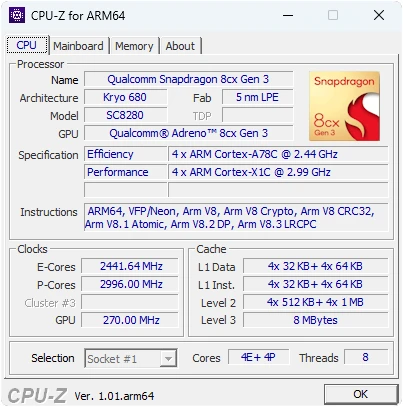
CPU-Z is that step. The processor tab names the model, the architecture, the manufacturing process, the core and thread count, the live clock speed and the supported instruction sets. The mainboard tab gives the model, the chipset and the firmware version. The memory tab goes further than most people expect, showing the timings and factory parameters of each individual module rather than one summary line. Anything that does not match what was promised has nowhere to hide, which is precisely the point.
The value is concentrated in two properties that sound unremarkable: accuracy and lightness. The figures are read from the hardware itself rather than trusted from the operating system's opinion of itself, which is why a screenshot from this tool functions as evidence in a second hand sale. Both buyer and seller show the same panel and the discussion becomes factual.
Small in size, hard in data
The package is small, it starts in a moment, and the resource footprint is close to nothing, so it behaves the same on a decade old machine as on a new one. That matters for a tool whose whole purpose is to be run on machines of unknown provenance, often before you have decided whether to trust them with anything.
The benchmark produces single and multi core scores that can be compared against an online database of other configurations. This is where the tool turns a specification sheet into an empirical answer: whether an overclock actually improved anything, how far behind a platform really is, whether the cooling is holding the clock up under load. Recent major versions rebuilt the validation screens and added support for the newest processor platforms on both desktop and mobile, which is the maintenance work that keeps a hardware tool honest.
There is a second use that only becomes obvious after a repair. When a machine starts misbehaving, the first question is what changed, and the answer is often a replacement part, a firmware update or a memory module that was swapped while nobody wrote anything down. Having a saved set of readings from before turns a vague hunt into a comparison between two panels, and comparisons of panels are much faster than comparisons of memories.
One more observation on judgement. This class of tool is often criticised for being narrow, and the criticism is fair and beside the point. Narrowness is the contract: it measures and reports, it does not diagnose, it does not advise. Users who want diagnosis should reach for the tools that do that. Users who want an unambiguous answer about what is installed, delivered without interpretation, will keep finding this one first in the toolbox.
CPU-Z stands for a plain creed among tools: it does not give conclusions, only facts. Whether a model is genuine, whether a clock is real, whether the timings are what they claim, the hardware is allowed to speak for itself.
Habits worth forming
Three of them. After a build, capture a full set of screenshots and keep them, because they become the record for warranty claims and for resale. When mixing memory modules, use the memory tab to verify that the timings match across slots, which is the difference between a stable machine and an intermittent mystery. And if you overclock, watch the live clock panel under load, because a frequency that collapses when work begins is the most common form of self deception in the hobby.
It is free on both Windows and Android, available from the official site or the app store, and it belongs in the first tier of any build or maintenance kit. It will never tell you what to buy. It will tell you, precisely and without argument, what you already have, which is the question you should be asking first.