
HD Tune Pro 6.10: a checkup kit for hard drives and solid state drives
Summary
A long running toolbox for hard drives and solid state drives: read and write benchmarks, health readings taken from the drive own counters, a surface error scan and a secure erase, with a free edition for personal use and a Pro edition at 6.10 licensed per user for 29.95 dollars after a 14 day trial.
Recommend- Name
- HD Tune
- Version
- 6.10
- Pricing
- Free
- Open source
- Proprietary
- Operating system
- Windows
- Website
- https://www.hdtune.com/
- Updated
- 2026-10-13 11:57
A drive rarely fails without warning. It usually leaves traces in its own counters first, and almost nobody goes looking.
Why the numbers inside the drive deserve a look
Hard disks and solid state drives tend to go wrong in different ways. A mechanical drive usually starts slowing down, making noises or growing bad sectors before it dies outright; a solid state drive can be perfectly healthy one day and refuse to appear in the system the next. What both have in common is that the monitoring counters inside the device change before the failure becomes visible. That data sits there quietly and never asks for attention, which is why a tool is needed to read it.
HD Tune is one of the older tools in this category. The official description calls it a multi functional tool for hard drives and solid state drives, and the things most people need - performance readings, health data, error scanning, wiping a drive before handing it on - all live in the same program, so there is no reason to install three utilities to look at one number. Both drive types are named side by side in the official material.
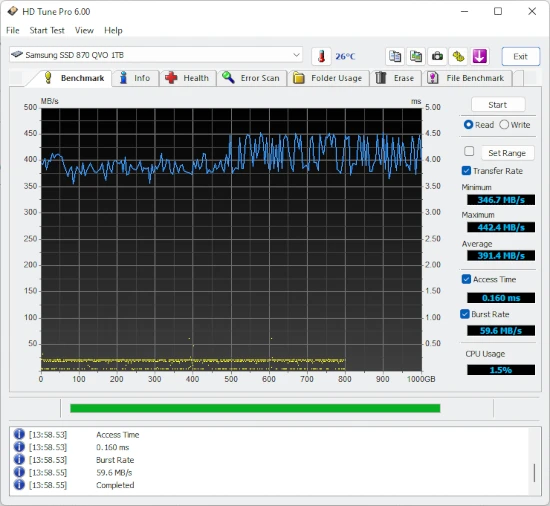
Start with the most visible part, performance measurement. The comparison table on the official download page lists low level read and write benchmarks as a core capability. The curve a benchmark draws says something that a single score cannot: whether performance is even across the whole surface of the drive, and whether it drops suddenly somewhere along the way. For judging whether a drive that has been in service for years is still trustworthy, the shape of that curve is more informative than the number at the end of it.
Health readings, surface scans and wiping
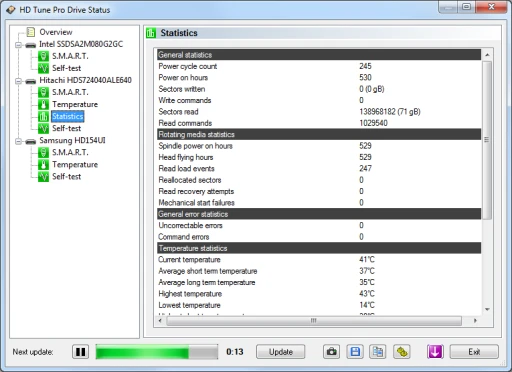
Health status is read from the drive own monitoring data and includes power on hours, start stop counts and the various error counters. A single value on its own rarely supports a conclusion, but it can be compared against other drives of the same model, or watched over time on the same drive. A counter that has just started climbing is usually more interesting than a high absolute value that has been stable for years.
An error scan reads the whole surface of the disk section by section and marks the places that respond abnormally. On an older drive that has begun to stutter, one pass tells you roughly whether the problem is concentrated in one region or spread across the platter. If it is local, that area can be avoided and the drive kept in service; if it is everywhere, replacement is the sensible next step.
Secure erase covers the moment before a drive changes hands. It overwrites the data in a standard way and is considerably more thorough than deleting files by hand. Running it once on a second hand disk costs little and removes a nagging doubt. The official comparison table also lists detailed drive information, the error log, folder usage, a file benchmark, a cache test and a disk monitor, which is a wider spread than the name suggests.
Where the free edition stops
The official download page puts both editions side by side. The free version stays at an older version number, and both its interface and its feature set are simpler, but for someone who wants an occasional look at health data plus the odd benchmark it covers most of what is needed day to day. The official page notes that it is intended for personal use.
The Pro edition fills in the rest and currently stands at 6.10, released on 24 October 2024. The change log shows that this release is mostly fixes, while the one before it adjusted the interface and the resolution of several measurements, and support for solid state drives arrived across a few earlier releases. After installation there is a 14 day trial, and a serial number is needed afterwards; a single user licence costs 29.95 dollars. Tools of this kind are usually bought once and kept for years, which spreads the cost thin.
Item | Official information |
|---|---|
Pro edition | 6.10 (24 October 2024) |
Free edition | 2.55, for personal use |
Platform | 64 bit Windows 7 through Windows 11 |
Main areas | Read and write benchmark, health status, error scan, secure erase, file benchmark, disk monitor |
Licensing | Pro single user 29.95 dollars, 14 day trial after installation |
Treating health data as a regular checkup is far cheaper than hunting for a cause once reads and writes start failing.
A few practical notes: run a benchmark on a new drive and keep the curve as a baseline for later comparison; read the health data every few months and watch the trend rather than any single figure; wipe a drive with secure erase before passing it on; and when data first starts behaving strangely, stop writing to the disk so that recovery stays possible.