
UltraCompare Review: Three Ways to Put a Difference in Plain Sight
Summary
Eyeballing works until the file is several thousand lines long or the folder holds a hundred documents. UltraCompare handles two file comparison line by line, three way comparison for merges, and whole tree comparison for directories, with colour coded differences and one step merging.
Recommend- Name
- UltraCompare
- Version
- 20260922
- Pricing
- Paid
- Open source
- Proprietary
- Operating system
- WindowsmacOSLinux
- Updated
- 2026-10-07 16:36
Three levels of comparison
Comparing two files is a task everyone can do: read them side by side and look. That method fails at a specific and predictable size. When a file is several thousand lines long, the eye stops seeing differences and starts seeing paragraphs, and a single changed character inside a familiar block becomes invisible because the brain is not reading, it is recognising. When the comparison is between two folder trees holding hundreds of documents, the method does not fail gradually; it simply does not start.
UltraCompare organises the work into three levels of force. The first is two file comparison, line by line and word by word, with changes, deletions and insertions marked in distinct colours so the eye is guided rather than asked to hunt. The second is three way comparison, which is what merging actually requires: a common base and two sets of edits presented in parallel, so it becomes obvious which side changed which line and where the two sides disagree.
The third is folder comparison, which scans an entire tree and reports which files exist on only one side and which exist on both but differ in content. For anyone who has tried to keep a documentation set or a website in step between two locations, this is the level that saves the most time, because it produces a list of decisions rather than a mass of content.
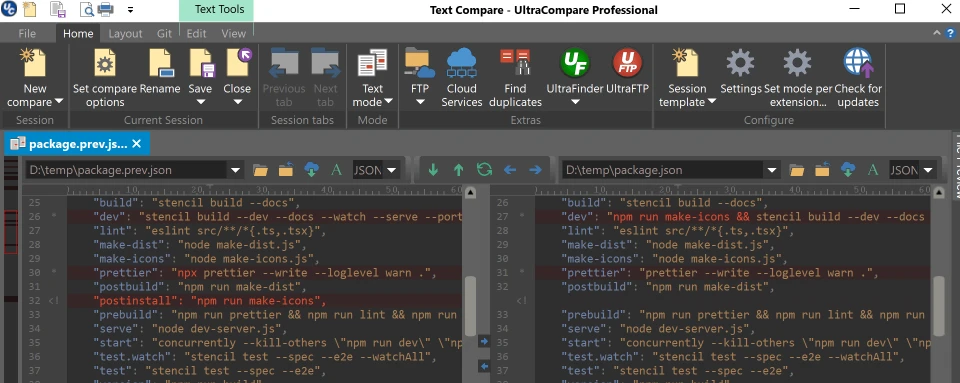
Comparing is only useful if you can merge
The end of comparison is merging, and the tool is as decisive there. Select a block of difference and adopt it from either side, and the content converges automatically rather than being copied and pasted by hand and then re-checked. For remote work it avoids the round trip entirely: instead of downloading a copy, comparing, editing and uploading, it connects to the remote host and compares there, which halves the handling for site maintenance.
Integration with the companion editor is smooth, in the sense that a comparison can be launched from inside the editing session instead of as a separate ritual. The tool covers Windows, macOS and Linux, and is licensed either through the suite subscription or on its own, which suits professional document review, code review and site synchronisation rather than occasional use.
The honest boundary is worth stating. For a quick look at two small files, the diff built into a code editor is sufficient and free, and buying a dedicated tool for that would be waste. The value appears at the scale where a missed difference costs more than the licence: contract revisions, translation checks, configuration drift between environments, a deployment that differs from staging in one line nobody can find.
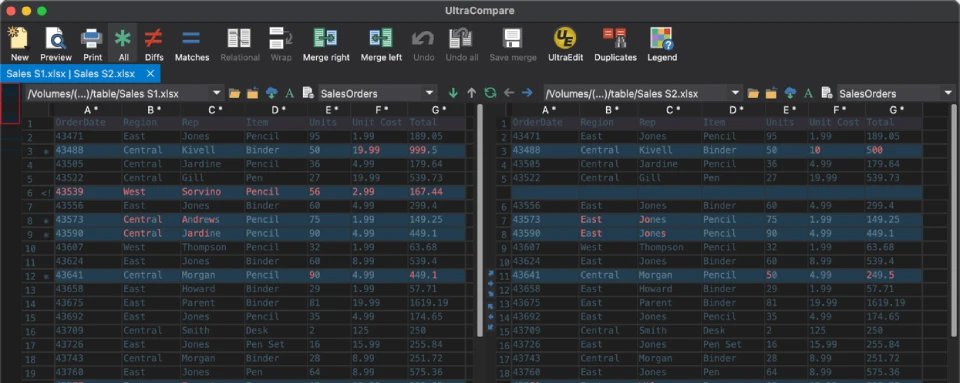
UltraCompare positions itself as an arbiter: it does not decide what is correct, it only guarantees that every difference is laid out where it can be seen. Seeing the disagreement is the precondition for agreement.
Working habits that pay off
When a team merges frequently, make three way comparison the default workflow rather than an advanced feature discovered during a crisis. Before synchronising folders, always run a preview and read the deletion list specifically, because an automatic sync that removes files is only as safe as the reading of that list. And keep comparison out of the blame conversation: the tool reports what differs, not who caused it, and treating its output as evidence rather than accusation is what makes people willing to run it.
It is a paid product with a trial, which is the right model for something used intensively by a minority of people rather than lightly by everyone. Used at the scale it was designed for, it turns a task that consumes an afternoon of squinting into a list of decisions that takes twenty minutes.