
HCFR review: measuring your screen instead of guessing at it
Summary
A colorimeter plus free software: test patterns go up, the meter reads what the panel actually shows, and greyscale tracking, primary accuracy and shadow detail become charts with a number on them.
Recommend- Name
- HCFR
- Version
- 3.5.4.2
- Pricing
- Free
- Open source
- Open source
- Operating system
- Windows
- Updated
- 2026-10-08 17:09
Factory settings are a sales pitch
A television in a shop is competing with forty other televisions under bright lights, so the picture it ships with is tuned to win that comparison: a cool blue cast that reads as crisp, greens pushed until they glow, and a contrast curve that crushes shadow detail in exchange for punch. Bring that same set home, dim the lights and watch a film, and faces look slightly ill and dark scenes lose everything below the brightest highlights. The hardware is fine. The settings are lying to you.
Fixing it is a measurement problem, not a taste problem. You need to know what the panel is actually emitting, compare that against a known standard, and adjust until the difference closes. HCFR is the long-standing free option for exactly that loop, and it has been the entry point into calibration for a generation of home cinema enthusiasts.
How the loop actually runs
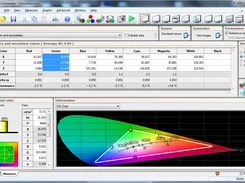
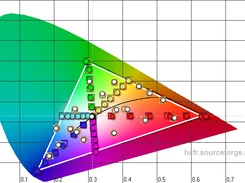
The software puts a test pattern on screen, and a colorimeter placed against the panel reads the light coming off it. After a series of patterns at different brightness levels, it produces a greyscale tracking chart: the ideal line is neutral, and any drift shows as a colour cast at that level. Below it sit the primary and secondary measurements, showing whether red, green and blue land where they should, and a gamma curve that tells you whether the transition from dark to bright is compressed or stretched.
Then you adjust. Most televisions and projectors expose two-point or multi-point white balance controls, plus a gamma setting and a colour management menu. Change a value, re-measure, watch the point move toward the line. This is the whole craft: measurement, adjustment, verification, repeated until the error is small enough that the eye cannot find it. The report is what turns the work from superstition into engineering.
What it asks of you
Two things, both reasonable. The first is a meter: an entry-level colorimeter costs less than a single professional calibration visit in most cities, and it can be used as often as you like afterwards. The second is patience. A full run on a projector takes an evening, and the adjustment phase is slower than the measurement phase because every change invites another check.
The software itself is a community project with an open codebase, aimed at people who want the numbers rather than a wizard. Support for high dynamic range content has been added over the years, alongside the extended measurements that modern panels require, and the workflow documentation is written by users who have done it many times. It runs on Windows, which is worth knowing before you plan the evening.
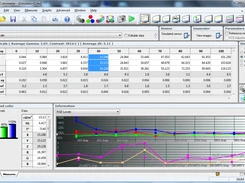
What this tool really removes is the mystique. Calibration looks like a specialist service until you see the charts, at which point it becomes an ordinary feedback loop: measure, adjust, measure again. A meter and free software are enough to run it yourself.
Practical notes before starting. Let the display warm up for at least half an hour, because a cold panel measures differently from a settled one, and reset it to a neutral picture mode first so you are not fighting the shop preset. Measure in a dark room, since light bouncing off the walls lands on the screen and skews the reading. And finish with a verification pass rather than stopping at the last adjustment, because the goal is convergence and the only proof of it is a fresh measurement that agrees with the last one.