
OCCT 17.1.9 splits the memory test into 16 modules and stays free for one machine
Summary
OCCT 17.1.9 rewrote its memory test as 16 blocks that can be combined at will, next to a power supply stress test and live temperature and voltage curves. The personal edition is free, on both Windows and Linux.
Recommend- Name
- OCCT
- Version
- 17.1.9
- Pricing
- Free
- Open source
- Proprietary
- Operating system
- WindowsLinux
- Website
- https://www.ocbase.com/
- Updated
- 2026-10-21 16:05
OCCT is a set of stress tests and stability checks for a whole machine: one group each for the processor, the graphics card, memory, storage and the power supply, with temperature, frequency, voltage and power draw recorded while they run. The personal edition is free, and it installs straight from Steam as well.
The version sits at 17.1.9
The current stable release is 17.1.9, published on 16 October 2026. Three waypoints sit behind it: the stable v17 release on 30 June 2026, v17.1 on 9 September 2026, and then point releases from 17.1.4 through to 17.1.9 polishing details.
Reading those smaller change logs shows edges being filed: one fixed detection of RAID devices under Windows, another stopped occasional upload interruptions and a wrong core number in error reports, and a third handled sensors being merged on machines with several processors. The major number never moved, which says the frame set by v17 and v17.1 holds.
One widely repeated claim needs correcting first. The list puts rewriting the memory test and arriving on Steam in the same sentence, as though they happened together. The Steam store page actually dates its arrival to 24 June 2025, a full year before v17, and what v17 did was rewrite the memory test. The two events do not share a moment.
The memory test became sixteen building blocks
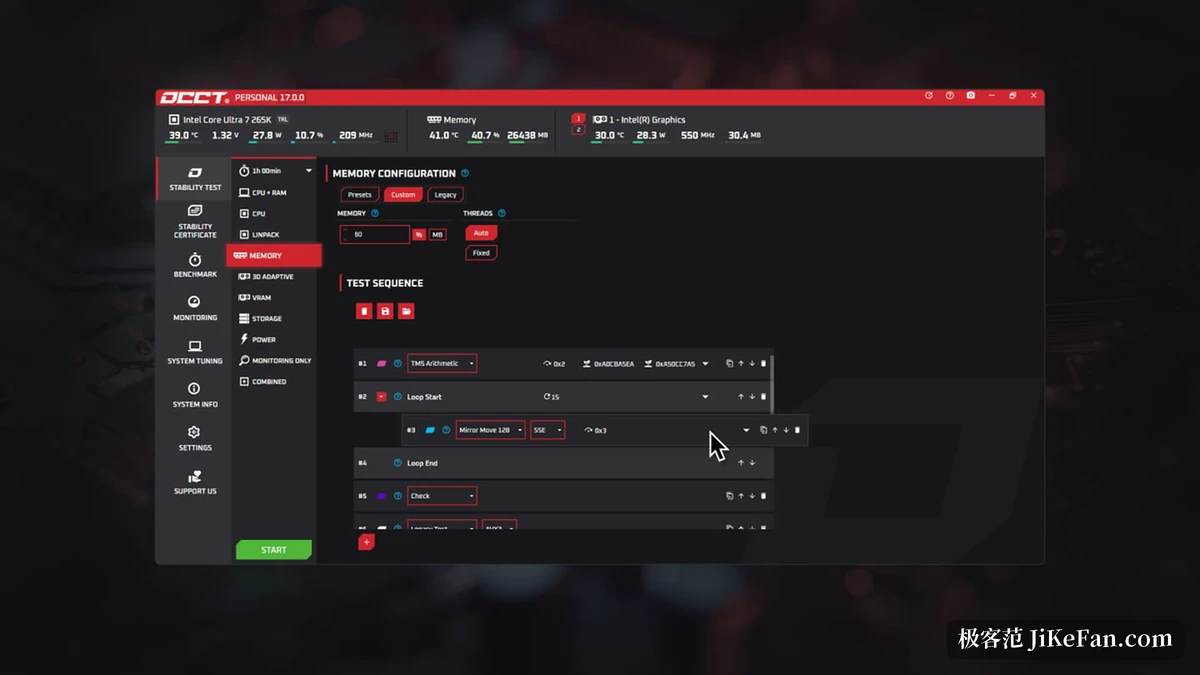
The most substantial change in v17 is that memory test. The project says it was rewritten from scratch around a highly modular architecture, with 16 independent test blocks that combine freely into a customised memory stress test.
The split puts those 16 into five classes. Non-idempotent blocks write particular patterns into memory and change its state; idempotent blocks move data about while leaving the initial state intact; checking blocks find errors; integrated blocks are ready made combinations that carry their own checks, and the familiar test from the old version survives inside one; and tool blocks supply arrangement, things like waiting and looping.
Here is a detail easy to trip over, and the project adds emphasis to it: attaching test blocks without a checking block means nothing is being checked. The freedom to combine comes with that precondition, that you have to know what a block actually does.
The stable v17 release shipped with 6 presets, one of them made by a community user. Beyond presets you can assemble your own, save them and share them. The project states the intent plainly: let the community grow test scenarios rather than waiting for the vendor to add them one by one.
The power test pushes draw to the limit
The store page describes the power test in one line: simulate extreme power draw to judge the reliability of the supply. What it answers is whether the supply holds up under the heaviest load a machine can produce, and situations like a wattage chosen too tight or voltage sagging under long high load show up in that scenario.
One entry in a 17.1 change log points right at it: fixing a false timeout when the power test was stopped quickly. Fixes like that never reach a launch note, but anyone who has run a power test knows what it feels like to want to stop midway and get a timeout message instead.
The same area holds two more test lines, one for the processor and one called 3D Adaptive. A point release moved 3D Adaptive onto Unreal Engine 5.7, up from 5.4, and the stated reason is a harder push on power draw: on one of their RTX 5080 cards the newer version pulled about ten watts more than the old one, with finer control over the power curve during the test.
Monitoring is the other half
Benchmarks and stress tests are only the front half; monitoring is the other. The four items the project lists are temperature for the processor, the graphics card and the memory supply; frequency and voltage; resource usage; and sensor data such as fan speed and total power draw, presented as a live table plus live curves.
The value of that pairing is comparison: when a stress test hits a thermal wall halfway through, the curve tells you which item hit it; when the voltage curve develops a notch, it usually signals a problem earlier than an error message does. The table shows the current value, the curve shows the trend, and either alone is not quite enough.
Beyond monitoring there are benchmarks and a stability certificate. Benchmarks support comparing results and tracking history; the certificate is a shareable piece of evidence generated after a full test run, and Pro and above can upload it to the project's own console for keeping.
What the free edition does, and what paid adds
The promise for the personal edition is clear: it provides all the core features of OCCT and it is free. The line that matters sits in two places. Unlimited test duration and the ability to start at once between two runs are paid only. Put another way, the free edition runs the whole set of tests but limits how long and how often.
The other paid items are PNG test reports, CSV export, a commercial licence, the stability certificate and the console. For someone who only wants a check-up on their own machine, those two limits usually suffice; multiple machines, kept reports or delivery work push you toward a paid tier. One thing holds for everyone: OCCT is a portable executable, so it starts from a USB stick on Windows and Linux alike.
Catching up on the Linux side
The v17.1 release put its weight on Linux. Supported distributions reach back to Debian Buster, Red Hat 8 and releases from around 2018, so older machines run too, and IPMI monitoring is new, reading finer sensor data through the system management controller on condition that FreeIPMI or IPMItool is installed, with the refresh rate following those tools' own rhythm.
Set that next to the Steam edition and the route becomes clear: both platforms have an official channel for packages, while commercial licensing and test duration mark the border between the Pro and personal tiers.
Seventeen versions in, the approach has not changed: put the load and the monitoring for a whole machine in one window, so the question of whether this machine is actually stable has a reproducible answer. Splitting the memory test into 16 blocks is the most thorough rebuild inside that idea; for the rest, the free edition is already enough.