
WinDynamicDesktop: wallpapers that follow the sun instead of the clock
Summary
WinDynamicDesktop changes the wallpaper according to local sunrise and sunset rather than a fixed timer. Open source and free, with a handful of official themes and hundreds more made by the community.
Recommend- Name
- WinDynamicDesktop
- Version
- 5.7
- Pricing
- Free
- Open source
- Open source
- Operating system
- Windows
- Website
- https://windd.info/
- Updated
- 2026-10-06 22:31
A desk that dims with the day
One of the desktop systems has carried a feature for some years now that photographs the same stretch of desert at a dozen hours of the day and lets the system move between them as the sun does, so the wallpaper walks from bright morning sand to a deep blue night. WinDynamicDesktop does one thing: it takes that mechanism and puts it on Windows. It is open source under the MPL licence, developed mainly against Windows 11, and it still runs on Windows 7 and later.
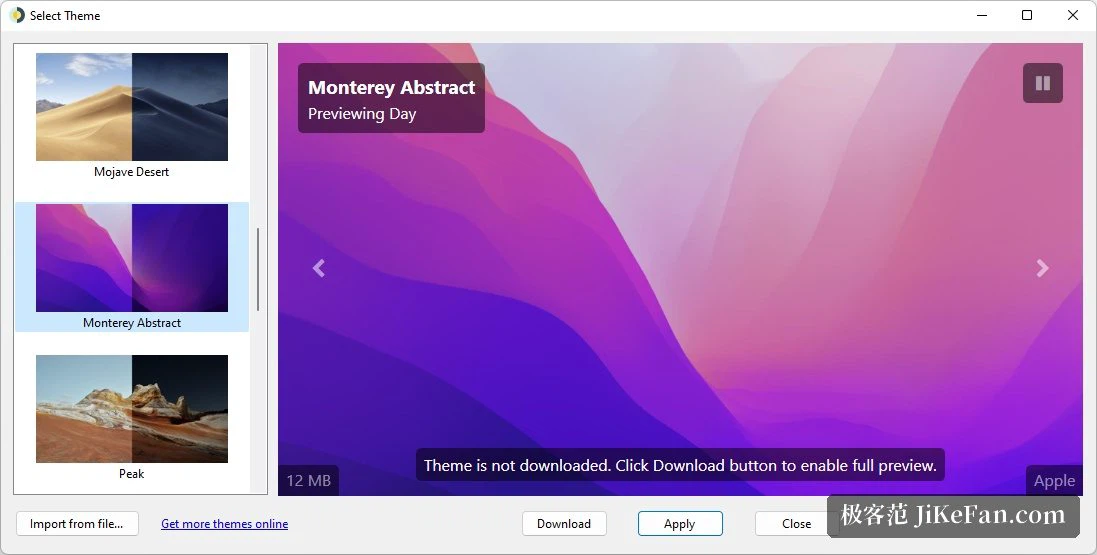
By daylight, not by the hour
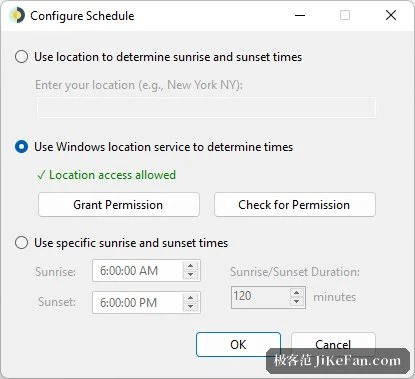
Windows has had wallpaper rotation for years, but it changes the picture on a fixed interval, which has nothing to do with the sky outside. The approach here is to know where you are first. On the first run a city is entered, the location service works out the sunrise and sunset times for that place, and a schedule spreads a set of images across the twenty-four hours that follow. When the sun goes down the desk darkens; when morning comes the wallpaper brightens with it, and the change uses the system's own fade so nothing snaps.
What if you would rather not say where you are
There are alternatives for anyone unwilling to hand over a location. A schedule can be picked by hand, or the latitude and longitude typed in directly, and the position is used only to compute sunrise and sunset rather than for anything else. That matters more than it sounds: a wallpaper tool asking for location data is exactly the kind of request people are right to refuse, and here the refusal costs nothing but a minute of typing.
Where the themes come from
A handful of official themes ship with the program, and the corresponding image sets are fetched on the first run. The project site also lists several hundred themes made by the community, from landscape photographs to abstract gradients, and any of them can be applied in a couple of clicks. Making one is not hard either: prepare a group of photographs of the same scene at different hours, follow the format, and import them.
How a day gets divided
Which picture appears at which hour is decided by the time divisions inside the theme file. A theme with a long daytime stretch can carry more frames, and the change in light becomes finer as a result; a theme with only a day image and a night image falls back to a simple timed switch. That is the whole design, and it explains why some themes feel almost like a slow video while others read as two pictures taking turns.

The small features and the edges
Right-clicking the tray icon changes the theme, forces a refresh or sets the program to start with the system. The release in June 2026 moved the runtime forward, brought dark mode to the whole application, replaced the theme preview rendering with a lighter approach and fixed a wallpaper that occasionally failed to refresh after the machine woke from sleep. Anyone who wants to go further can extend the behaviour with a script, and the community has examples ready to borrow.
Two things worth knowing
The first is a limit imposed by the system: it cannot show a different dynamic wallpaper on each virtual desktop, so the picture is one across all of them. The second concerns rights: the artwork inside the official themes belongs to whoever made it, and the program itself only handles the switching. Understanding both keeps expectations honest, and neither gets in the way of the ordinary use.

Why it is easy to forget about
Set a city, choose a theme, and the rest is left to the sun. The program is open source, costs nothing, and sits so lightly in the background that after a week it stops being something you notice and becomes a property of the desk. For anyone who has ever looked at a fixed wallpaper at midnight and felt the mismatch, that is the whole argument.