
Boxy SVG: an editor that does one format, and exports code clean enough to keep
Summary
Boxy SVG looks after the SVG format and little else. Editing happens on the canvas, the export keeps IDs, classes and titles intact, and the source can be inspected and changed directly. The web version is free.
- Name
- Boxy SVG
- Version
- 4.111
- Open source
- Proprietary
- Operating system
- WindowsmacOSLinux
- Website
- https://boxy-svg.com/
- Updated
- 2026-10-06 13:36
One format, looked after properly
Most vector editors take the everything-in-one-box route: icons, illustration, layout and export all pushed into the same application, with a toolbar that keeps growing. Boxy SVG goes the other way and watches a single format. Its own description is an SVG editing tool for beginners, professional designers and developers, which is a fair summary of who ends up using it. The first version reached a Mac app store in 2013, the whole thing was later rebuilt on an open browser core, and that is why the web version and the desktop version are the same program rather than two products kept roughly in step.
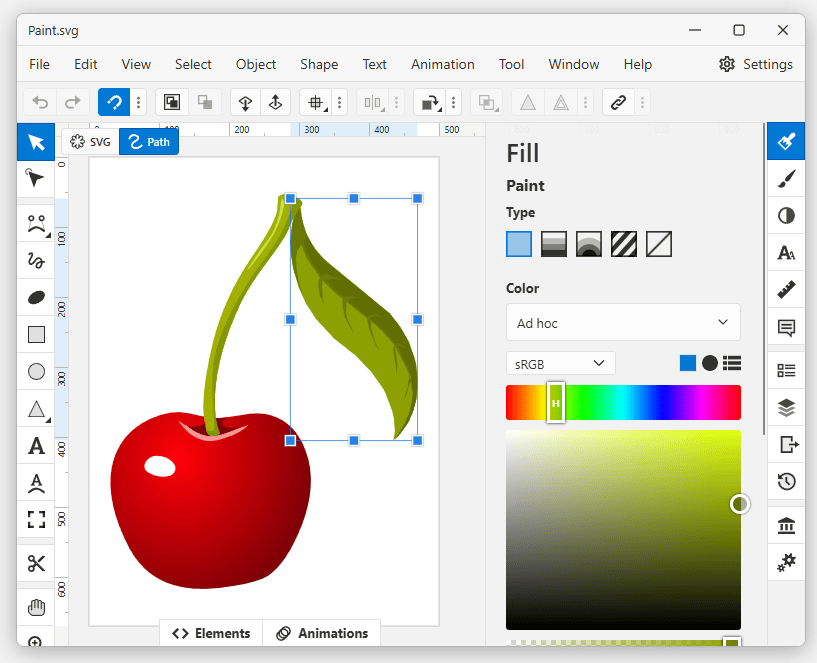
Editing happens on the canvas
The interface is deliberately spare. Geometry, transforms, gradients and fills are adjusted by dragging handles on the canvas itself, and the panels fold away in one action when they are in the way. The path tool separates quadratic from cubic curves and adds a tool for continuous arcs, which is the one people miss when drawing anything mechanical. Path operations are there as a set, merge, intersect, subtract, exclude, close and reverse, and so are the arrangement commands: align, rotate, flip, group. Text can run along a path, and colours, gradients and patterns can be stored as reusable definitions, so changing one place updates every object that refers to it.
Friendly to the people who write the code
Export is the part that gets talked about, and for good reason. The SVG that comes out keeps its identifiers, classes and titles instead of burying them under a pile of redundant markup, which means it can go into a front-end project without a cleaning pass first. The element panel shows the SVG and CSS source and lets it be edited directly, close in spirit to a browser's developer tools, and sprite editing is supported as well. Beyond SVG and its compressed variant, the export list covers PNG, JPG, WebP, PDF and HTML.
Why the clean output matters more than it sounds
A file that arrives with meaningful names is a file a developer can reason about. Styles can be lifted into a stylesheet, a group can be targeted by class, and a title is already there for anyone using a screen reader. When an icon needs a colour change six months later, the difference between editing one class and hunting through generated markup is the difference between a five-minute job and a lost afternoon. That is the practical value of keeping a single format at the centre of the tool rather than treating it as one export option among several.
Versions and licensing
The web version can be used straight away. The desktop version needs a paid licence, listed at about ten dollars, and covers Windows, macOS, Linux and ChromeOS. A font library and a stock image library are built in, keyboard shortcuts can be remapped across a hundred or more commands, and manual guides, smart guides and a grid are all available. The package maintained by the developer in a Linux software source has moved on again, adding a further emoji set and an option for the colour space of the export.
Who it is for
If the work is mostly icons, interface illustration and vector graphics destined for a web page, an editor that concentrates on one format, exports cleanly and lets the source be edited directly is a good deal lighter to carry than a suite that does everything. The web version costs nothing, so the sensible order is to try it there and decide about the desktop licence afterwards.