
Slimjet: a free browser that ships the usual extensions already built in
Summary
Slimjet is built on an open-source browser core and puts the usual add-ons inside the program: ad blocking, a download manager, video grabbing, screenshots and mouse gestures all work on first start. Free for personal and commercial use.
Recommend- Name
- Slimjet
- Version
- 50
- Open source
- Proprietary
- Operating system
- WindowsmacOSLinux
- Website
- https://www.slimjet.com/
- Updated
- 2026-10-06 22:40
The usual add-ons, already inside
Anyone who has used a mainstream browser for years has some weariness about it. The interfaces have grown to look alike, the settings have sunk deeper, and the features actually wanted still have to be installed one extension at a time. Slimjet takes the other road and builds the common ones in: ad blocking, video grabbing, screenshots, mouse gestures and image compression before upload all work from the first start, without a trip to an extension gallery. It is free for personal and commercial use, and by September 2026 it had reached series 50, keeping pace with the open-source engine it is built on.
The built-in list is longer than expected
Read the feature list out and it is substantial. The ad blocker works without an add-on and filters most of the distracting elements on a page, so bandwidth and memory use drop with it. The download manager runs several connections at once and resumes an interrupted transfer, which makes large files arrive noticeably faster than a plain browser manages. Web video can be saved or stripped to audio, and the screenshot tool captures a region or scrolls down a whole page. There is a run of smaller pieces too: images are compressed to a web-friendly size before upload, a photo can be framed and colour-corrected and shared from the same place, and a couple of gestures with the mouse handle back, forward and closing a tab.
A privacy stance that differs from the mainstream
It promises plainly that usage data is not handed back to search engines, and it carries several layers of anti-tracking options that block the usual identification and profiling methods. With phishing protection and a sandboxed multi-process architecture alongside, the security floor sits at the same level as the mainstream browsers. The new tab page can be arranged with a chosen number of shortcuts and a background image, several search engines and voice input are supported, and typing an alias into the address bar jumps straight to a site used often. For anyone who cares where their data goes, defaults like these save the work of checking each setting by hand.
Customisation is the real selling point
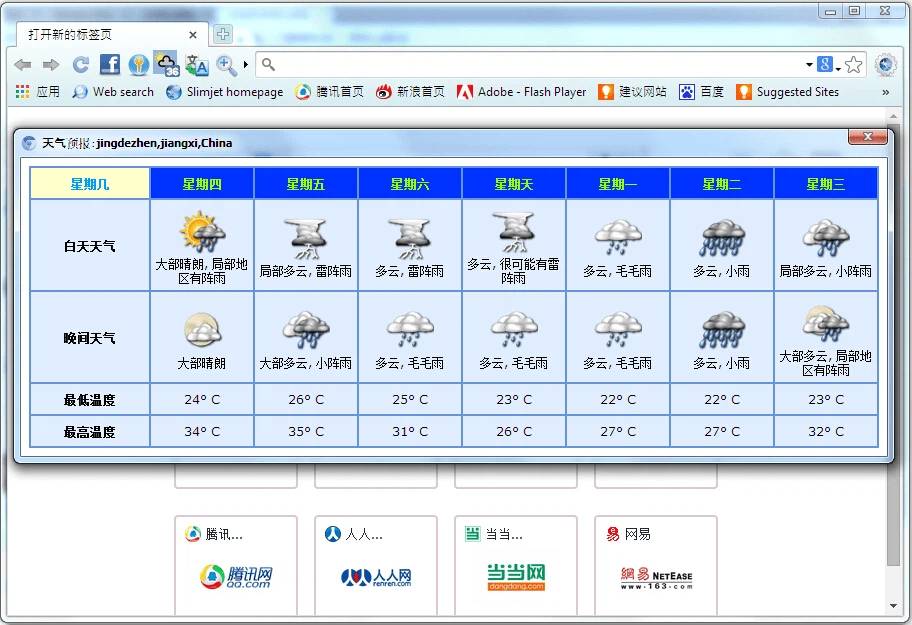
The depth of the settings is what separates it from the mainstream. Toolbar buttons can be added or removed freely, so the things actually wanted go on the bar in one move. Translation handles any pair of languages rather than following the interface language, and weather sits in a corner of the window. Compatibility is seamless: extensions from the open ecosystem all install, and bookmarks and passwords come across from an older browser in a few steps. Windows gets both an installer and a portable build, in 32-bit and 64-bit, Linux gets a package and a plain archive, and users of very old systems have a legacy build kept for them.
What moving over costs
Switching from a mainstream browser is close to painless, because the first run offers to bring bookmarks, history and saved passwords across, and the familiar tools from the extension gallery install as before. A few habits are worth picking up. Short aliases in the address bar reach frequent sites far faster than a full address. The right-click menu carries a good number of useful entries, such as translating selected text or compressing an image before it is uploaded. And the speed dial on the new tab page can be grouped by project, keeping the doorways to work and to home apart. Updates follow the major versions of the engine underneath, so security patches do not fall behind, and an official forum is there when something goes wrong; the community is smaller than a mainstream product's, but answers come back promptly. It suits the user who already knows what they want and has stopped enjoying the hunt through an extension gallery: install it, and the toolchain is complete.