
vMix 29 brings eight overlay channels and local recording to live production
Summary
vMix is real time video production and streaming software for Windows aimed at multi camera work. Version 29 raises overlay channels to eight, a full trial runs sixty days, and licences come as lifetime or subscription with the lowest tier at 60 dollars.
Recommend- Name
- vMix
- Version
- 29.0.0.49
- Pricing
- Paid
- Open source
- Proprietary
- Operating system
- Windows
- Website
- https://www.vmix.com/
- Updated
- 2026-10-17 16:11
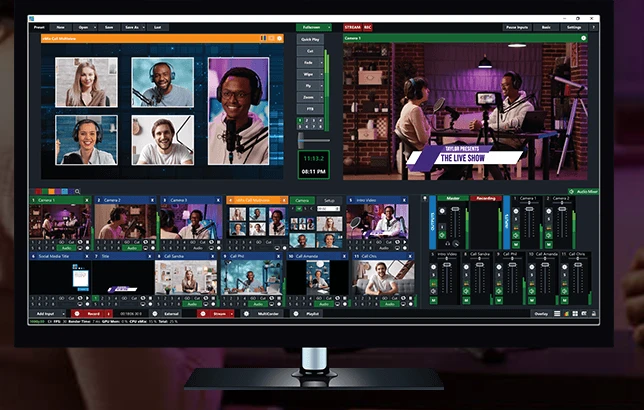
vMix puts the parts of a multi camera broadcast into one interface: bringing in signals, cutting between shots, adding overlays, mixing audio, replay, streaming and recording. It runs on Windows, splits input counts and output capability by licence tier, and a new user can run a full sixty day trial through a real production before deciding where to land.
From signal input to camera switching
vMix describes itself as a complete real time production and streaming package, covering creation, mixing, switching, recording and broadcasting on a Windows machine. The input side is broad: cameras and webcams, capture cards, network video streams, local video files, discs with menu navigation, audio files and audio devices, and several video or audio clips can be merged into a single input. Video file formats cover AVI, MP4, H264, MPEG-2, WMV, MOV and MXF, audio covers MP3 and WAV, and a web browser, a webcam feed, a presentation, a still image or a flat colour can each serve as an input.
Switching offers 13 transitions plus 4 customisable buttons and 8 custom transition slots. Several feeds can be arranged on one screen, and each input shows its preview state separately from its program state, which eases the work when several cameras have to be watched at once. The company also counts desktop capture and a browser based touch console as part of the flow: the first treats the local screen as an input, the second lets an operator switch from a tablet or a phone browser.
Overlay channels, instant replay and remote guests
Overlay is one of the main lines of the program. Version 29 lifts overlay channels from 4 to 8, each with its own transition, position and border, and above that sit layers and multi view layouts for more complicated arrangements. On graphics, the standard tiers ship more than 100 animated titles, scoreboards and scrolling ticker templates, the higher tiers allow titles of your own and can import layered image files for further work.
Instant replay handles slow motion, with an official ceiling of 8 cameras. For remote guests the built in video call feature takes 8 participants, and third party meeting software can be connected so its video lands straight in the program. On the output side streaming, local recording and multiple outputs run together: the comparison table states two recordings at once, streaming to 5 destinations, plus fullscreen output, external output and virtual output channels for sending the picture to a venue screen or to another stage of production.
System requirements and graphics tiers
The entry specification is Windows 10 or Windows 11, a quad core processor at 2Ghz, 4GB of DDR4 memory, a 7200 rpm mechanical drive for recording, a discrete graphics card supporting DirectX 10.1, and a 1920x1080 display. The recommended build swaps in an Intel Core i7 above 3Ghz, raises memory to 8GB of DDR4, moves recording to a solid state drive, and asks for a discrete card with at least 2GB of memory.
Graphics gets its own comparison table for an obvious reason: the compute on the card decides how many cameras can come in at once and how many recordings and streams can run. The table rules out two families of integrated graphics, then lists camera and input counts by tier. An entry level discrete card roughly covers 4 cameras with 8 inputs and instant replay switched on, the next tier runs replay with two 4K cameras or eight HD cameras, and both cover 1080p recording and streaming.
Licences, prices and the trial
Licensing runs on two lines, lifetime and subscription. Lifetime is a one time payment across four tiers: Basic HD at 60 dollars, HD at 350, 4K at 700 and Pro at 1200. Subscription has a single MAX tier at 50 dollars a month. The difference is not only the price. A lifetime licence includes 12 months of version updates while a subscription keeps updates for as long as it runs, and input counts, overlay channels, the resolution ceiling, call participants and replay cameras also change by tier. Basic HD allows 4 inputs in total where every other tier allows 1000, overlay channels are 1 on Basic HD against 8 elsewhere, and only 4K and above raise the resolution ceiling to 4096x2160.
New users get a full sixty day trial in which recording, streaming and display all work normally, and the company states that output carries no watermark. The practical point is straightforward: run a real production with the full feature set, confirm that the input count and output capability are enough, and only then decide between buying outright and paying monthly.
What version 29 changes
The release notes for vMix 29 went out on 27 October 2025, and the current installer is 29.0.0.49. The changes cluster in three places. One is a new open source media transport protocol, described as carrying high quality audio and video across a gigabit local network with low, medium and high quality presets so bandwidth can be traded against picture. Another is performance and the recording path: 4K and frame rates above 120fps are supported, recording can skip re-encoding and write straight into the instant replay and multi camera recording modules, and the company says processor load for replay drops by roughly half. The third is operation and layout: new storage settings, a quad view mode, an activator and a batch of shortcuts, overlay channels raised from 4 to 8, and the early entry level edition returning in a programmable form.
The trade vMix makes is clear. Split what a multi camera broadcast needs into a tiered list, build the price ladder out of input counts, overlay channels, resolution and output numbers, then let the same installer and a sixty day full trial prove the fit. It runs only on Windows, the hardware bar is printed on the site, and the graphics tier maps straight onto how many cameras can be connected. For a team turning live production into a long working chain, reading the list before choosing a tier saves more trouble than installing first.