
lzop 1.04: nine compression levels from a GPL command line compressor
Summary
lzop compresses files through the LZO library, ships under the GPL, and puts speed ahead of ratio on both sides of the job. Version 1.04 defaults to level 3 and keeps the source file, which suits backup archives.
Recommend- Name
- lzop
- Version
- 1.04
- Pricing
- Free
- Open source
- Open source
- Operating system
- WindowsLinuxmacOS
- Website
- https://www.lzop.org/
- Updated
- 2026-10-17 16:09
lzop aims at something narrow and clear. Shrink files, but compress quickly and decompress even faster. It draws its compression from the LZO library, keeps the command habits of the classic tools, and asks for almost no extra memory on the user side. For anyone writing backup scripts, that preference for speed is what actually lands in a daily routine.
Putting speed ahead of ratio
The project page describes lzop as a file compressor very close to the classic gzip, with compression provided by the LZO library. The stated advantage is blunt: both compression and decompression are far faster, at the cost of some ground given up in ratio. The manual summary says the same thing in fewer words, that it favours speed over compression. That single choice settles where it belongs: repeated packing, backups and transfers, where the only demand on size is that it get noticeably smaller, not that it reach the limit.
The design goals are listed one by one as well: speed of compression and decompression, command conventions close to the classic tools, and portability. Not one of the three points at ratio, and the omission is deliberate. The page also notes that backing up terabytes on modern systems tends to be limited by how fast the disks read and write rather than by the processor, so using this both lowers the storage taken and cuts the time a backup needs.
On licensing, lzop ships under the GNU General Public License and the site labels it copyrighted open source software. That licence lets anyone run, study, modify and redistribute the program, and carry the source along. For people who fold an archiving step into an automated pipeline, this is what decides whether the toolchain can travel with the business.

Compression levels and everyday commands
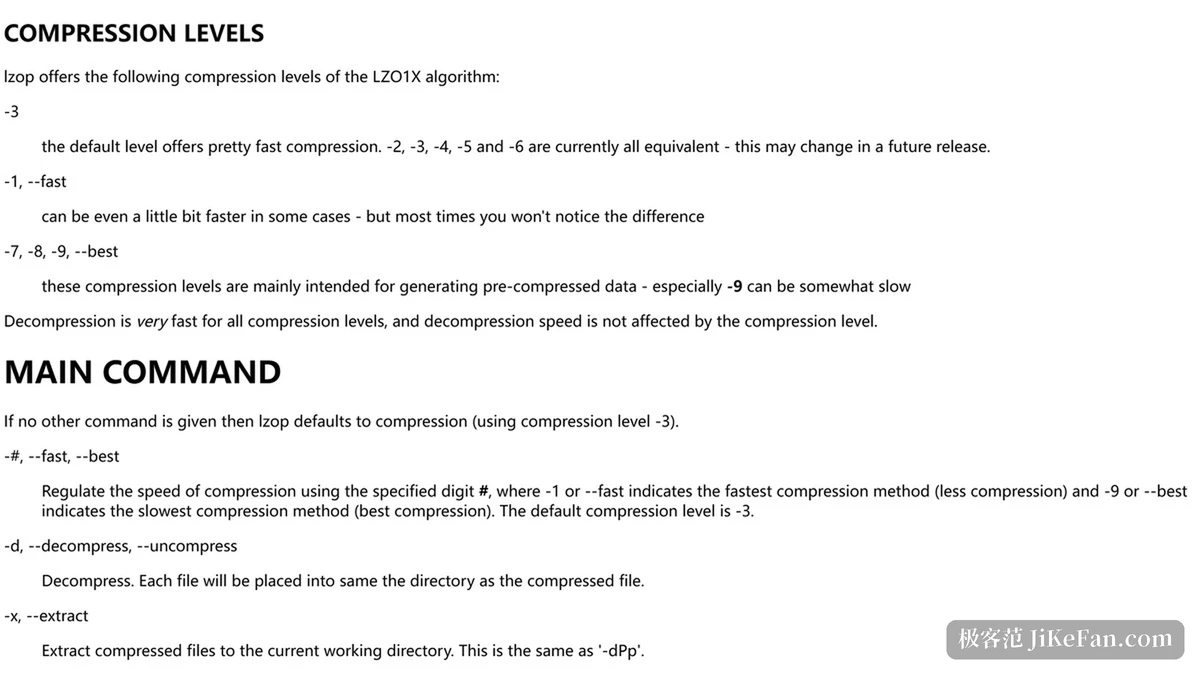
lzop offers several levels and defaults to 3. The manual explains that the default level compresses quite fast, that levels 2 through 6 are currently equivalent and may diverge in later releases, that level 1 or the fast switch can be a little quicker in some cases, and that levels 7, 8 and 9 or the best switch mainly serve pre-compressed data, with level 9 being noticeably slow. The section ends on a line that matters to users: decompression is fast at every level, and its speed does not depend on the level chosen.
Put another way, the level mainly decides how long one packing run has to wait, and barely affects how long each later read waits. For an archive written once and read many times, pushing the level up is often cheaper than expected, while a temporary bundle read straight away is better served by the default.
The everyday actions sit in three commands. The decompress switch restores files carrying the lzo suffix, the test switch checks the integrity of a compressed file, and the list switch prints the method, the compressed size, the original size, the ratio and the original file name for each entry. A fuller directory style listing comes from the long listing option, and the raw header fields of a compressed file come from the info option, both of which help when tracing an archive of unclear origin.
A few defaults are worth learning early. lzop writes the original file name, permissions and timestamp into the compressed file and restores from them on the way out. With no file named, or with a single dash given as the name, it compresses standard input to standard output and slots straight into a pipeline behind another command. It keeps the input file by default, deleting the source after compression only when the unlink switch is passed explicitly, and passing the keep switch explicitly undoes that.
Archive mode and checksums
To gather several files into one archive, name the output with the output switch, and adding the path switch stores the tidied relative paths so decompression can restore them where they were. The backup recipe in the manual is to attach lzop to the compressor argument of an archiving tool, which lets an existing backup flow borrow the speed with a single parameter changed.
On integrity, lzop writes a checksum into the compressed file by default, adler32 unless the crc32 switch asks for the other one. That default dates from early on, and older releases also offered a switch to turn the checksum off, which the manual treats with caution: turning it off is a little faster, but damage to a compressed file becomes hard to notice. The slower levels write a checksum whether or not one is requested.
Several switches exist for scripting: one sends the result to standard output, one changes the suffix, and the quiet and verbose switches adjust how much is printed. A default set of arguments can be supplied through an environment variable, and the exit status is separated into categories, zero for normal, one for an error and two for a warning, so a script can branch without guessing.
Platform coverage and the version trail
The published packages cover a wide spread: the Arch, Debian, Fedora, Gentoo, Red Hat, SUSE and Ubuntu distributions on Linux, the BSD family with FreeBSD, NetBSD, OpenBSD and DragonFly BSD, and commercial UNIX systems including AIX, HP-UX and Solaris, while macOS is served through two package manager channels. A separate set of binaries covers a statically linked Linux build, a Windows console build, a 32 bit DOS build, an OS/2 build and an Atari build.
The changelog keeps a full timeline. Work started in September 1996 and the first public release came in August 1997. Version 1.00 added the list command with several quiet options, 1.01 added path storage and a selectable checksum, 1.02 made it build against newer compression library releases and improved reading and writing of large files on Windows along with the size display for very large files, and 1.04 marks the twentieth anniversary and adds CMake support.
The value of lzop is not a place on a ratio chart but the way it reorders the job. Make compression and decompression fast first, take decompression speed out of the level decision, then narrow the room for mistakes with conservative defaults such as keeping the source file and writing a checksum. The command habits follow the classic tools, so there is almost nothing to learn. For anyone embedding an archiving step in a backup script and wanting a tool that survives across a range of systems for years, this belongs in the box.