
Sound Forge 2026 states it is no multitrack workstation: one audio file, repaired until it ships
Summary
Sound Forge 2026 belongs to Boris FX and works on a single audio file: recording, repair, noise reduction and mastering share one toolbar. A subscription starts at 24.95 dollars a month, a perpetual licence at 299.95.
Recommend- Name
- Sound Forge
- Version
- 2026
- Pricing
- Paid
- Open source
- Proprietary
- Operating system
- Windows
- Website
- https://www.soundforge.com/
- Updated
- 2026-10-21 12:36
Sound Forge 2026 edits and masters one audio file at a time: record, repair, denoise and squeeze loudness all sit on one toolbar, and it does no multitrack arranging at all. The official site says as much in its own FAQ, and the product now belongs to Boris FX.
Owners changed, this generation is just called 2026
The software was born at Sonic Foundry in 1999, went to Sony with Vegas in 2003, and moved to MAGIX in 2016. In 2026 it changed hands again as part of a bundle with Vegas Pro and Acid Pro, and it now sits under Boris FX. The site title reads Vegas Creative Software by Boris FX, and the footer copyright follows.
Naming changed with it: the front page carries Sound Forge 2026 as a headline instead of continuing the 16 and 17 sequence. The product page lists it beside Vegas Pro and Acid Pro as one video and audio bundle, and all three sell on the same site.
In the official words: not a multitrack workstation
People buying audio software often assume more features must be better value, and want multitrack mixing folded in. The product page answers that in its FAQ: it deliberately does not aim to be a digital audio workstation, it is built for a single audio file, and that work is exactly what general editors handle badly. It works with other hosts rather than replacing them.
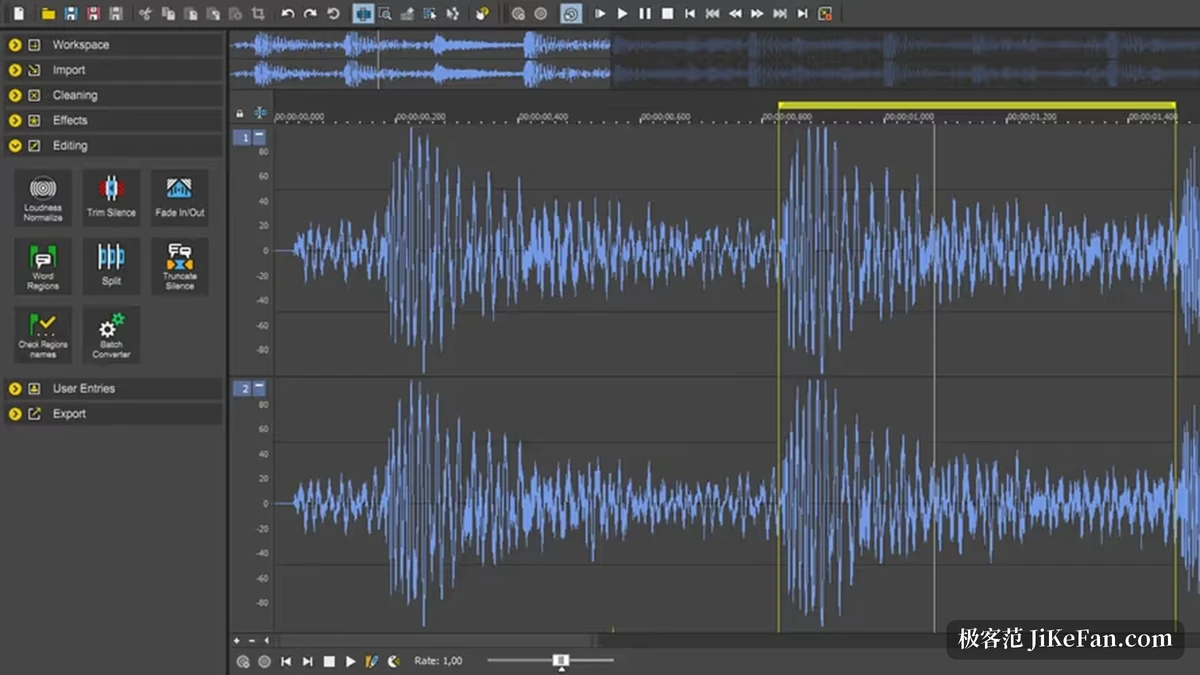
That sentence explains the whole shape of the product. Open it and one waveform fills the canvas, five button groups down the left for workspace, import, cleanup, effects and edit, a toolbar above. There is no track stack and no multi-way alignment on a timeline; every operation circles the file in front of you. A podcast episode, a voiceover for a video, a cleaned-up interview: those are its real work.
Treating audio like text
The first selling point the site offers is that comparison: rearranging audio is like rearranging words in a document, and cut, copy, paste and delete are operations you already know. Further in, the waveform zooms to sample level, and edits land on individual samples.
Looking at the waveform gets a layer of colour too. WaveColor shades the wave so pitch, character and saturation separate at a glance, which beats staring at a slab of blue-grey when hunting a problem passage. Frequent treatments can be pinned as Instant Actions and called up without walking the menus each time. Rendering can run in the background while the foreground carries on with the next passage.
Three repair tools, one problem each
Trouble in a field recording usually comes from three places: floor noise, stray clicks, overload. Sound Forge answers with three tools. DeHisser profiles the hum and hiss of the room and pushes it down; DeClicker and DeCrackler take clicks and low-frequency pops, the noise that comes with record transfers and old material; DeClipper handles clipping, and hard flat tops from digital or analogue overload can be repaired.
All three ship in the standard edition as basic repair, with no upgrade needed. Broadband noise reduction is standard too, removing steady background such as air conditioning and fans while keeping as much of the wanted voice as it can.
Recording: 32 channels, and it can start on its own
Recording is wider than one might expect. Up to 32 audio channels in one pass, input routing assignable channel by channel, fine metering; bit depth and sample rate can go up, or down to save disk. Mono voiceover, two-channel stereo and multichannel surround all come in.
Automatic recording is for people with their hands full: trigger when input level crosses a threshold, or set a clock time to start, with a pre-roll buffer in front. The few seconds that matter are not lost even with nobody at the machine.
Mastering: Wave Hammer and loudness metering
Mastering here takes the practical route. Wave Hammer 2.0 is the dynamics tool: it tightens the dynamic range so the whole thing sounds louder and hits harder. The peak and loudness meters that come with it are accurate enough to show where a piece of material actually sits, and to catch overshoot before delivery.
Batch work lives at this level too: queue several files into one batch project, apply the same effects and settings, and the run finishes while you do something else. For a team with a lot of licensed material, this is where saved hours really show.
Four plug-ins that Plus adds
The line between the two editions runs through the plug-ins. The standard edition covers everything above, and Plus adds four on top: Melodyne 5 Essentials for note-level pitch and time correction, useful on vocals; Vandal, a guitar amp and cabinet simulation that goes after tone; VariVerb II, a reverb where room size and amount are both hand-adjustable; and 3D Reverb, which places a voice or an instrument in a virtual room and can lift stereo to multichannel.
What it covers | Standard | Plus |
|---|---|---|
Waveform editing down to samples | Yes | Yes |
DeHisser, DeClicker, DeCrackler, DeClipper | Yes | Yes |
Broadband noise reduction | Yes | Yes |
Recording up to 32 channels | Yes | Yes |
Wave Hammer 2.0 and loudness meters | Yes | Yes |
Melodyne 5 Essentials | No | Yes |
Vandal, VariVerb II, 3D Reverb | No | Yes |
On the plug-in side, VST2, VST3 and ARA are all supported, so third-party effects load in and behave like the built-in ones. A text-to-speech function turns typed text into a voiceover with several languages and voices, computed on the machine.
Two ways to buy, fifteen days to try
The site offers subscription or perpetual licence, starting at 24.95 dollars a month and 299.95 dollars, with the exact figure following the edition. Trying first is possible: a fifteen-day fully functional trial with nothing held back, and when it ends you subscribe, buy, or the program stops working.
One thing worth stating plainly: download and go on the site means that trial, not a free edition. There is no permanent free tier and no stripped annual version; the trial ends and a decision is due.
What it runs on
The system requirements page carries little information but it matters: Windows 11 only, no macOS and no Windows 10. A 1.4 GHz processor as a minimum with multicore recommended; 2 GB of memory minimum, 8 GB recommended; onboard graphics are enough at 1024 by 768 or better; 1100 MB installed, 1400 MB for Plus.
Format support is broad: AIFF, FLAC, MP3, OGG, W64, DSF and DLS for audio, and AVC, MPEG 1 and 2, MOV, SWF and MXF readable on the video side. Material from mixed sources generally opens.
Who should use it
For podcasters, audiobook and course-audio people, the daily job is getting this one file to a publishable state, and waveform-level editing plus the three repair tools is enough; there is no reason to open a whole workstation for one or two tracks. It suits sound for video as well, since it reads video containers and the result lines up with picture.
For arranging, multitrack mixing, or stacking a dozen tracks while recording, this is plainly not the tool. The official position gives that ground away, so before choosing, decide whether you hold a file or a project.
The trade-off in Sound Forge 2026 is blunt: no multitrack workstation, and the recording, repair, editing and mastering of a single audio file done thoroughly. After the change of hands it belongs to Boris FX, the naming went annual, and standard and Plus differ by four plug-ins. Fifteen full-featured days are enough to judge whether it fits the hand.