
Audacity 4 rebuilds the interface on Qt, with clips you can select and group directly
Summary
Audacity 4 moves the whole interface onto Qt, replaces the tool modes with context aware clip editing, adds grouped clips and three workspaces, and stores projects in a new aup4 format. The 4.0.1 patch brought back export multiple and a portable Windows build.
Recommend- Name
- Audacity
- Version
- 4.0.1
- Pricing
- Free
- Open source
- Open source
- Operating system
- WindowsmacOSLinux
- Website
- https://www.audacityteam.org/
- Updated
- 2026-10-22 21:35
In September 2026 Audacity took its largest rebuild in more than twenty years: the whole interface moved onto Qt, clip editing gained a new model, and the project format changed to aup4. The 4.0.1 patch followed at the end of the month, bringing back export multiple and a portable Windows build.
A Qt interface, with toolbars that dock or float
The Audacity 4 interface is rewritten in Qt and renders at the system's native scale on high density screens, so text and icons stop going soft after scaling. Toolbars and panels are no longer locked in place: they dock on any side of the window, float as their own small windows, or fold away entirely. A workspace dropdown at the top of the window switches layouts, and with them the way toolbar buttons and the ruler are shown.
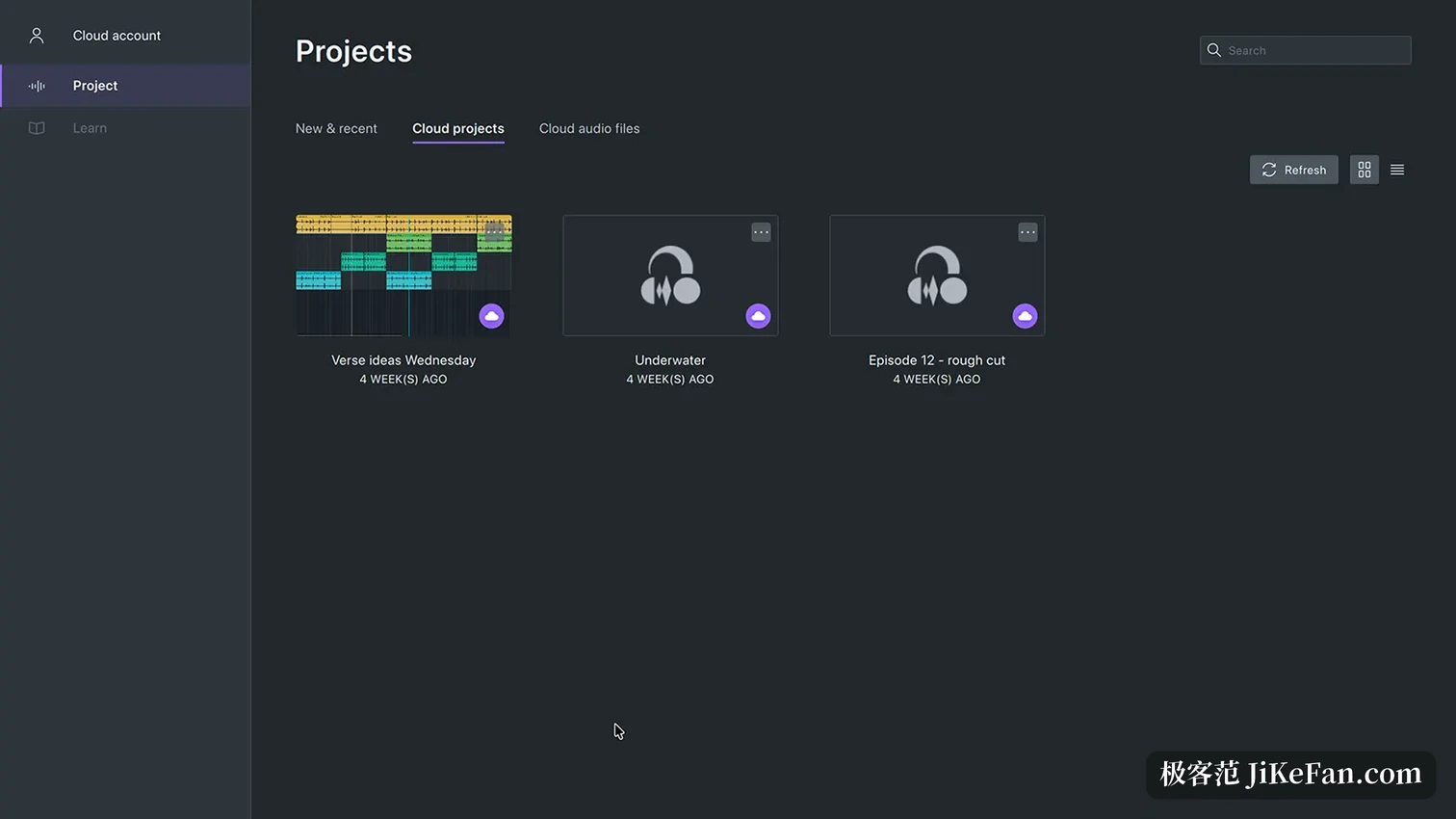
The home screen became an entrance, laying recently edited projects out as cards, each with a thumbnail, one click away from resuming. Before, opening a project meant the history list in the file menu, where long names were hard to tell apart.
Clips no longer need a tool switch first
In Audacity 3, touching a waveform meant switching the toolbar to the selection tool first, and drawing sample points meant switching to draw, and shaping an envelope meant switching to envelope. Audacity 4 removes those separate modes and lets functions appear by context: clicking a clip header selects it, shift clicking adds more, and several selected clips then move, trim and time stretch together.
Splitting got its own gesture too: hold S and click the waveform or a clip header, and the cut lands there. Cut and delete each split into two variants, one leaving a gap and one pulling later material forward, so timing no longer depends on lining things up by hand. Clips also move between mono and stereo tracks, and dropping one onto another replaces the overlapping stretch instead of refusing to budge.
Grouping ties a whole structure together
The usual trouble in a multitrack podcast is that the opening is built from three layers, music, voice and effects, and moving the whole thing two seconds later means dragging each one. Audacity 4 lets those clips be grouped, after which moving, copying, pasting and duplicating all carry the group along with relative positions intact. To touch one member alone, ungroup first.
Three workspaces and three themes
Three workspaces ship built in. Modern aims at multitrack work centred on voices and keeps only common buttons on the toolbar; Classic preserves the arrangement long time users know; Music leans toward production, with the ruler defaulting to bars and beats. Users can also arrange and save their own for later. Appearance offers light, dark and high contrast themes, with accent colour, track colour and clip style all adjustable, and the high contrast set is meant for people with reduced vision.
The project format becomes aup4
The new format is called aup4. Opening an older aup3 project makes Audacity convert it first, leaving the original untouched and storing the converted copy in the new format. After conversion there is no saving back to aup3, so anyone whose collaboration depends on the old format should check first whether the other side can read aup4. Older aup projects still import. Besides audio, a project now carries thumbnails and the clip and appearance data only the new version understands.
Recording, meters and plugins
Every track header now carries a live meter, showing input level while recording and playback level the rest of the time, so mixing no longer means guessing by ear. Recording can start anywhere on the timeline and produces a clip right at the drop point; the playhead stays visible while navigating, and dragging it elsewhere resumes from there. The audio settings panel was rebuilt and can list system default devices, refresh the device list and offer custom channel mapping. Official Windows builds carry ASIO playback and recording. On plugins, VST3 and Nyquist are supported, LV2 on Linux and Audio Units on macOS, and when a plugin brings no interface of its own Audacity generates a set of controls from its parameters.
What the 4.0.1 patch restored
The first release landed on 3 September 2026 and the patch followed on 30 September. The two solid items: export multiple is back, so each track or each labelled region exports as its own file, and a portable Windows build exists again, unzip and run. On top of that the Audacity 3 shortcuts returned, the cloud project tab gained an entry to open in the file manager, and the carousel dots on the welcome screen became clickable.
Among the fixes, several matter for daily use: a project left corrupt after a failed save, clips scrambled when converting an aup3 project, projects that would not open when a filename or folder held non ASCII characters, a failure to start while the system's smart app control was on, and an AppImage that would not install or start on some Linux distributions. A crash when dragging clips across tracks is fixed as well, and dragging is faster with many live effects loaded.
What has not come back yet
The project listed what had not reached 4.0 and would follow later: time tracks, note and MIDI tracks, the mixer, the macro manager and script pipeline, VAMP and LADSPA hosting, and variable speed playback. The patch restored export multiple; the rest still queue. Anyone whose daily work depends on MIDI arrangement or scripted batch processing is steadier staying on the older line for now.
From the previous line to 4.0, Audacity changed more than its skin: the Qt rebuild brings dockable panels and workspaces, the new clip model turns multitrack editing from switching tools into clicking directly, and aup4 reorganises project data from the ground up. With export multiple and the portable build restored, this new interface can already carry daily podcast and voice work.