
XSplit Broadcaster keeps a whole stream in one workspace, and the free tier gives 720p without a watermark
Summary
XSplit Broadcaster puts scenes, sources, preview, audio and output in one workspace. The free tier allows 720p with no watermark, and a subscription opens resolution, frame rate, AI features and commercial use.
Recommend- Name
- XSplit Broadcaster
- Version
- 4.6.2609.2802
- Pricing
- Free
- Open source
- Proprietary
- Operating system
- Windows
- Updated
- 2026-10-21 15:33
XSplit Broadcaster is a long-standing studio for streaming and recording, with scenes, sources, preview, audio and output laid out on one surface. The free edition gives 720p with no watermark, while resolution, frame rate, AI features and a commercial licence come in subscription tiers.
One workspace holds a whole stream
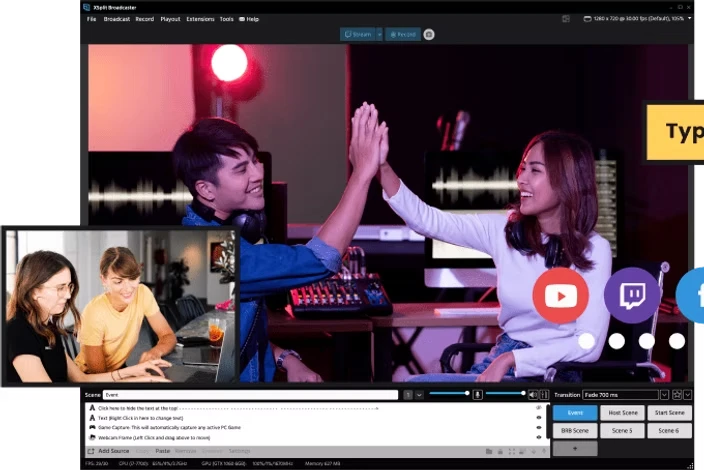
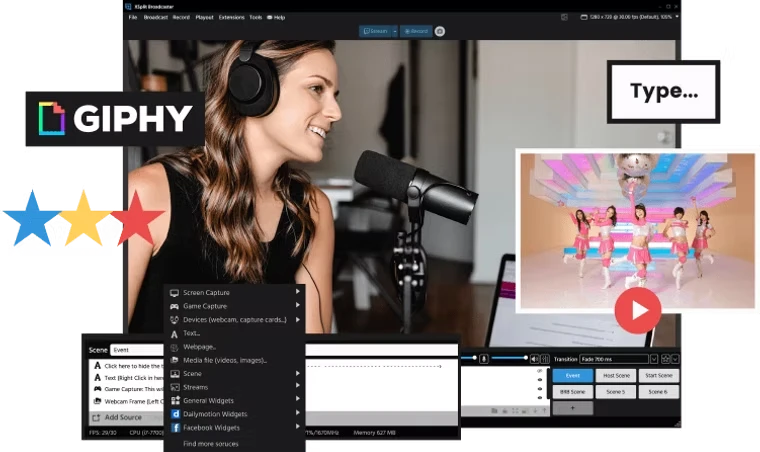
It treats a stream as building a scene: the source list sits on the left, the preview canvas in the middle, scene switching and the audio mixer below, output control on top. A camera, a screen, a window, a web page, an image, a video and an audio file are all sources; once on the canvas they scale, crop, and take filters and transitions. A scene is a combination of those sources, and switching scenes swaps a whole arrangement of the picture.
A newcomer need not start from an empty canvas. A built-in layout wizard asks what you are broadcasting, a game, an interview, a tutorial or an event, and lays out a starting canvas from the answer to adjust later. The assumption underneath the whole program is that the scene gets built correctly first and the stream is discussed second, not the other way round.
How far the free edition reaches
The free tier is not a trial period and can be used indefinitely, with the boundaries written out: up to 720p and no watermark at all; four scenes at most; 30 fps at most; anything above 720p or above 30 fps carries a watermark; AI background removal and the virtual camera also carry one in the free tier; and the licence covers personal non-commercial use only.
Item | Free tier | Paid tier |
|---|---|---|
Resolution | 720p at most | Unlimited |
Watermark | None at 720p and 30 fps | None at any setting |
Scenes | Four | Unlimited |
Frame rate | 30 fps at most | Up to 240 fps |
AI background and virtual camera | Watermarked | Unlocked |
Commercial use | Not covered | Allowed |
Price | Zero | 14.99 a month, 59.99 a year, 119.99 once |
The paid tier opens all of those at once: unlimited scenes, unlimited resolution, 240 fps, no watermark, plus AI voice clarity, live AI captions, chroma key, simultaneous output to several platforms, a projection window and audio mix preview, with commercial use allowed. Prices come in three steps: 14.99 dollars a month, 59.99 a year, which works out at five dollars a month, or 119.99 once. The yearly and the perpetual options sit close together, so long-term users usually look at the last two.
What the October release added
The main dish of 4.6.2609.2802 is the Presentation Switcher. Each presentation keeps its own scenes, sources, output channels and video settings, resolution included, and even the stream title and description for each output travel with it. Broadcasting a different game, or moving from solo play to an interview with a guest, is one click on the current presentation name at the top, and the whole set changes without rebuilding.
Several other changes are practical: enhanced broadcast support reaches the Alchemist and Battlemage discrete cards from Intel Arc, encoding H.264 or H.265 through Quick Sync, with the platform splitting quality tiers automatically by viewer bandwidth; controls for multi-output mode moved onto the Stream Deck, so output one and output two can start and stop separately or together, with volume dials for microphone and speakers added alongside; and local recording now defaults to multitrack audio, so the microphone track can be adjusted afterwards without touching the game sound.
Smaller repairs came too: decoding and playback cover RTMP and RTSP streams, fixing cases where some video played sound without picture, some MP3 files would not play, and adding an RTSP source crashed; exporting a presentation package now carries the Stinger and Luma transition files with it, so a new machine needs no retuning of transitions; and the video playlist was renamed a media playlist, so audio files can join the queue.
Landscape and portrait at once
Multi-output mode is still marked as testing but already does work: two layouts, a landscape composition and a portrait one, sit on one canvas, share sources, control size and position independently, and push to a landscape and a portrait outlet at the same time. For anyone publishing both long video and short video, that beats recording once and cutting again.
On the protocol side, NDI and SRT are both on the supported list, and NDI output can specify which layout goes out under multi-output mode. Audio runs on per-track routing, and in the mixer every source takes its own volume, effects and delay.
The hardware bar
The minimum is written neither high nor low: 64-bit Windows 10 or 11, a processor around a second generation Core i5, 8 GB of memory, a graphics card with DirectX 10.1 and 250 MB of disk. To record or stream 720p the site suggests a fourth generation i5, and for 1080p a fourth generation i7. On the network, the lowest quality stream needs 500 kbps of upload and high definition is better at 5 Mbps.
The site lists keeping graphics drivers current as a requirement of its own, which is unusual for streaming software but the reason is obvious: encoding leans entirely on hardware acceleration at the driver level, and an old driver leaves the encoder unused and the picture stuck in software encoding.
Plug-ins and the companion
The plug-in store is one reason it holds users for years. The official list includes a Gamepad Visualizer that shows controller buttons on the picture in real time, a Whiteboard that turns the canvas into a board, an audio mixing extension with DSP effects, and a Replay source that plays back the last stretch of footage. Third-party chat boxes, alerts and interaction overlays mostly arrive the same way.
The companion Media Manager is free: recorded material gets trimmed at the marked points, unwanted parts deleted, the result exported or sent straight to a linked channel, and several accounts on the same platform managed. It is positioned as the second step after recording and takes no room in the Broadcaster interface.
Who should use it
It suits people treating streaming as long-term work and willing to pay a subscription for one interface that holds every scene: interviews, tutorials, events, shows with several guests, the kind of scene switching that shows the value most. It also suits long-standing users already depending on a pile of plug-ins, since the cost of migrating often exceeds the subscription.
Conversely, for the occasional screen recording without a subscription, the free tier at 720p with no watermark is genuinely enough; but hit one of four scenes are not enough, 1080p is required, or commercial use is needed, and there is no way but the paid tier. The tiers are cut by how professional the work is rather than by stripping features, which is worth settling before choosing.
XSplit Broadcaster breaks a stream into combinations of scenes and sources and holds the whole path from building the picture to the output in one workspace. The free tier gives 720p without a watermark and four scenes; the paid tier opens resolution, frame rate, AI features and a commercial licence, and the October release made several presentations switchable configurations and let landscape and portrait go out together. Whether to use it depends on how often you change scenes and whether that switching logic is worth paying for.