
Navidrome: one binary starts a music server, and the home library answers from anywhere
Summary
Navidrome is written in Go and released under GPL v3. It opens a Subsonic interface so a hundred and two existing clients connect, adds transcoding, several libraries and plug-ins, and the current release is 0.64.2.
Recommend- Name
- Navidrome
- Version
- 0.64.2
- Pricing
- Free
- Open source
- Open source
- Operating system
- WindowsLinuxmacOS
- Website
- https://www.navidrome.org/
- Updated
- 2026-10-21 12:39
Navidrome is a music server written in Go: a folder of audio on a disk becomes a private streaming library reachable from anywhere. It ships no phone client of its own; instead it opens an interface along the Subsonic protocol and lets existing players connect.
One process, two directories
The shape of a deployment is plain. The site publishes compiled binaries per platform, Linux, Windows, macOS and ARM boards included, plus an official container image covering x86 and ARM at v6, v7 and v8. Running it asks for two locations, one for the database and cache and one pointing at the music folder, and it takes port 4533.
The only hard external dependency is ffmpeg, which does the transcoding. Configuration has three entrances: environment variables, command-line flags, and a toml file; when both are set the environment wins, and under a container the program looks for that toml in the data directory by itself.
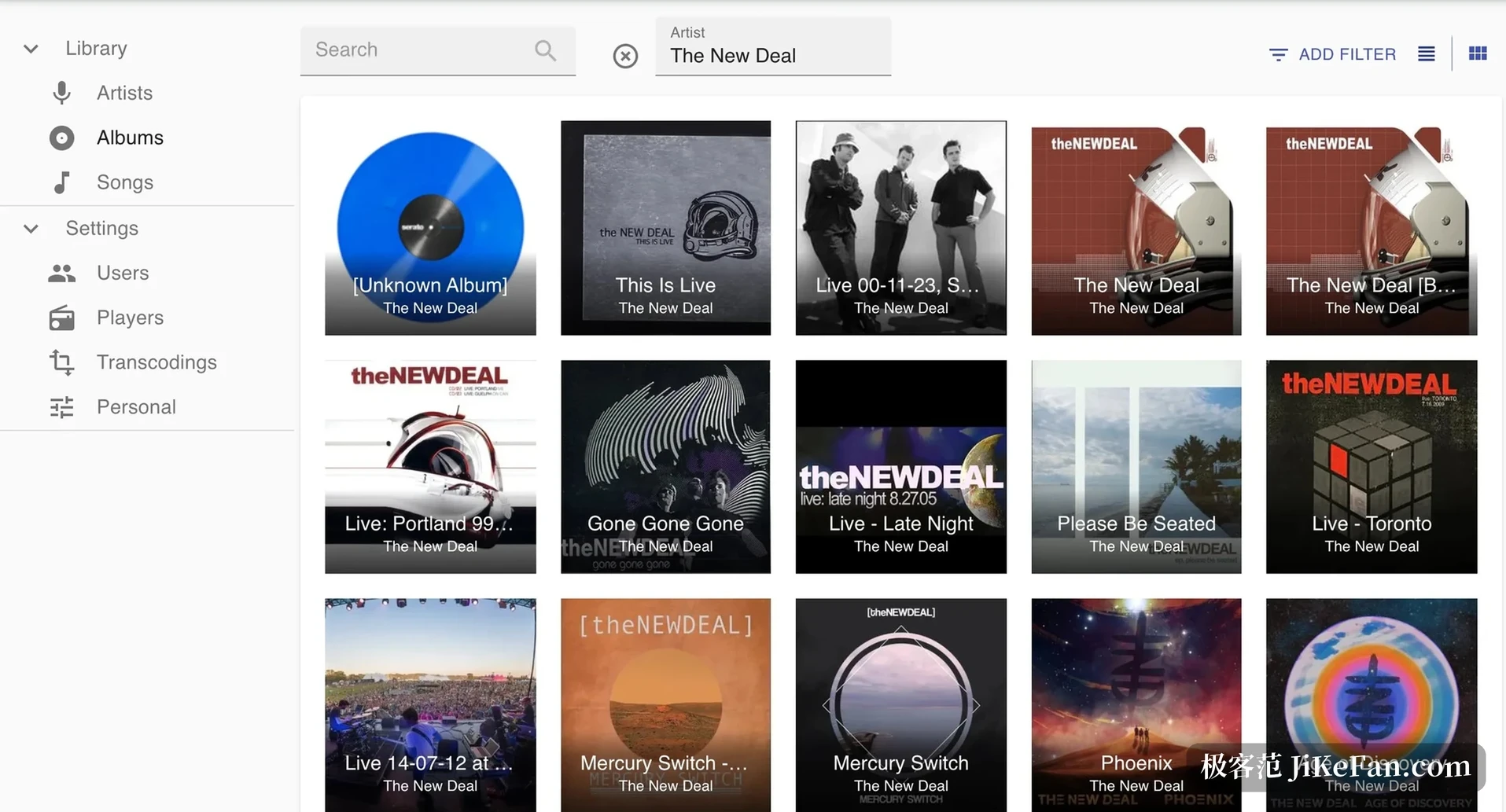
Scan the folder once and the library exists
The first start builds the library and scans the music folder. The site gives a concrete timing guide, and afterwards a scan schedule can be set to rerun at a fixed interval.
Library size | First scan |
|---|---|
Under 1,000 songs | Within a minute |
1,000 to 10,000 | One to five minutes |
10,000 to 50,000 | Five to fifteen minutes |
Over 50,000 | From fifteen minutes up |
It builds the library from tags, not from directories. The FAQ says it plainly: a folder-browsing mode is technically possible but would mean moving the internals of most components, and the product fixed its direction on tags from the first day. Tracks fall into albums and albums hang off artists entirely through the tags inside the files; write the tags wrong and the interface is a mess. The site mentions the scanner has been tested on a library of about nine hundred thousand songs, two thirds of them FLAC, and that this size still runs on a Raspberry Pi.
The protocol is the door, clients are someone else s job
It carries a web player of its own, but what holds it up is protocol compatibility. The documentation states alignment with Subsonic API 1.16.1, with a few interfaces differing, and the OpenSubsonic extensions being filled in steadily. The gaps are published too: nothing to do with video; no folder browsing, so a request for indexes returns a simulated directory tree; a play request alone does not count as a play, only a report from the client does.
Once the protocol works, clients need not be written. The client directory on the site lists a hundred and two applications, covering Android, iOS, desktop, web and TV boxes, and anything marked Subsonic or OpenSubsonic connects.
Several libraries, permissions and separation
Multiple music libraries have been supported since 0.58.0. Startup builds a default library from the configured music folder, and existing users carry the permission automatically; administrators see every library, ordinary users are granted one by one and switch with a selector. An album belongs to one library only, while an artist can span several and statistics aggregate across all of them; a playlist can mix libraries provided the user holds permission on each. Splitting music from audiobooks, or giving each member of a household a collection of their own, becomes configuration.
Transcoding, cache and sharing
Playback can transcode. The server converts a file to a suitable bitrate in the form the player asks for and sends that, saving bandwidth and decoding load; the result lands in a cache with a ceiling you can set. Sharing is the other road: any user can generate a link for a song, an album, an artist or a playlist, people without an account can listen, and the link expires after a year by default, with the duration adjustable or the feature switched off.
Smart playlists and listening history
Smart playlists are still in testing, built by writing rules as JSON and dropping an nsp file into the library folder. The rules carry fields, operators, sorting and a count limit: the last thirty days played, top hundred; eighties tracks rated above three stars, newest first, twenty-five of them. Relative time conditions with a percentage limit produce a daily list that turns over.
The same syntax is reused elsewhere. Since 0.64.0 every user can set a filter rule to keep certain songs out of their history, blocking holiday music for instance, or letting only four-star tracks feed recommendations; blocked songs still count as local plays, so the history keeps no gap.
Plug-ins and the Jellyfin interface
Plug-ins run inside a WebAssembly sandbox and first declare which capabilities they offer: fetching artist biographies and album art, sending listening history elsewhere, running scheduled tasks, responding to playback events. Installation means putting the file in the plug-in folder, then enabling it in the web interface and assigning permissions. Plug-ins have no network permission by default, and reaching a service on the local network requires writing the address range into the manifest.
0.64.0 also opened an experimental Jellyfin interface, off by default. Once on, the server answers Jellyfin music clients on a separate path, logging in with the local account and password, and every device appears as a player in the settings. Automatic discovery on the local network uses UDP 7359 and stays off by default, because a real Jellyfin server on the same machine would fight over that port.
What the 0.64 releases fixed
0.64.0 is a large release and the most important change hides where it cannot be seen: internal IDs were re-encoded into a uniform 128-bit format, the migration touches every table, the database should be backed up before upgrading, and clients that cached item IDs may need to resync. People writing plug-ins should note that the sandbox HTTP capability went off and requests have to pass through the host interface.
0.64.1 is a security release fixing five holes at once. The heaviest sits on the Subsonic interface: failed logins were not rate limited, so an attacker could guess passwords at full speed, rated 7.4; another let an external cover address in a playlist point at the internal network and turn the server into a probe. 0.64.2 closes the run and treats a fault on slow storage: USB sticks and network drives threw a pile of database-locked errors during a scan and the full scan failed, so this release pauses cover work while scanning.
Who it suits
Someone with several hundred GB of lossless audio who would rather not pay a subscription every month is the typical user. A Raspberry Pi that stays on, an idle old laptop, or a container on a NAS, and the library is alive. It wants no graphics card, is not fussy about the system, and the single compiled binary runs once dropped in place.
Navidrome takes the narrow road: a music server only, organised by tags only, aimed at the Subsonic protocol only, and the rest handed to a hundred and two clients to do each in its own way. The code goes out under GNU GPL version three, the repository carries over twenty-four thousand stars, and the version has walked to 0.64.2. Turning a local music folder into something within reach at any moment has few other entry points.