
Birdfont: an open source font editor whose four editions split on commercial use and colour
Summary
Birdfont is an open source font editor that exports TTF and single colour SVG. The website splits distribution into four editions, two of them free, with colour fonts and variable fonts reserved for Plus. Paid editions start at 9.99 dollars.
Recommend- Name
- Birdfont
- Version
- 6.15
- Pricing
- Free
- Open source
- Open source
- Operating system
- LinuxmacOSWindows
- Website
- https://birdfont.org/
- Updated
- 2026-10-21 12:35
A font editor does two things: draw the shapes, then hand over a file. Birdfont keeps both in one window, and its website spends more words on the licence than on the drawing, because that is where it separates ideas people run together.
From a toolbox to a font file
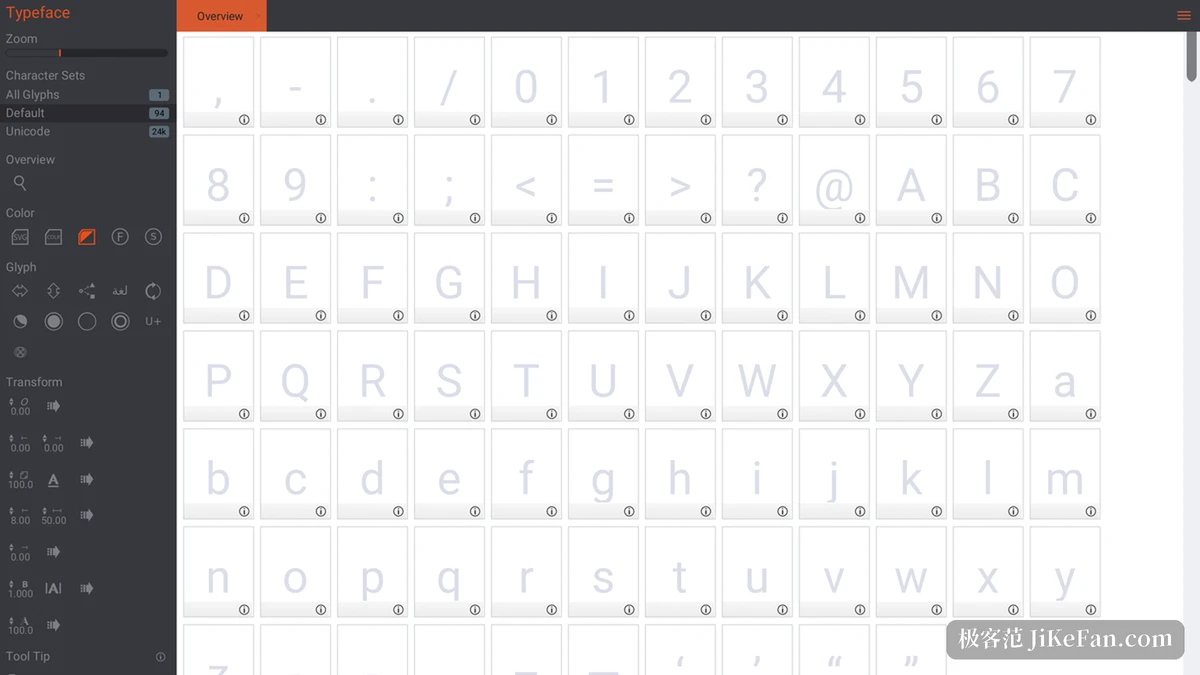
Birdfont lets vector glyphs be drawn and exports three kinds of font file: TTF, single colour SVG and OTF. The window is laid out the way such tools usually are: the left column holds the toolbox, layers and character set; tabs along the top switch between the overview, glyph editing and kerning. The overview is a grid of cells where glyphs already built into the font light up.
The author, Johan Mattsson, states on the site that the editor is written in Vala, comes to roughly a hundred and twenty four thousand lines, and that the first line was written on 1 January 2012. Packages and source cover Windows, Linux, Mac OS X and BSD.
Four editions, two free and two paid
The download page stacks the editions in four rows. The open source edition is priced at zero and the source runs under the GNU GPL; the free binary edition is also zero, with the permitted use written into the SIL Open Font License. The commercial edition starts at 4.99 dollars and Plus at 9.99, and both carry a year of upgrades, after which the version in hand keeps running.
A comparison table on the same page puts the boundaries plainly. TTF fonts, single colour SVG fonts, kerning, ligature substitution, alternate glyphs and SVG import are ticked in all four. Commercial use is ticked for open source, commercial and Plus, and left blank for the free binary. Colour fonts, OTF, single stroke engraving fonts and variable fonts appear only in the Plus column.
Edition | Price | What it allows |
|---|---|---|
Open source | 0 | Source under GNU GPL, commercial use allowed |
Free binary | 0 | Fonts must stay under the SIL Open Font License |
Commercial | from 4.99 dollars | Commercial use, one year of upgrades |
Plus | from 9.99 dollars | Adds colour, OTF, engraving and variable fonts |
How far a free edition reaches
Anyone wanting a font for their own use without paying can finish the whole flow in either the open source or the free binary edition: draw glyphs, set kerning, write ligature rules, export TTF or single colour SVG. The difference lies in the use, since a font from the free binary edition has to hang under the SIL Open Font License while the open source edition may go straight into commercial work.
Before choosing, settle three things: whether the font is for personal use or for sale, whether OTF is needed, and whether colour glyphs are needed. The third mostly pushes people to Plus. Adding a commercial licence, or switching to the open source edition, settles the question of use.
What Plus opens up
Two rows of colour fonts sit under Plus: one carries colour through OpenType SVG, the other through the COLR and CPAL tables. OTF follows the OpenType CFF outline and appears in the Plus column only, as do variable fonts.
Single stroke engraving fonts count as Plus as well. They exist for computer controlled engravers and plotters: the glyph keeps only a centre line, with no variation in weight, and the machine follows that line with its cutter.
Drawing: pen, grid, anchors, layers
The toolbox runs to a dozen groups: drawing tools, control points, layers, stroke, guides and grid, zoom and view, geometric shapes, variable fonts. With a point tool selected, version 6.15 displays the coordinates of the current control point inside the toolbox, and need not be looked up elsewhere. Grid and guides snap, and 6.10 added searching and browsing Unicode blocks from the overview tab.
Layers keep out of each other's way and control points show only in their own layer. The 6.0 revision replaced the whole interface, made both a light and a dark theme grayscale, and let the middle mouse button pan the canvas.
Background images and tracing
A scan or a specimen sheet can become an underlay. The image goes beneath the glyph and the outline is traced point by point with the Bezier tool; automatic tracing can also run first, producing a rough outline that gets fixed by hand. Once traced, several paths are joined into one closed contour so the inside and outside separate properly.
The source repository keeps the automatic tracing module apart, and the official tutorial puts it in the first three entries of the 6.x group. For a glyph as complex as a Chinese character, tracing first and repairing by hand saves a great deal of time.
Kerning, ligatures and alternate glyphs
Kerning has a tab of its own, where pairs can be set individually or handled in classes, and 6.14 sped the class handling up noticeably. Ligature substitution is written as substitution rules, and 6.11 opened a ligature tab that moved this work into view and improved emoji support at the same time.
Alternate glyphs follow the same logic: several glyphs hang off one character and a substitution rule picks between them. Accents travel as a mark class, and since 5.8 a custom diacritic can be positioned in the GPOS table by attaching it as a mark to a base. The character set can be narrowed to a custom selection in the overview, so the whole of Unicode need not be in view.
Variable fonts: three masters on one axis
This is Plus only, and it works rather differently from an ordinary font. Three glyph masters sit on one axis, data along the axis is interpolated, and a whole run of weights slides out of a few masters. The data lives in the GVAR table.
An axis tag takes four ASCII letters, lowercase for standard axes such as wght and uppercase for custom ones such as SERF. When the masters are done, the menu generates a variable font specimen in HTML, so the effect can be dragged through in a browser. The documentation advises keeping the point count on each master low and handling the extremes by hand.
What 6.15 changed
The release notes give 6.15 two entries: showing control point coordinates in the toolbox when a point tool is selected, and a dark canvas theme. Further back, 6.13 put a colour wheel in place of the old picker, 6.12 updated ligature generation, and 6.10 made closing a path complete the stroke.
The version number has walked from 6.0 to 6.15, and that density says the project is still being polished. Commits in the repository stop in November 2025, so the site remains the place to check the current version.
Who it suits
For someone designing a display face, a symbol font or an icon font, the entry threshold is not high: a little vector drawing, and the rest is kerning and ligature rules. For a branded colour icon font, the 9.99 dollars of Plus is well spent.
To change the glyphs of an existing font, the free editions are enough. A gallery of fonts made with Birdfont hangs on the site and work can be submitted; the project lives on donations and a monthly subscription, and the October bar in that column is still sitting at zero.
Birdfont separates open source from free more finely than most projects: the source goes out under the GNU GPL, the binaries split into a free and a paid half, and colour fonts, OTF and variable fonts stay locked in Plus. Someone making a font for themselves starts in a free edition and finishes the flow; a designer heading for commercial work picks between 4.99 and 9.99.