
Sandboxie-Plus 1.19 hardens the box around unknown programs
Summary
Sandboxie-Plus 1.19 is a hardening release: overflow, out-of-bounds reads and races are closed, and a loopback block that never worked is fixed.
Recommend- Name
- Sandboxie-Plus
- Version
- 1.19
- Pricing
- Free
- Open source
- Open source
- Operating system
- Windows
- Website
- https://sandboxie-plus.com/
- Updated
- 2026-11-13 23:00
An installer of uncertain origin has just landed in the downloads folder, and the double click comes with a pause: will it write into the system, change the registry, add a start-up entry, leave residue after an uninstall? Putting such a program into a sandbox first is a habit more than a decade old on Windows. A layer sits between the program and the real system, and deleting the sandbox afterwards means nothing happened.
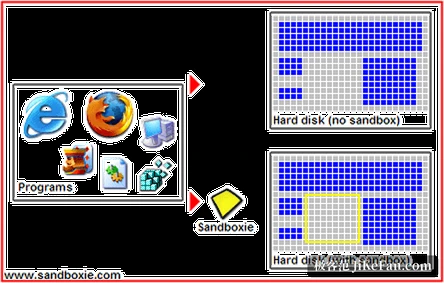
Think of the system as a sheet of paper that every program writes on, and a hostile one tries to write itself in. The sandbox lays a transparent film over the sheet: the program writes on the film, sees no difference, and pulling the film away leaves the paper as it was.
Sandboxie-Plus is the most senior member of that family. It runs a program inside an isolated environment, intercepting changes to files, registry and processes and redirecting them, so the program believes it wrote while nothing reaches the real system. The project ships as Plus and Classic, sharing one service and one kernel driver with identical isolation strength; the difference is interface and features. Plus carries a rewritten Qt interface where new work lands, Classic keeps the original one.
In practice, files written inside a box live in a SANDBOX directory on the system drive and registry changes are stored separately, so clearing the box content clears both. That also means an antivirus still scans the folder, and finding something there is answered by emptying the box.
What version 1.19 repairs
The release from late October is a rare large repair rather than a feature drop. New capability is almost absent from the notes, which deal instead with memory handling, request validation, access checks and synchronisation: buffer overflow, out-of-bounds reads, uninitialised memory handed back to the caller, resource leaks and races that could end in a crash or a deadlock.
Configuration reading was tightened as well, malformed input is now rejected outright, and the protection that limits editing by section is harder to bypass. Several items belong to the family where a rule existed but never took effect: blocking of IPv4 loopback addresses had not been working, and an overlap test for firewall rule ranges was written wrongly, which could disable a blocking rule.
The build before this one already closed the most urgent points, and version 1.19 is the wider sweep that follows. The project suggests running the usual workload after upgrading, and falling back a version if something regresses.
What the Plus line adds beyond the interface
The snapshot manager stores the current state of a box and rolls back to it, so trying an installer starts with a save and ends with a return. An encrypted box keeps its data under AES, which suits material that should not sit in a plain directory. Each box can carry its own network firewall built on the Windows filtering platform, with DNS blocklists and redirection, which fences in the networking step as well.
Resources can be limited per process and per box, in memory and in the number of processes, and triggers run actions at points such as box start, initialisation and termination. A few items lean toward privacy: a privacy mode box blocks unusual access to user data, a hardened box narrows the system calls and endpoints available, and screenshots taken by programs inside a box can be prevented. There is a portable mode that unpacks everything into one directory to carry along.
It does not judge whether something is a virus
The project draws the boundary clearly in its own answers: a sandbox does not separate good programs from bad, it assumes every program may be harmful and lets none of them change the system. The advantage is needing no virus definitions and staying calm in front of something without a signature yet. The price is that it never tells you whether a program is harmful, only that it could not touch the system.
So the advice is to use both. An antivirus stops known threats, a sandbox stops unknown ones. Nor is it watertight: the project admits that someone finds a way out of a box from time to time, and only patches quickly. Treating it as one layer that lowers risk, rather than betting the whole of safety on it, is what makes it comfortable to use.
What it is handiest for
The form is light: no full system image, no reboot, a right click and the program runs inside a box. What it governs is a program's changes to the system, and it does not interfere beyond that. Anyone who regularly tries tools of unclear provenance, or needs to open a web page or a mail attachment somewhere that can be emptied at will, finds a convenient layer here. For isolating one or two programs now and then, there is nothing to manage after installing, and one extra entry in the context menu is enough.