
Keeper Password Manager: zero knowledge vault with passkeys, free tier of ten records
Summary
A password and passkey manager built on zero knowledge encryption: scrambling and unscrambling happen on the local device and the service stores only ciphertext. Extensions and native desktop and mobile clients all open the same vault, while the free tier caps at ten records and one mobile device.
Recommend- Name
- Keeper Password Manager
- Version
- 20261011
- Pricing
- Free
- Open source
- Proprietary
- Operating system
- WindowsmacOSLinuxAndroidiOS
- Website
- https://www.keepersecurity.com/
- Updated
- 2026-10-12 11:09
Once remembering passwords is delegated to a tool, the only secret left to guard is the master password itself.
Nobody else can read what is in the vault
Keeper Password Manager is a manager for passwords and passkeys. The official wording of the core job is direct: create and store passwords and passkeys safely, and reach them from any place and any device. What supports that is the security model, described as zero trust and zero knowledge encryption, under which only the account holder can reach the stored data.
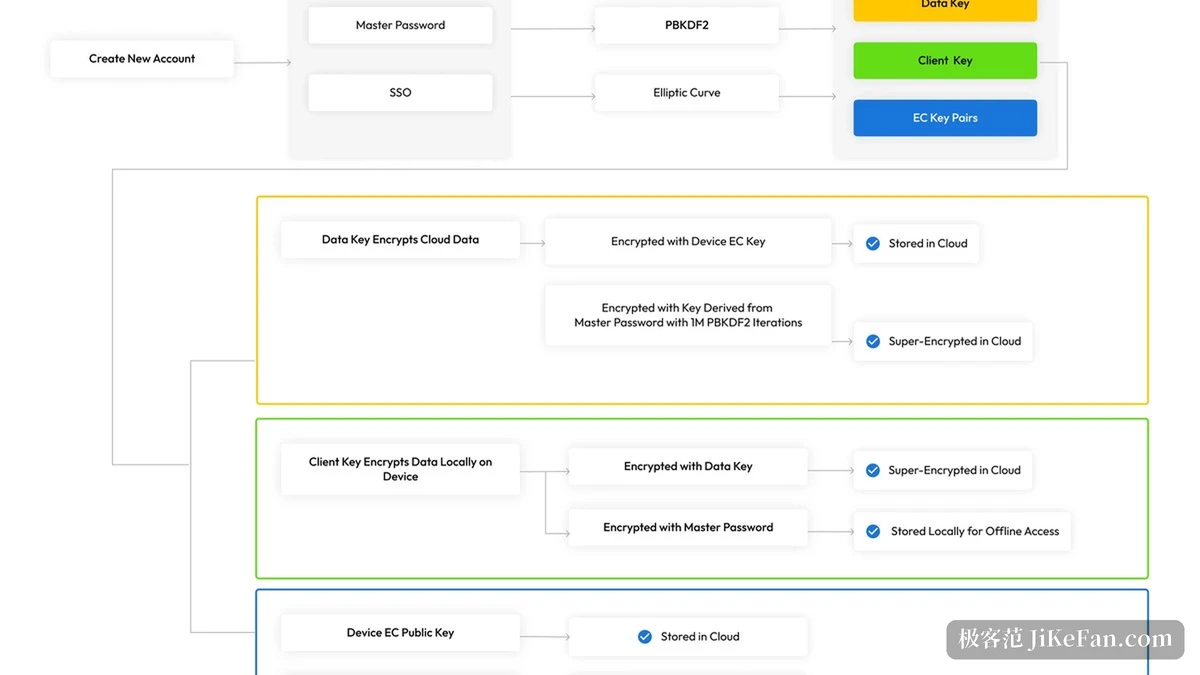
Zero knowledge is not a slogan here, because the technical notes put it somewhere specific. Encryption and decryption always happen on the user s own device, and the service keeps ciphertext only. Neither the keys nor the plaintext leave the terminal. For a tool of this kind that single point matters more than the length of the feature list, since it decides how much is lost in the worst case.
The practical consequence is worth spelling out. If the provider is breached, what leaves the building is a pile of scrambled records without the material needed to read them. That does not make a breach harmless, and it does not protect against a weak master password, but it changes the shape of the disaster from a leak into an incident.
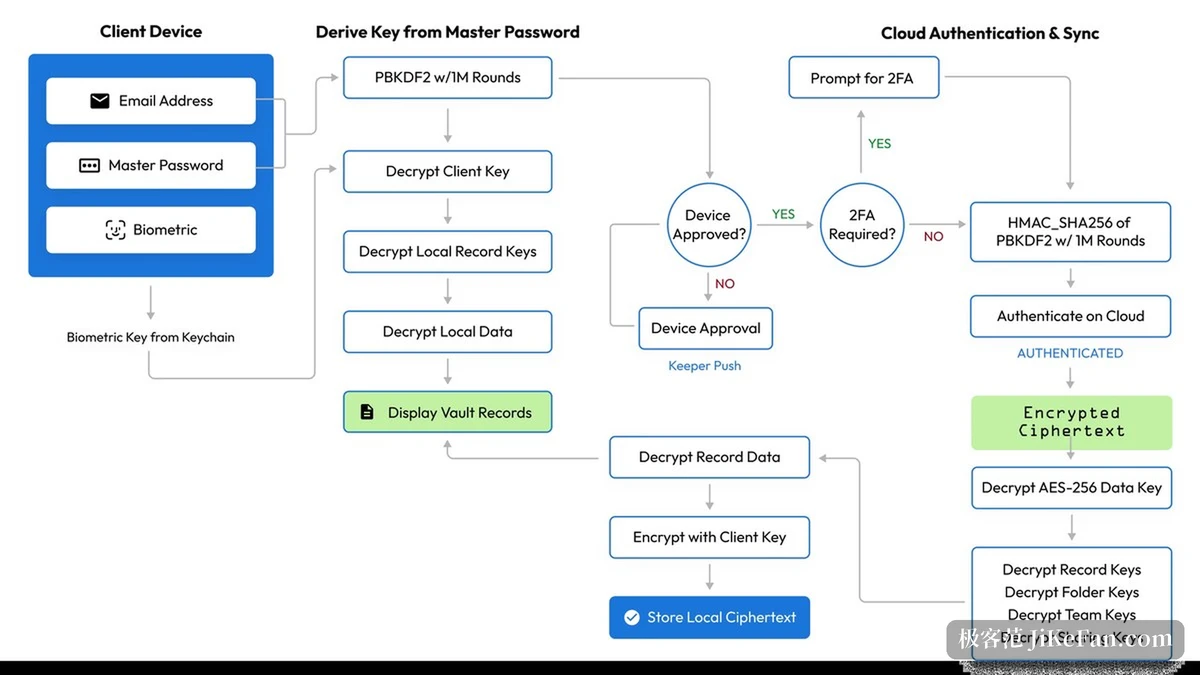
Reaching the vault from anywhere
The experience hinges on grabbing a credential without ceremony. Browser extensions are provided, along with native desktop applications for Mac, Windows and Linux, and mobile clients for iOS and Android, with the vault synchronised across devices without a manual refresh. A record saved on the phone is available on the desktop the next moment, and that is what decides whether the tool can really replace the old habit of typing from memory.
Coverage of entry points shapes how often it actually gets used. The desktop side is a native program for each system rather than a wrapped web page, which matters for something that has to sit in the background and be summoned dozens of times a day. The extension covers the browser, where most logins still begin.
Item | Official notes |
|---|---|
What it holds | passwords and passkeys |
Security model | zero trust and zero knowledge, encryption on the local device |
Desktop | native apps for Mac, Windows and Linux, plus browser extensions |
Mobile | iOS and Android, with immediate synchronisation |
Compliance | SOC 2 Type 2, SOC 3, ISO 27001, 27017 and 27018 |
Free tier | one mobile device, up to ten records |
Where the free tier stops and the paid plans begin
There is a free tier for individuals at a price of zero, limited to one mobile device and ten stored records. That allowance is enough to learn the interface and the sync behaviour, and it will be hit as soon as the record count grows past a handful of everyday accounts.
The paid side runs on two lines. The help centre lists the flagship Unlimited plan at 42.99 US dollars a year and the family plan at 91.99 US dollars a year, both billed annually. For a household with several people, the family line usually works out cheaper per head than individual subscriptions, which is the usual reason households pick it.
The compliance credentials are the other argument. The project states certification under SOC 2 Type 2 and SOC 3, plus ISO 27001, 27017 and 27018. The first two examine how the provider controls its own processes, while the three ISO standards cover information security management, security in cloud services and the handling of personal data in the cloud. Together they answer different questions, and for a team that has to explain its data handling to a client or an auditor, third party conclusions carry more weight than self description.
The less you have to remember yourself, the closer the whole arrangement comes to being reliable.
A few suggestions. Learn the master password and the sync path on the free tier first, and only upgrade once cross device use feels natural. Keep the master password in memory and on a physical copy stored offline, because without it the vault cannot be recovered by anyone. And where a team shares credentials, move to a business plan with sharing and permission controls rather than passing an account around.