
BeefTV 2.2.2 puts AI video on a local node canvas
Summary
BeefTV 2.2.2 moves AI video work onto a local node canvas: wires track storyboard references, an agent lays the frame, and costs show before you spend.
Recommend- Name
- BeefTV
- Version
- 2.2.2
- Open source
- Proprietary
- Operating system
- WindowsmacOS
- Updated
- 2026-11-13 23:00
Making AI video rarely fails at a single generation. The trouble is that storyboards, reference images, shots and voice tracks scatter across four or five places. BeefTV puts them on one endless canvas and links them with nodes and wires. Version 2.2.2 arrived on 12 November. It is a desktop tool for macOS and Windows, so nothing runs in a browser tab, and projects, canvases, media and model settings all stay on the machine; it opens without a sign-up.
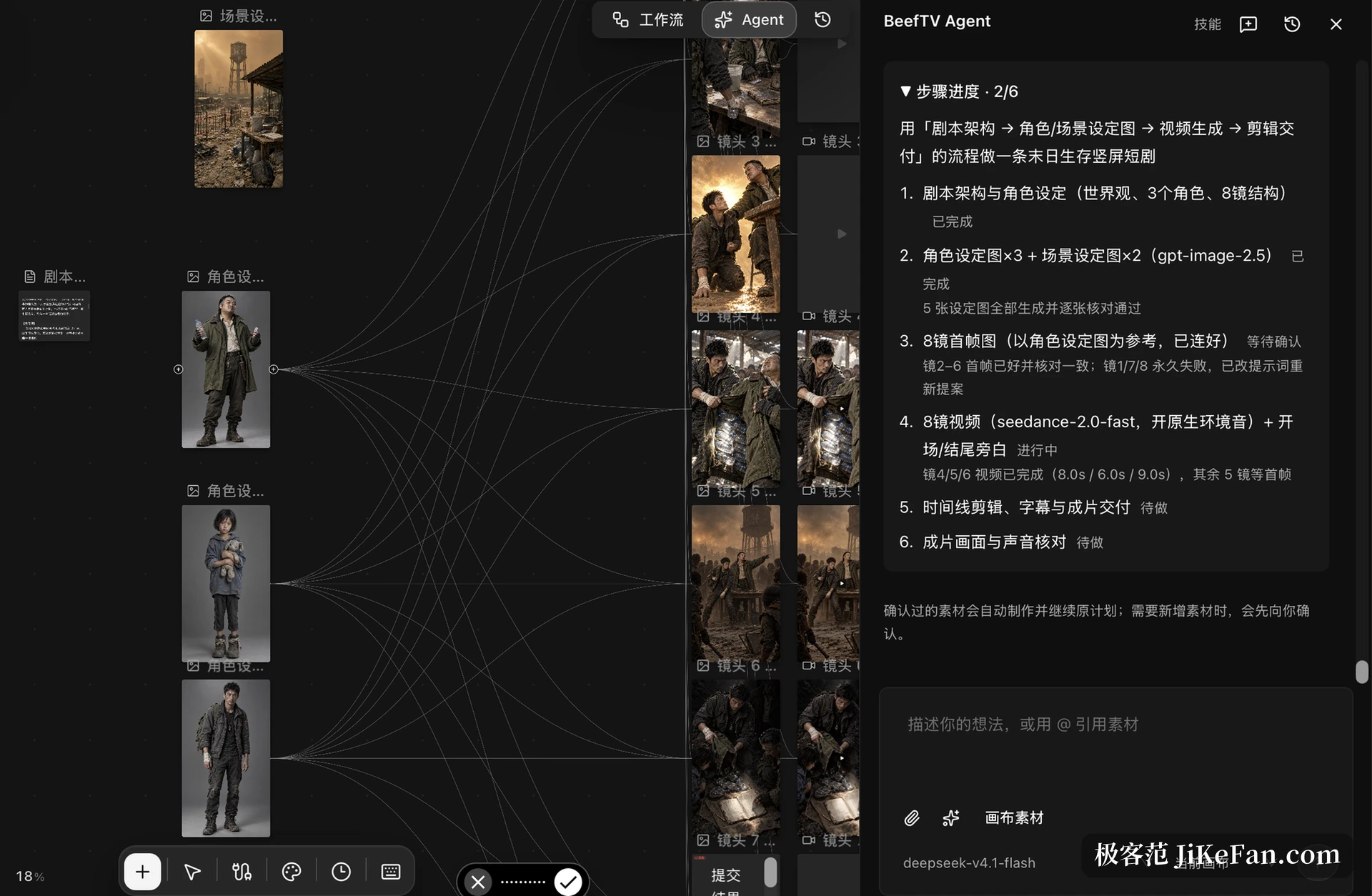
The canvas is the product
Open a canvas and everything is a node: a prompt, a reference image, a freshly generated picture, a clip, a voice line. Wires are not decoration, they carry reference. When three storyboard frames take one character sheet as their reference, three wires leave that sheet. Change the character later and you can count which downstream pieces have to be redone, instead of tracking shot numbers and file names in a spreadsheet.
The base is a Go backend with a React front end, packaged as a desktop program through Wails. The installer sits around two hundred megabytes, and data lands in a local database and asset directory.
Work continues after generation
Text, images, video and audio all reach the canvas and can feed one another. A text node feeds an image node, an image node feeds a video node, and changing a prompt or a reference anywhere along that chain lets the downstream steps run again. A result is not the end either: it can be cropped, annotated, repainted in part, split, referenced, or stitched together with other material.
Every prompt and product you tried stays in the node. To return to a fork, step back and branch again. So that dozens of nodes still move, viewport rendering, node loading, media preview and generation jobs run as separate work, and the canvas keeps dragging while a generation is under way.
An agent lays the frame first
The built-in BeefTV Agent reads the canvas. It follows what nodes and wires are saying, proposes a plan for the goal you set, and after confirmation creates nodes, attaches references and calls models. The official example is an apocalyptic short drama: the agent built 25 nodes and 48 wires of its own, from script structure and an eight shot storyboard through character sheets, scene designs, first frames, video and Chinese narration, with the process and the material left on the canvas.
Whether the result is right still needs a person, and failed jobs keep their state too. The frame, at least, no longer has to be laid wire by wire.

Skills and tools from outside
Skills keep a method. The official set includes text storyboarding, interview outlines and asset checklists; once installed they can be switched on or off, updated, or rolled back to an earlier version. Outside agents get in as well: a BeefTV MCP page in the sidebar connects Claude Code and Codex to the local canvas in one step and ships a guide to the canvas, while clients such as Claude Desktop or Cursor need a connection config.

See the number before spending
Version 2.2.2 brings cost into the open. A single node on the canvas, the standalone creation page and the batch storyboard table all show an estimate and an upper bound before generating, and the figures follow parameter changes. The account carries a live balance and online top-up through WeChat Pay, Alipay and international cards.
This release also strips subtitles from video on the canvas and hooks up a catalogue of dynamic super resolution models. When the video model changes, reference mode switches to what that model actually supports and stale first and last frames are cleared away. Long jobs now wait on server state; the built-in assistant batches storyboards longer than eight lines by itself, and a full proposal holds at most 24 targets per batch.
The official note on local first is plain: projects, canvases, media and jobs sit on the machine, and the key is stored only there. Only the moment you press generate does that key go out, to the model service you configured. What is saved is the platform layer; compute and models still cost money.
The licence is easy to get wrong
Early content in the repository went out under MIT; new original content moved to the BeefTV Source Available License 1.0. That licence allows self deployment, internal forks and selling works made with it. Commercial resale, rebranding, paid deployment or offering it as a hosted service needs written permission in advance. Officially the text says this is not standard MIT and that the repository should not be described as open source in the OSI sense. Plenty of write-ups outside call it open source anyway, which is not accurate.
Limits are stated as well. A desktop build covers macOS and Windows only, the Mac package is not notarised by Apple, the Windows package carries no code signature and the system will block the first launch, so the installer must come from the upstream repository. This software does not sell models: you fill in an endpoint and a key, or connect an official account, and metered charges do not disappear. Agent and plugins are still moving, few people maintain the core, releases come several times a week, and interfaces and data structures can change.
Who it suits
Anyone producing series of short films with a heavy storyboard load gets the most from the canvas: references sit in the open, and a change shows its reach. Small teams that already hold model access and would rather not pay a platform layer also fit. Someone who generates a clip or two now and then may find the learning cost of this canvas hard to justify, and is better off trying an existing service first.