
HandBrake 1.11.2 adds ProRes and DNxHR to the main window
Version 1.11.2
Summary
HandBrake arrives at 1.11.2 with ProRes, DNxHR and a MOV container built into the main window, plus repairs for a two-pass H.265 crash and a memory leak.
Recommend- Name
- HandBrake
- Version
- 1.11.2
- Pricing
- Free
- Open source
- Open source
- Operating system
- WindowsmacOSLinux
- Website
- https://handbrake.fr/
- Updated
- 2026-11-13 23:00
HandBrake 1.11.2 is already on the project site for Windows, macOS and Linux. This release repairs two hard faults in the encoding path, but the part that deserves a paragraph of its own is earlier: the 1.11 line brought the ProRes and DNxHR intermediate encoders straight into the main window of this free transcoder.
The tool has never pretended to be an editor or a media library. It takes the file you already have, writes it out in another codec, and stops there.
What a transcoder should look like
HandBrake is maintained by volunteers under the GPL and stays narrow on purpose. It converts an existing video into another codec and writes MP4, MKV or WebM. It does not cut, grade or catalogue. The input is whatever came off a camera, a phone, a screen recorder or a disc image, and the output is a version that plays smoothly on a phone, a tablet, a set-top box or in a browser.
That positioning has not moved in a decade, so the skeleton of the interface has not either. The source file goes at the top, presets sit in the middle, and a row of tabs below runs from dimensions and filters through audio and subtitles to chapters. The summary page collects every option that changes the output on one screen, with a live preview beside it.
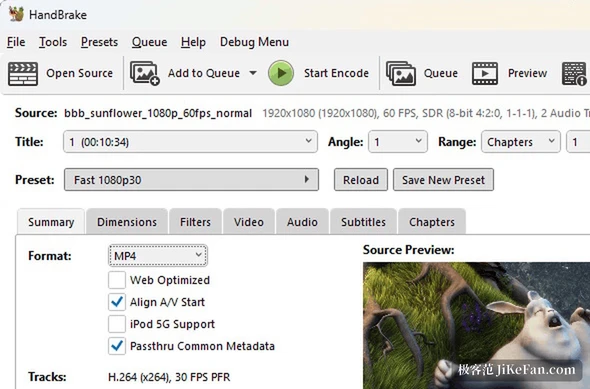
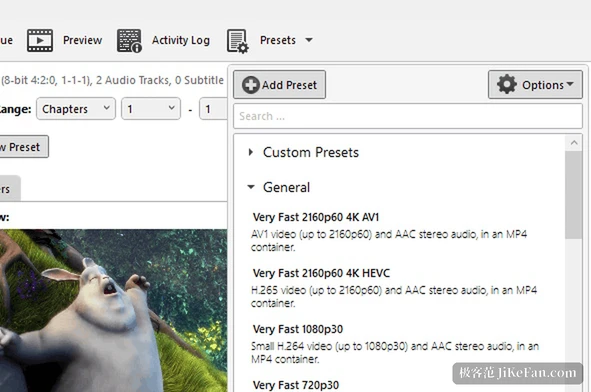
Presets are where the tool saves the most work. The official set ships combinations sorted by resolution and codec, such as Fast 1080p30 or Fast 2160p60 4K HEVC, and choosing one gives a workable set of values instead of leaving bitrate and keyframe interval to guesswork. Fine tuning stays possible: container, optimisation and audio passthrough sit right on the summary page, and an adjusted setup can be saved as a personal preset for the next job.
Intermediate formats without borrowing another program
ProRes and DNxHR have long been the default intermediate formats of an editing timeline, because they lose little and scrub without strain, at the cost of large files. Reaching them from HandBrake used to mean converting the footage elsewhere first and coming back, a detour through a second tool.
The 1.11 line added both encoders, listed as Production ProRes and Production DNxHR. Presets spread across standard, high quality and proxy tiers, resolution reaches 4K, and the proxy tier offers the three common sizes of 2160p, 1080p and 540p. A MOV container arrived alongside them, so a chosen preset produces the file directly, with no extra conversion in between.
Audio and archiving
On the audio side the same release added PCM encoding and passthrough, and multichannel material can be arranged in a custom channel order instead of accepting the default mapping. For anyone delivering a master, that detail matters more than another filter: whether a 24-bit multichannel track arrives in the container intact often decides whether the result needs another pass through post.
Archiving was extended more quietly. The Preservation FFV1 presets used to carry a single audio arrangement and now offer FLAC and PCM variants, the first lossless after compression, the second untouched. Passthrough widened as well, so Apple Lossless, PCM and Vorbis survive as they are, and FFV1 can be muxed into MP4 rather than being tied to MKV. Anyone digitising old material cares, because archiving means the file still opens in twenty years, not that it looks tidy today.
Hardware encoding: AMD joins AV1
The hardware side gains ten-bit AV1 encoding on AMD, exposed as an AV1 VCN 2160p 4K preset that needs a 9000 series card or newer. Older models can still call the same encoder, but the output size may not match, a limit the release notes state plainly because it sits in the hardware and cannot be patched in software. On a machine that already has a new card, 4K AV1 material no longer has to be ground out on the processor, and the fans stay quieter.
Platform notes
Windows moved its threshold. The interface now requires version 10 of the .NET Desktop Runtime, and .NET 8 is no longer needed, a point the upgrade notes repeat because it explains why some installations would not start after updating. The same release removed Intel HyperEncode support, since the upstream feature was deprecated.
Linux changes are about feel. Opening the output file inside a sandbox now goes through the system file launcher, so a Flatpak install no longer clicks into silence. The summary page gained paging buttons for the preview frame, the file size display was rearranged, and a false warning about disk space was corrected. The interface language can now be set on its own rather than following the system. macOS changes are smaller: a completion notice plays a sound when the window is in front, and overlong file names in the queue are truncated in the middle so both ends stay visible.
What the release itself repairs
Two hard faults sit in the encoding path. One is a crash during two-pass lossless H.265, the other a memory leak that accumulates across repeated passes, and both end a long job halfway through. The bundled FFmpeg and SVT-AV1 libraries were refreshed with the release, and WebM integration on Linux was improved on the way.
Who should switch now
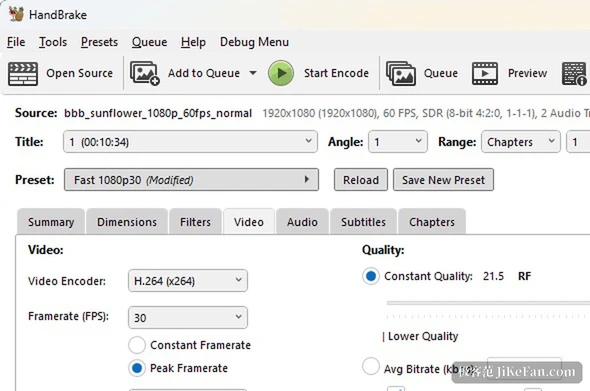
Anyone who hands footage to an editor and does not want a second machine just for a format change gains clearly here, because ProRes and DNxHR straight out of the tool save a whole stretch of the pipeline. Owners of a 9000 series card who compress 4K often will notice the difference immediately, since hardware AV1 cuts the wait. For everyday compression, shrinking phone clips for storage, little of this is visible, and the existing Fast 1080p30 preset still does the job.