
SnowAir 0.1.21 trims capture to one pixel and settles memory
Summary
SnowAir 0.1.21 packs screenshots, scrolling capture, recording and OCR into a single 4 MB exe, adds pixel level selection and frees memory again, free and open.
Recommend- Name
- SnowAir
- Version
- 0.1.21
- Pricing
- Free
- Open source
- Open source
- Operating system
- Windows
- Updated
- 2026-11-13 23:00
SnowAir is a screenshot and annotation tool for Windows. The whole program is one exe of about 4 MB, and a double click runs it. Version 0.1.21 shipped on 12 November 2026, the core is open under Apache License 2.0, and the free build covers capture, scrolling capture, recording, text recognition, annotation and pinning, on 64 bit Windows 10 and Windows 11.
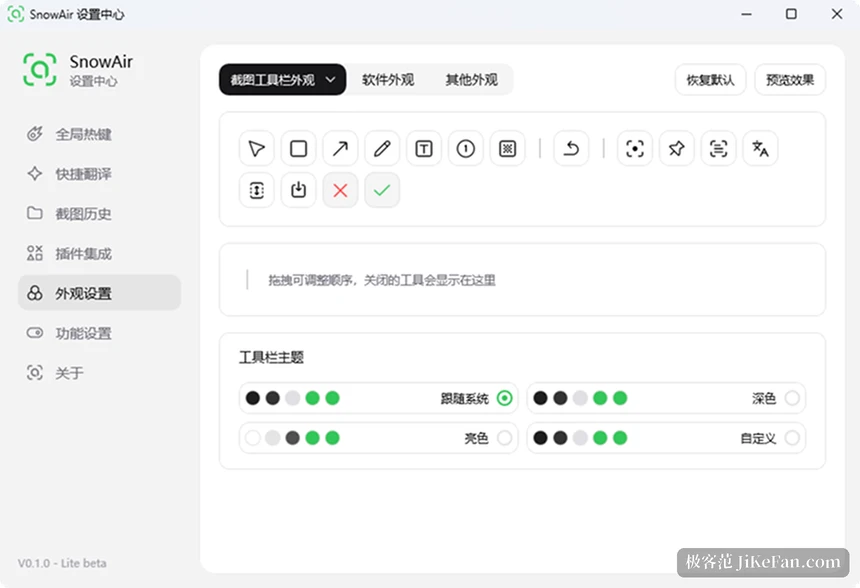
What fits inside one exe
Region capture, window detection, scrolling capture, recording, pinning, a presentation canvas, QR recognition and clipboard history all live in the same file. Scrolling capture uses the space bar to start and pause the scroll, and afterwards the result can be dragged up and down for a look with annotations added. Recording writes MP4 or one of three animated formats, GIF, WebP and APNG, and while it runs you can draw on the picture; one click then lets the mouse pass through and hands control back to the software underneath, with the marks left on screen and still recording.
Annotation is where this tool spends its effort. Beside rectangles, arrows, a pen, text, numbers and mosaic there is a dimension line that measures its own length, plus angles, bubbles, text outlines, watermarks and highlights, and a filter that deliberately ages and smears a screenshot. Buttons on the toolbar drag into any order, rarely used ones collapse, and nobody has to hunt through a row of icons every time.
The small size comes from shipping no runtime. The interface draws straight on the native graphics interfaces with no browser engine inside, so the file opens on another machine from a USB stick. Settings sit in the user AppData directory by default; to make them travel with the program, put an empty config.json beside the exe, and hotkeys, theme and toolbar order move with the folder.
Two lines of release exist, which deserves saying. One is the free single file described above. A professional build stands apart and adds screen mirroring, super actions, AI models and quick translation; the free build shows those entries, but the functions themselves need the paid one.
Calling it up first
Started without an argument it only sits in the tray and never pops up a capture window by itself, which makes a first run look like a failure. There are two ways to call capture: a single click on the tray icon, or a hotkey set in the preferences. Running the exe a second time opens the settings centre.
It also takes command line arguments. Adding a pin entry opens pinning right after the selection, a long entry goes to scrolling capture, a video entry goes to recording, and an auto quit flag closes it after the shot. Hanging it on another tool's shortcut leaves a capture entry available at any moment.
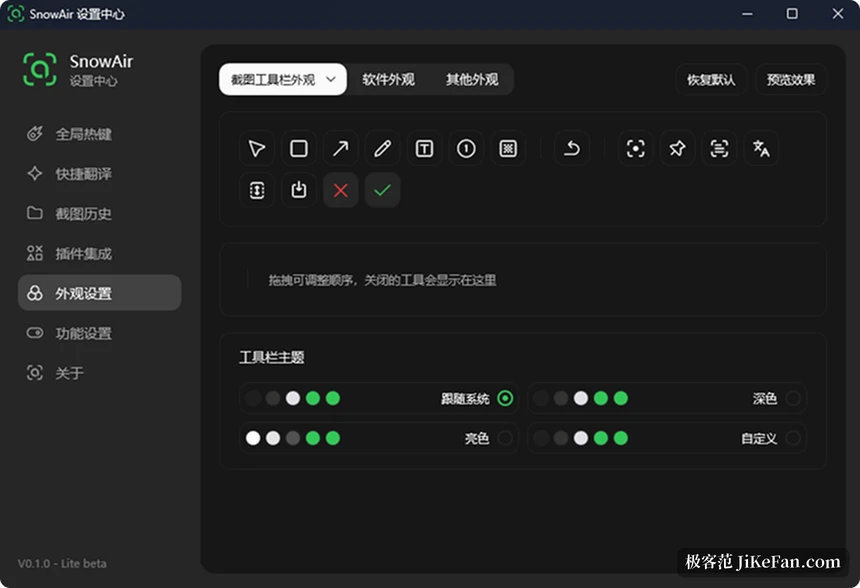
0.1.21 mostly tunes the feel
This release adds no new module and spends its changes on small details of handling. The new toolbar alignment has three steps, left, right and centred, and decides which side of the selection the toolbar stands on. Another switch called silent capture, once turned off, makes a full screen shot, a repeat of the last shot and a shot of the focused window bring the toolbar back and wait for a click before finishing.
The magnifier says more about the intent of this version. When the selection reaches the edge of the screen the magnifier steps aside instead of being squeezed out of sight, and while an edge or a corner is dragged the sampling centre lines up with that line, which gives a one pixel adjustment something to grip. Before, a drag at the edge left the sample point half a pixel off and the only guide was feel.
A few old habits were fixed at the same time. Pressing the mouse on the border of a selection now only selects that edge or corner, and the block moves after a real distance, so a small tremble no longer shifts the whole area. The I beam cursor is no longer drawn as the marquee cursor, and monochrome cursors display properly. Closing the tray menu hands the graphics device and the working set back, so memory no longer climbs and stays there.
The settings centre was sorted again
The separate text recognition page and translation model page became one recognition model page with recognition and translation groups inside. Options that hung under an appearance page moved into a new other functions page, and the clothes line only appears in the top navigation once a plugin is installed. Offline translation packs now show their download size on each row, so the space is known before installing.
Configuration and local data were split in this version. config.json holds settings only, while clipboard records, capture and recording history and the last selection go into local.json and stop travelling with the settings. That change settles a nuisance on synced folders: two machines sharing one configuration used to produce piles of conflict copies, with settings overwriting each other.
Recognition and translation both come as add ons, downloaded on demand from the plugin section of the settings centre. The lightweight model is about 7 MB, the standard one about 31 MB, and language packs count separately. Without them the recognition built into the system still answers, with less accuracy. The privacy note says screenshots and text are not uploaded by default, and that the network is used only for update checks, online recognition and translation, and plugin downloads.
Worth knowing before using it
The open source part of SnowAir covers the core only. It depends on a customised Ling framework that carries unpublished implementation and is not published with the repository, so the project says plainly that a build straight from the source is not offered, and anyone who wants it takes the compiled release.
The pace also needs a little preparation. The project went public in the middle of October and the version number has already reached 0.1.21 in a month, with the feature list and the layout of the interface still moving. The clothes line, which hangs screenshots, notes and files on a rope at the top of the screen, is still marked beta and only appears with a plugin installed.
SnowAir takes the subtraction route: rather than compete on the length of a feature list, it packs capture into a 4 MB file and then tunes the feel release after release. An update like 0.1.21, which moves a single pixel, is exactly the sign that it is still on that road.