
PureCodec Bundles Player, Decoder and Renderer Into One Answer
Summary
A playback bundle for Windows that puts a player, a splitter and decoder suite and a high-quality renderer together with sensible presets, so a file plays the first time instead of after an evening of matching components.
Recommend- Name
- PureCodec
- Version
- 20260514
- Pricing
- Free
- Open source
- Open source
- Operating system
- Windows
- Website
- https://jm.wmzhe.com/
- Updated
- 2026-10-16 22:00
The oldest annoyance in video playback
Everyone who has downloaded a file and found it would not open knows the shape of this problem. A container that the installed player does not recognise, or one it recognises but cannot decode; a picture without sound because the audio track uses something the player never shipped; a high-resolution file that plays as a slideshow on a machine that should be able to handle it. The usual advice is to install a player, then a decoder, then a renderer, then to spend an evening working out which combination of the three actually cooperates. A codec pack exists to make that evening unnecessary.
What is actually inside
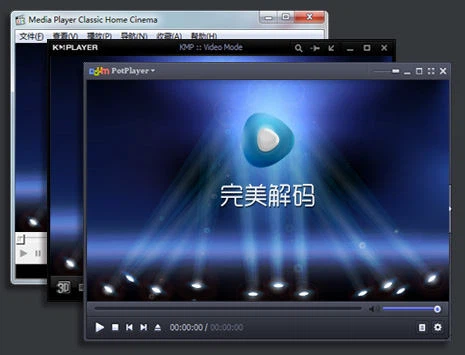
This is not a single player but a configured set of the three parts that playback really consists of. There are two players with different temperaments — one flexible in its interface, one deliberately plain and light — so the choice can follow habit rather than necessity. Beneath them sits a splitter and decoder suite built on a well-established decoding library, which is what gives the pack its breadth of format support: the common containers and codecs, the newer efficient video formats, and lossless audio among them. On top sits a professional-grade renderer responsible for the picture rather than the file, with high colour depth output, conversion of high dynamic range material for ordinary screens, and scaling algorithms that are in a different class from what a player does by default.
Three parts, three jobs
The division of labour is the whole argument. The player handles the interface and the interaction; the decoder suite handles turning a file into a stream of frames and sound; the renderer handles how those frames reach the screen. When one program tries to do all three, it does all three acceptably and none of them well. Separating them means each can be the best at its own job, and the pack's job is to have already decided which combination works.
For anyone who does not want to make those decisions, there are presets, and the default one is genuinely usable rather than a placeholder. For anyone who does, the splitter and the decoding path can be changed by hand, which is the difference between a locked appliance and a configured system.
Hardware decoding, and what it changes
Hardware decoding is where the pack earns its place on modest machines. The decoding suite can hand the work to the graphics hardware through the interfaces the operating system provides, and all three major graphics vendors are covered, so a high-resolution file that would exhaust the processor can be played smoothly on a machine with integrated graphics. Software decoding remains available as the fallback, and it is the more compatible of the two paths at the cost of processor load — which is exactly the kind of trade a viewer wants to be able to make consciously rather than have made for them.
The same layer handles the awkward case of high dynamic range material on a screen that cannot display it. The renderer can convert the tone range so colours look right on an ordinary monitor, while a display that does support the format can receive the signal directly without the player interfering.
Why not simply install one player
Because a player's built-in decoders are a compromise. They are written to cover the common cases and to keep the download small, and they run into trouble precisely at the edges: a demanding encode of a modern format, or an audio track that uses a less common codec. The arrangement here is different in kind — the player is used for what a player is good at, and the technical work is handed to components built only for that. The result is usually better in both picture quality and compatibility than a single program's default path.
There is a second, less obvious benefit. The operating system's own support for media formats is limited, and installing a pack of this kind raises the floor for everything on the machine, not only for the bundled players. Files that previously opened in nothing at all start opening in programs that had nothing to do with the installation.
Who it is for
Three kinds of people, and the boundaries are honest. Anyone who regularly meets a file that will not play: after the setup, format problems largely stop being a topic. Anyone who cares about the picture: the renderer's scaling and colour depth are a visible step above a default rendering path, and the difference is easiest to see on material that was authored well. And anyone who simply does not want to spend an evening on this: one install covers player, decoding and rendering, and the defaults are good enough to leave alone. What all three have in common is that they want the result rather than the process, which is what a bundle is for.
Free, complete, and finished the moment it is installed. The problem it solves is the old one: why will this machine not play this file? The answer is that the three parts which ought to work together have been put together already, with settings chosen by someone who has done it before.
A short verdict
The premise is modest and the execution is practical. Nothing here is novel; every component has existed for years and is well understood. What the pack contributes is a decision already made — this player, this decoder, this renderer, these settings — which is worth more than it sounds, because the difficulty was never in finding the parts but in knowing which combination of them is correct. For a problem that people solve once and then forget for years, being handed the answer is the right shape of solution.