
Kodi 21.3 Omega turns a folder of files into a poster wall
Summary
An open media centre for the living room that scans local films and music into one library with artwork and descriptions, designed for a remote control on the sofa, and extended through community add-ons; the current stable release is 21.3 Omega.
Recommend- Name
- Kodi
- Version
- 21.3
- Pricing
- Free
- Open source
- Open source
- Operating system
- WindowsmacOSLinux
- Website
- https://kodi.tv/
- Updated
- 2026-10-13 11:52
Keeping the films on a disk is only the first step; finding one the way a website lets you is the harder half.
From a list of filenames back to posters
Open a folder full of video with the player that came with the system and what appears is a column of filenames. With tidy naming that is survivable, but material gathered from various places tends to scatter the seasons of one series across several directories, so finding an episode means scrolling up and down the list more than once. Past a certain volume, browsing this way simply stops working.
Kodi takes the library road. The official about page states the position plainly: a free and open source media centre application, aimed at the machine connected to the television. When a directory is added for the first time it is scanned, and films, series and music are filed into the library along with descriptions, artwork and other metadata. What opens afterwards is a wall of posters, browsable by series, season and cast, close to the experience of a video site.
Its history is worth a sentence too. The about page notes that the project was once called XBMC and took its present name in 2014. Plenty of guides and add-on notes online are still filed under the old name, so when searching that way it pays to check the date of a document, since the approach may have moved on.
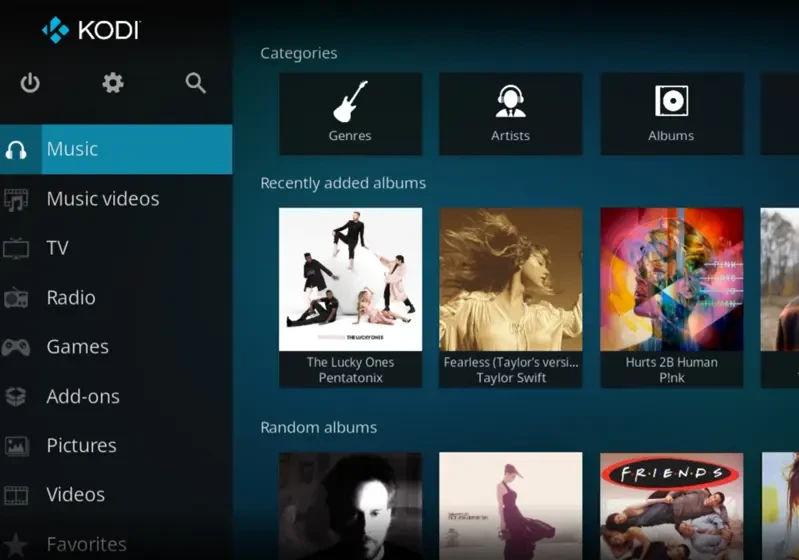
The add-on system and remote control
Another capability named on the about page is extension through add-ons contributed by the community. They fall roughly into three kinds: the look of the interface, the source of content, and added functions. The first can change the interface into whatever suits, the second decides where data comes from, and the third fills in what the original lacks. Plenty of choice also means judging maintenance yourself, and a glance at the last update before installing saves a good deal of trouble later.
Media does not have to sit on the same machine. The official notes say it plays files on local disks and reads material from network shares as well. In a household the easier division of labour is to keep the files on one device that is always on and let the others only play, so nothing has to be copied around when devices change.
The interface itself is designed for a remote. The official wording is that it is built to be used with a remote control from the sofa, with elements sized for viewing distance on a large screen and the number of key presses kept low. Details like that carry no technical glamour, yet they decide whether it is pleasant on a television.
Release rhythm and the choice about upgrading
The download page shows the current stable release beside the state of the next one. The stable release is 21.3 Omega, and the 22 series has reached the release candidate stage. A candidate means the features are settled and the remaining work is mostly fixing, and for an installation meant to last, waiting for the final release before upgrading is usually less trouble.
Software of this kind is rarely touched once it is set up, so the version number is the main evidence for whether to upgrade. A point release inside the same series generally fixes problems and carries little risk; crossing a major version brings changes to the interface and the add-on interfaces, and reading the notes first is worth the minute. The project is published under GPL-2.0, which allows running, studying and redistributing it, with modified versions keeping the same terms. Installing it on the machine in the living room is the most common use of all.
Item | Official note |
|---|---|
Current stable | 21.3 Omega |
Next release | the 22 series, at release candidate stage |
Platforms | Windows, macOS, Linux and others |
Library | scans local disks and network shares, filing film, series and music metadata |
Extension | add-ons contributed by the community |
Licence | GPL-2.0 |
Once the material is organised into a library, looking for a film goes back to what you want to watch rather than what you can remember of the filename.
A practical note: when adding directories for the first time, create them separately for films, series and music, and the scan comes out much cleaner; name files in the usual pattern with release year and season and episode numbers, and metadata matching hits more often; and install only the add-ons actually used, since the fewer there are, the easier a problem is to trace.