
MusicBee Review: Where a Local Library Finally Gets Organised
Summary
A local collection usually ends as a folder with a thousand songs and tags in ruins. MusicBee fixes that first and plays second: automatic tag and cover matching, duplicate detection, then a library sorted by album, genre and decade, with smart playlists that keep themselves current.
Recommend- Name
- MusicBee
- Version
- 3.6
- Pricing
- Free
- Open source
- Proprietary
- Operating system
- WindowsAndroid
- Website
- https://www.getmusicbee.com/
- Updated
- 2026-10-07 16:25
A local library ends up being an organising problem
Streaming is convenient and it has not replaced the folder where people keep the music they actually care about. That folder has a predictable fate: a thousand files, filenames generated by whoever ripped them, tags that are missing, wrong, or written in three different languages, album art present on some tracks and absent on others. Nobody intends to build that mess; it accumulates one download at a time over fifteen years, and then it becomes too large to fix by hand.
MusicBee is built around fixing it. On import it matches tracks against metadata sources, fills in the missing tags, pulls down cover art, and identifies likely duplicates so you can decide rather than guess. What comes out the other side is a library organised by album, genre and decade, with a coherent structure that makes browsing feel like browsing rather than archaeology. For a collection of a few hundred files this is a pleasant afternoon. For one of fifty thousand, it is the difference between owning music and merely storing it.
The listening side is not an afterthought either. Smart playlists rebuild themselves according to rules you set, so a list of "everything added this year that I have not played twice" stays true without maintenance. The equaliser and the sound processing plugins are detailed enough to correct a specific pair of headphones rather than offering three presets named after genres.
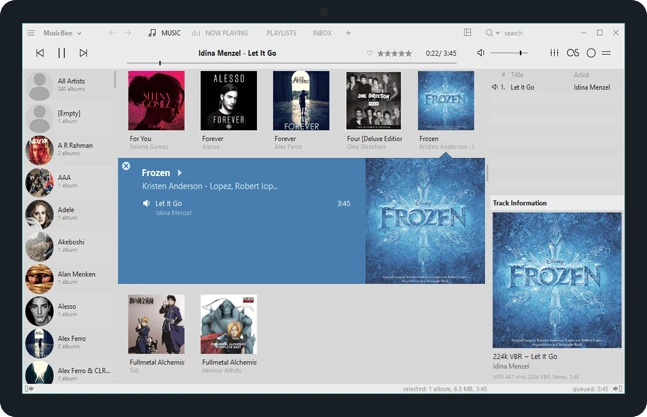
Long on features, restrained in layout
The feature list is genuinely long: CD ripping, podcast subscriptions, internet radio, automatic lyrics, device synchronisation, output to multiple rooms. The reason it does not feel bloated is that everything sits at a sensible level. The things you do daily are one click away, and the things you do twice a year are in a menu where you would expect to find them. That sounds like a low bar and most software fails it.
The interface is heavily skinnable, with community themes ranging from severe minimalism to the kind of layout that shows six panels at once on purpose. A companion mobile application keeps the library within reach, and the desktop side continues to be updated rather than abandoned, with the current release line still receiving work.
Everything is free, which in a category increasingly built on subscriptions is a meaningful statement rather than a technicality. There is no account, no tier, no feature held back behind a payment screen. For software that manages files sitting on your own disk, that is the arrangement that makes sense.
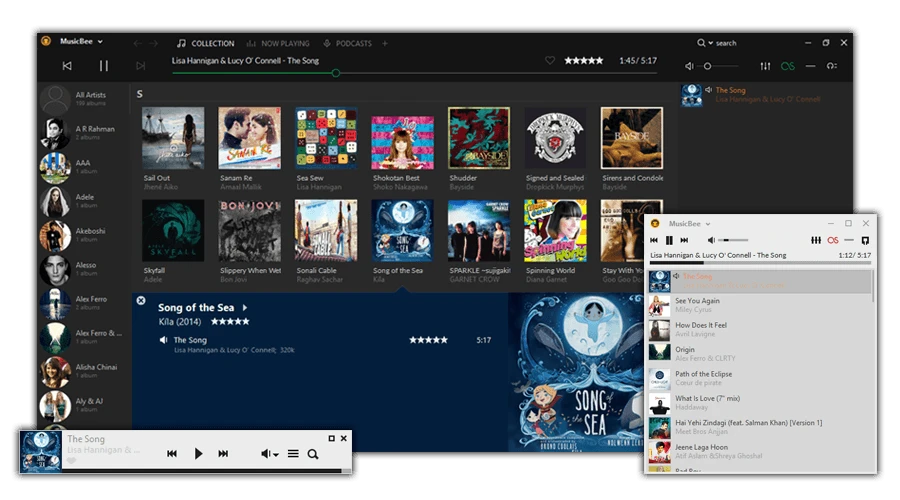
There is one more thing worth naming, because it is what separates a library tool from a player with a tree view. The library is a database, and it can be queried. Ask for every track added in a given month, every album by a composer rather than a performer, every file whose bitrate is below a threshold, and the answer is immediate rather than a manual crawl through folders. Once a collection can be interrogated, the question of what to listen to stops being a scroll and becomes a search.
MusicBee proves one thing: doing a single scenario deeply beats doing a hundred scenarios shallowly. The end of library management is getting people to open their own collection again.
Getting started without being overwhelmed
Two pieces of advice. On the first import of a large library, be patient while the tag matching runs; it is doing work that would take you weeks, and interrupting it halfway leaves a library in a strange state. And expect the interface to look dense at first, because it is: this is a program built by people who use it daily. Applying a community theme and hiding two panels solves most of the intimidation.
It is a Windows application, free with no gate, and it is a reasonable endpoint for anyone who has decided that their local collection deserves better than a file manager with a play button. It does not stream, it does not recommend, and it does not try to become a social network. It organises, and then it gets out of the way.