
PocketGuard turns a budget into one spendable number
Summary
Most money apps hand over reports and leave the decision to you. PocketGuard adds up income, bills, savings goals and essentials, then prints what remains as a single figure you can spend without thinking about it twice.
Recommend- Name
- PocketGuard
- Version
- 20260922
- Pricing
- Free
- Open source
- Proprietary
- Operating system
- AndroidiOS
- Website
- https://pocketguard.com/
- Updated
- 2026-10-06 21:10
One number instead of a wall of reports
Most money apps answer a question nobody asked. They produce categories, charts, a monthly summary, a breakdown by merchant, and at the end of all that the user still does not know whether dinner out tonight is fine. The information is complete and the decision is still missing, which is an odd failure for software whose whole purpose is to reduce effort.
PocketGuard starts from the decision instead. Its central feature adds up income, subtracts the bills that will certainly arrive, sets aside whatever is earmarked for savings goals and for essentials like food and transport, and prints what remains as a single figure. That figure is the answer. Open the app, read one number, close it. The change sounds trivial and is not, because the alternative is mental arithmetic repeated several times a week, done badly, and abandoned after a month.
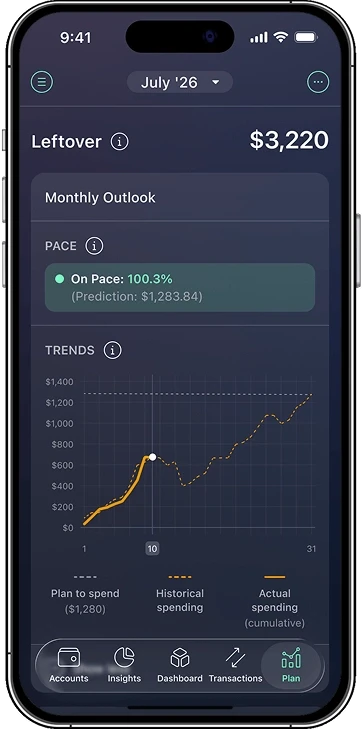
There is a quieter benefit underneath. A report tells you what already happened, which is useful for understanding and useless for deciding. A remaining balance tells you what is still available, which is the shape of a constraint rather than a record. Constraints are what actually change behaviour, because they can be consulted before the purchase rather than after it.
Automation first, manual as a fallback
What keeps the number honest is the automation behind it. Transactions are categorised without being sorted by hand, recurring bills surface before they hit rather than after, and subscriptions get a queue of their own. That last category is where the forgotten small charges accumulate, the ones signed up for during a free trial and never cancelled, and reviewing them tends to cover the cost of the exercise on its own.
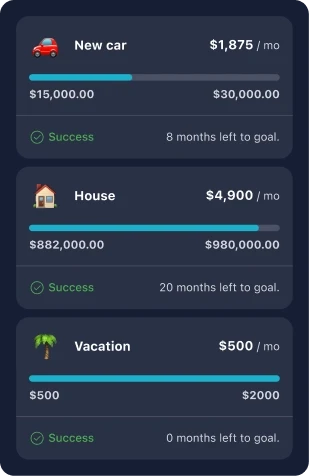
For anyone unwilling to hand over bank credentials, the manual route still works. Enter a handful of transactions and the budget frame functions normally, with the upkeep left to you. The free edition covers the core logic and a single budget dimension, which is enough to test whether the approach fits before paying for anything. The subscription adds unlimited categories, synchronisation across accounts and finer reports, billed yearly.
What the paid tier leaves out of the free one is worth understanding before subscribing. Unlimited categories and synchronisation across accounts start to matter once several income sources are in play, or when household money and personal money need separate books. For one salary and one current account, those are features paid for and never opened. The honest advice is to run the free version through a full month, including the awkward week when a forgotten bill lands, and watch whether the single number was consulted on the days it actually mattered.
There is also an argument from predictability for keeping the routine short. A budget that needs a weekly session tends to survive about six weeks. A budget that needs a glance survives because repeating it costs nothing, and repetition is the only mechanism by which any of these tools works at all. The number is not magic; it is a shortcut past the exact part of the process people abandon, and that is the part worth removing.
PocketGuard is betting on human laziness, and doing it politely: rather than training yourself into a bookkeeping expert, let the app report the one number that matters. Habits start with a lower threshold, not with more discipline.
The fit is fairly specific. Salaried workers and students who want to hold monthly spending down and who do not enjoy bookkeeping get the most out of it. Anyone managing a portfolio, tracking several currencies or reconciling business expenses should look at a dedicated tool instead, because a single spending figure is not what those jobs require and forcing one onto them produces a false sense of control.
Both phone platforms are covered, signing up takes about a minute, and the core loop runs on the free edition. Trying it for a month before deciding on the subscription is the sensible order, since the value depends entirely on whether the one number turns out to be one you actually consult. For a budgeting app, being opened is the entire product.