
Qianji: a Chinese personal bookkeeping app covering spending, budgets and assets
Summary
A personal bookkeeping app from a Chinese team, described by its maker as free of ads, splash screens and investment products. It handles income and spending, transfers and repayments, reimbursements, refunds, fees and coupons, and adds statistics, budgets, assets and debts. Data syncs to the cloud once an account exists.
Recommend- Name
- Qianji
- Version
- 4.5.9
- Open source
- Proprietary
- Operating system
- AndroidiOSWindowsmacOS
- Website
- https://www.qianjiapp.com/
- Updated
- 2026-10-16 22:34
Bookkeeping usually fails at both ends at once: the routine is too tedious to keep up, and the records that do get made never show where the money actually went.
Making non intrusion the product statement
Spend long enough with a personal finance tool and things start growing inside the interface that have nothing to do with your ledger: an entrance to investment products, a promotional panel on launch, a stream of notifications. None of it is automatically bad, but for someone who only wants the day spending written down accurately, it stretches an operation that should take seconds.
Qianji draws its boundary narrow. The maker sums the product up as no ads, no splash screen and no investment products, and insists it does only what relates to keeping accounts; the front page says the aim is minimalism, with as few as three steps from opening the app to a finished entry. The developer is a team in China, and the app is listed as a signatory of the domestic Green App Pact for Android.
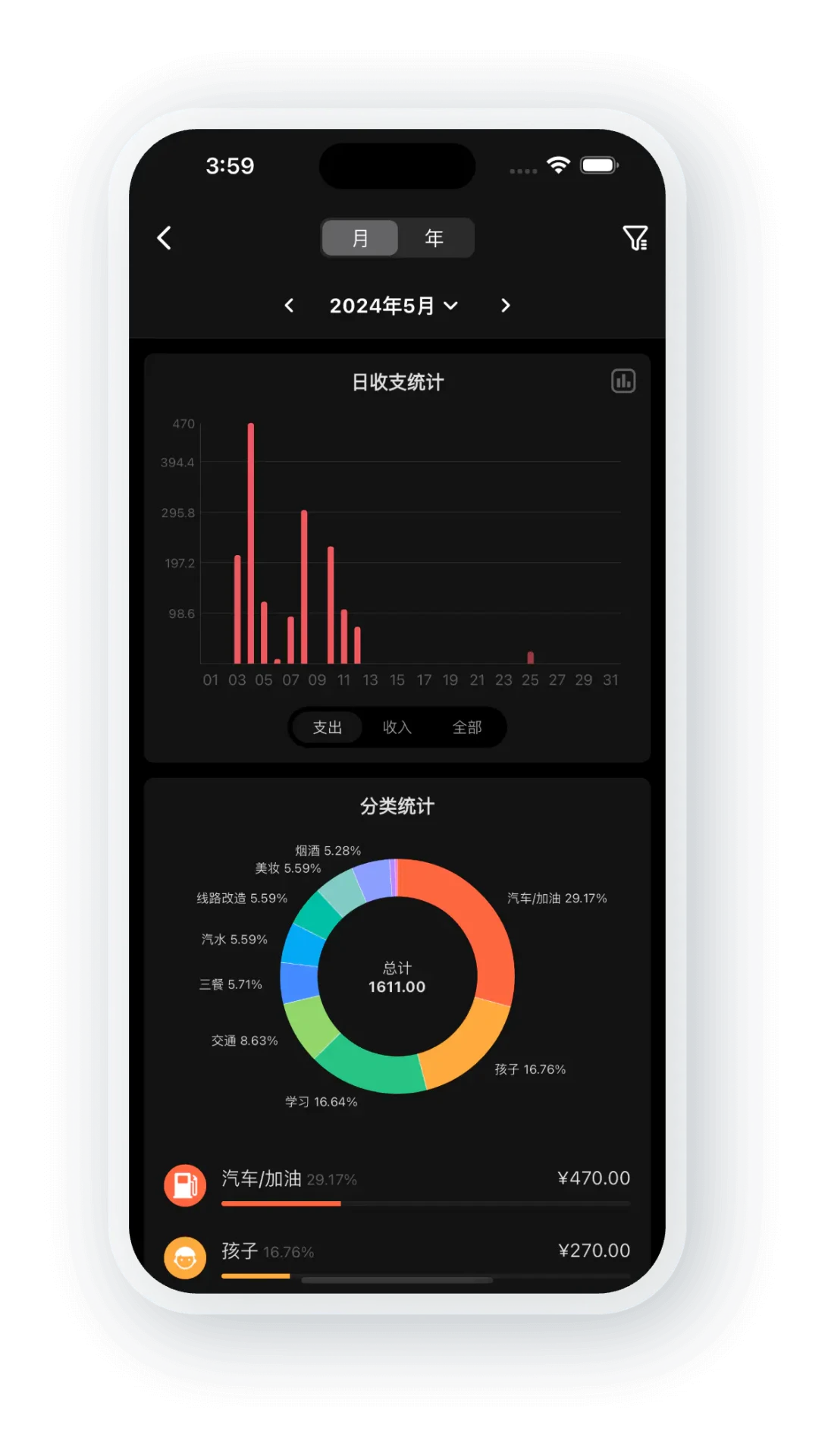
The positioning shows on the first screen. This month balance, budget progress and this week spending share one view, and only below that comes the day by day list of entries, with the date bar switching months and the side panel switching ledgers or opening statistics. Besides a light scheme there is a dark one, described officially as a carefully tuned night mode with several palettes, where amounts and categories stay legible in low light.
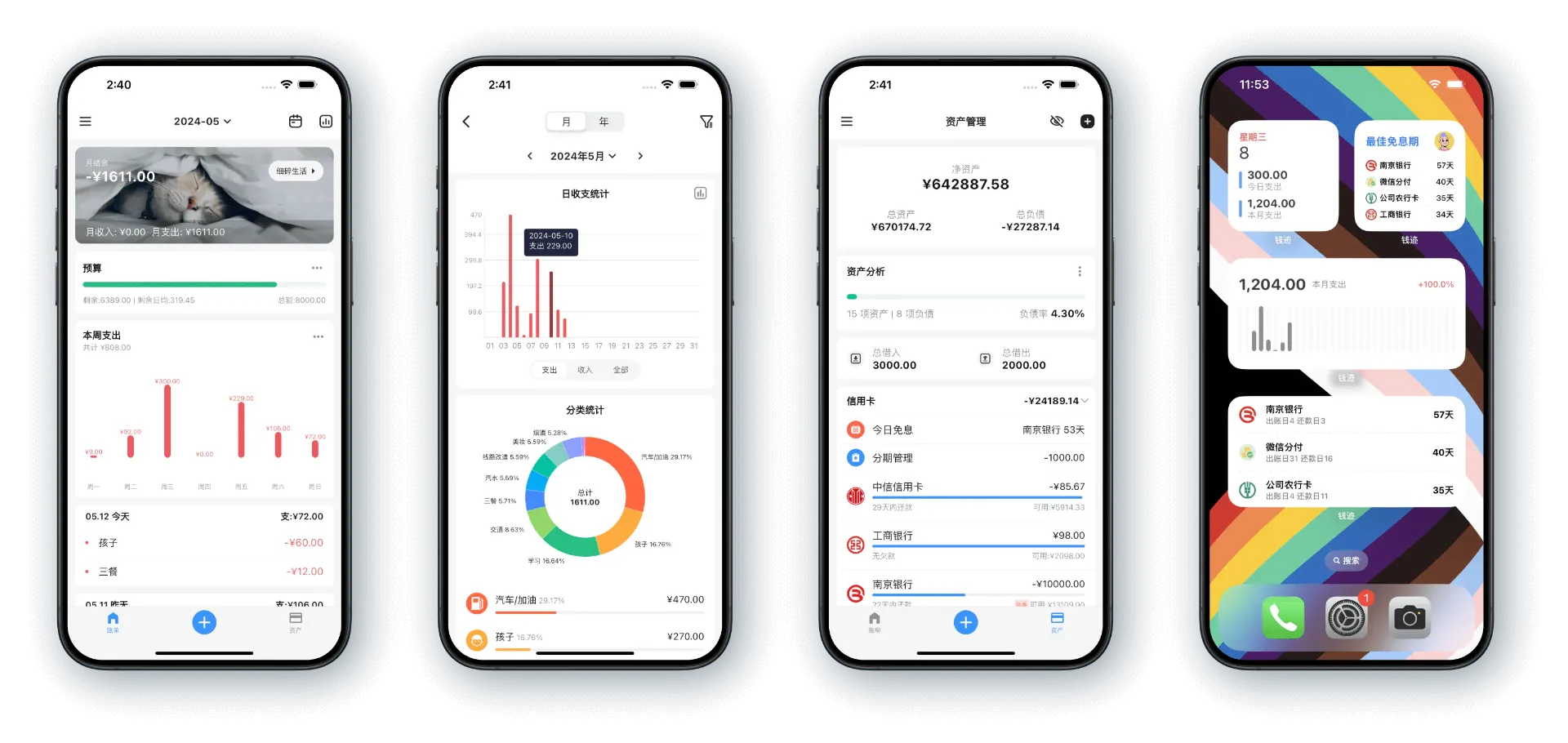
Recording, statistics and budgets on one line
What can be recorded is broader than expected: income and spending, transfers and repayments, recurring instalments, debts, reimbursements, refunds, and the handling of fees and coupons. A transfer or a repayment is only money moving between accounts, so the app counts those separately from income and spending and the same sum is never counted twice.
Statistics can be read by year, by month, or across a range you define. There are pie, bar and line charts, so you can look at the total and then click into a single category for detail. Budgets come in yearly and monthly form, a total and per category budget can be set at once, and the daily allowance updates as spending progresses. When a new month arrives, last month settings are copied across automatically.
Anyone entering expenses at night meets a second palette. The same category chart uses a different set of brightness levels on the dark background, and the contrast between ring segments and figures turns out easier to read, without straining the eyes over a long session.
Assets, ledgers and sharing
Assets and bookkeeping are linked: create an account for cash, a bank card, a credit card or a stored value card, and every entry moves the balance of the matching account. Credit card debt is entered as a negative figure, and a positive balance there means an overpayment. Accounts group into four kinds, namely funds, credit cards, top ups and investments, and ones no longer used can be hidden, after which they stop appearing in the picker while recording. The documentation states plainly that asset management is not a member feature.
Ledgers keep money for different purposes apart. A trip, or a renovation that runs for months, gets a ledger of its own, and categories, statistics, budgets and reimbursements all follow that ledger, with data kept separate between them. A shared ledger lets several people write into one book, each visible to the others; the maker sets the member limit at twenty, and only entries you recorded yourself can be edited or deleted. Debts sit in a block of their own, split into borrowed and lent, with unsettled and settled as two states.
Sync, platforms and where the free tier ends
Once an account is registered, cloud sync switches on by itself, with no extra toggle to find. Each entry triggers a sync, and pulling the list down to refresh on the home screen also submits anything not yet uploaded. Signing in on another device syncs in both directions, and the documentation notes that a single sync usually moves around ten kilobytes.
On platforms, the official line is iOS, Android, Mac and Windows, with tablet versions as well, one account working across all of them. Records exported from other tools can be brought in as Excel or CSV, though the maker notes that importing suits a one time migration and day to day entries are still best made by hand; export comes in Excel, CSV and JSON.
Licensing is free plus a membership. The FAQ says most features are free and a few are paid: basic recording, statistics, budgets and cloud sync cost nothing, export costs nothing, and asset management is again outside the member scope. Membership unlocks multiple ledgers, budgets, shared bookkeeping, receipt images, recurring entries, instalment management and extra themes. Recurring entries and instalment management each keep two slots for free users and rise to eighty for members, while receipt images are member only. The prices given officially are six yuan a month, thirty six a year and one hundred and twenty eight for a lifetime licence, valid across all platforms with a single purchase.
Item | Official information |
|---|---|
What it is | A Chinese app focused on personal bookkeeping |
Platforms | Android, iOS, iPad, Windows, Mac |
Entry types | Income and spending, transfers, reimbursements, refunds, fees, coupons |
Statistics | By year, month or custom range, with pie, bar and line charts |
Assets and debts | Several account types in one place, debts split into borrowed and lent |
Sync | Automatic cloud sync after registration, shared across devices |
Licence | Most features free, with a membership tier |
Lower the barrier to recording far enough, and a ledger finally has a chance of being kept up.
A workable order: set up the accounts and categories you use first, then split ledgers by purpose. Start budgeting with a monthly total and only break it into categories once the categories have settled. Enter things on the phone while out, and tidy up or export at a desk, where both sides always show the same data.