
MusicBrainz Picard 2.13: acoustic fingerprints name the song, so a badly labelled library gets sorted properly
Summary
Picard is the open-source tagger published by the MusicBrainz project, and its unit of work is the whole album rather than the single file. Even a file with no tags at all can be identified from its acoustic fingerprint, after which artist, release, track number, year and cover art are written in one pass.
Recommend- Name
- MusicBrainz Picard
- Version
- 2.13.3
- Open source
- Open source
- Operating system
- WindowsmacOSLinux
- Website
- https://picard.musicbrainz.org/
- Updated
- 2026-10-06 17:27
A library is rarely broken, only its labels are
Almost nobody thinks about how much of a music collection is metadata until the metadata goes wrong. A folder pulled down from a file host arrives with track titles in the wrong encoding, the album field left blank, a cover image that belongs to a different record, and a year invented by whoever ripped it. The audio itself is untouched and perfectly listenable, yet every player shows the collection as a heap of unrelated scraps that sort into nothing. MusicBrainz Picard is the tagger the MusicBrainz project publishes for exactly that layer of the problem: open source, released under the GPL version 2 or any later version, drawing on a music database the community maintains in public. What separates it from a generic tag editor is the unit of work. It does not repair one file at a time; it repairs one album at a time. Hand it a batch of files, let it search, and artist, release title, track position, year and cover art all land in a single pass, so the album returns to the shelf looking like an album again. The stable release as of September 2026 is 2.13.3, with a 3.0 preview already circulating.
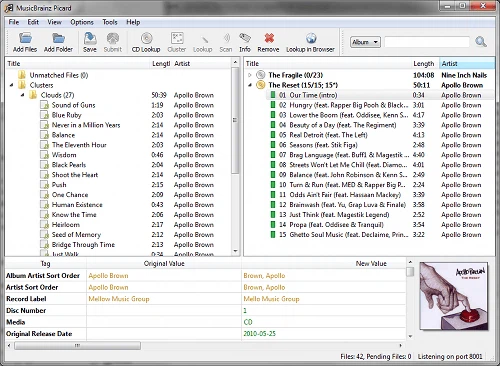
When there is no text to search by, listen to the sound instead
The feature that carries everything else is acoustic fingerprinting through AcoustID. An ordinary tagger has no choice but to trust the filename, which is why a folder holding track01.mp3, track02.mp3 and track03.mp3 defeats it completely: there is no text to match, so the software either gives up or invents something. Picard takes another route. It reads the actual waveform of the audio, condenses it into a fingerprint, and asks the database which recording produces that fingerprint. Rips whose names were lost when the files moved between drives, CDs copied years ago and never labelled, downloads of entirely unclear origin, all of them can come back with a proper artist and a proper release attached. Because a fingerprint is computed from sound rather than guessed from text, the identification is a measurement rather than a resemblance, and the difference shows precisely on the material manual tagging cannot handle. Every candidate match is laid out for inspection before anything is written, so a wrong guess is caught while it can still be rejected.
The database is the other half of the tool
A tagger can only be as good as the catalogue behind it, and this catalogue is unusual in being open. Development happens in a public repository, where bug reports and feature arguments are readable by anyone who cares to look, and the music metadata itself is proofread by volunteers around the world instead of being assembled by a single company. The practical consequence is that the long tail gets covered. A famous album will be correct in any database; an obscure pressing, a regional edition, a compilation that only ever sold in one country, is exactly where a volunteer-maintained catalogue overtakes a commercial one. The interface is translated into many languages, Chinese among them, and each release spends its effort on responsiveness and on compatibility with the systems it runs on. A 3.0 preview has already reached the usual release channels.
What working album by album actually looks like
In a conventional editor the loop runs like this: select a track, type a field, select the next track, type the same field again. Picard splits its window in two, files on the left and the matched release on the right, and that loop simply disappears. Files are dragged into the left pane, lookup is pressed, the database hands back candidate releases, and the one that fits is chosen. The files then rearrange themselves into track order, aligned against the tracklist, and a single save commits everything. What is gained is not only speed. An album tagged this way is consistent by construction: the release title is spelled one way across twelve tracks instead of three, the year is the same four digits everywhere rather than 2003 on one track and 03 on the next, and the cover art is embedded once and identically throughout. Release variants, multi-disc sets and compilations each get their own handling, which starts to matter once a collection passes a few hundred albums and inconsistencies accumulate faster than they can be fixed by hand.
Formats, plus enough rope for the tinkerers
MP3, FLAC, OGG, M4A, WMA and WAV are all handled, so a mixed collection does not have to be converted before it can be organised. An entire audio CD placed in the drive can be looked up in one step, and cover art is fetched and embedded without a separate detour through an image search. Beyond the basics there is a built-in scripting language for anyone who wants filenames or tag contents to follow a rule of their own, and a plugin library that adds lyrics, encoding conversion and other extras, with the option of writing a plugin from scratch when nothing on offer fits. Windows, macOS and Linux builds are all published, including a portable build and a store build for people who would rather not manage installers at all. For a collection large enough that tidiness has turned into a chore, a free licence, an open catalogue and album-level batching between them cover both the first pass and the ten-thousandth file.