
ClipX: a clipboard keeper of under a megabyte that remembers everything you copied
Summary
The clipboard in Windows holds one thing at a time, so whatever was copied a moment ago is pushed out by whatever is copied next. This old tool, which has been around since 2004, sits in the tray and quietly keeps every piece of text and every image you copy; a hotkey brings the list up and a click pastes one back. It has stayed under a megabyte, and the memory it holds is counted in megabytes too.
Recommend- Name
- ClipX
- Version
- 2.0.0.1
- Open source
- Proprietary
- Operating system
- Windows
- Website
- https://clipx.org/
- Updated
- 2026-10-06 18:54
What was copied a minute ago is already gone
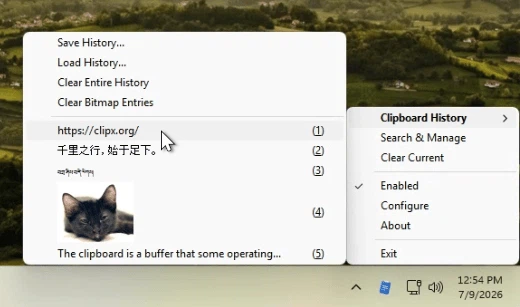
The clipboard in Windows holds exactly one thing. Copy something new and whatever was there is pushed out, and everybody who works with text has had the small annoyance of reaching for a line that was copied a moment ago and finding it replaced. ClipX has been answering that since 2004: it sits in the tray, quietly keeps every piece of text and every image that goes through the clipboard, and when the list is wanted a hotkey brings it up, so that one click puts an entry back. For more than twenty years it has kept the same very small size and the same very small appetite for memory, and the version released in 2026, numbered 2.0.0.1, keeps that habit while adding a good deal.
History, search, and the entries worth keeping
The number of slots is set by the user, from a dozen to a hundred or more. The list that pops up can be searched as soon as it is open, so a long history is not a long hunt. Anything that should not be recorded goes on an ignore list and never reaches the history at all, which is the difference between a convenience and a hazard on a shared machine. Text that gets used constantly, a standard reply, a piece of a template, can be pinned and kept for good, sitting at the top of the list where it is one click away. Text and images are both handled, so a screenshot is kept on the same footing as a paragraph.
Ways of calling it that fit the hand
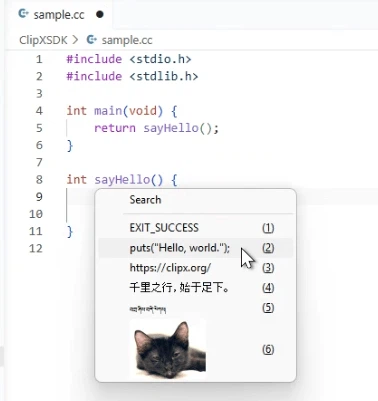
There is more than one way to bring the history up: a global hotkey, the middle button of the mouse, or a double click on the tray icon. The paste itself happens inside the popup, so neither hand has to travel far from where it was. A sound can confirm that something was copied, if that is wanted, and the look of the tray icon and the behaviour of the popup are both adjustable. While it runs there is almost nothing to notice: the memory it holds is counted in single megabytes, an old machine or a modest notebook carries it without complaint, and that is precisely why it has survived twenty years of systems coming and going.
For anyone willing to give an old tool another chance
The version released in 2026 is not a new number on the same box. Underneath, the core was rewritten while the way of working was left alone, so that someone who has used it for years does not have to learn it again, and it was brought up to date for high density screens and for the way modern systems behave. The interface for add ons was opened again as well, which is what made the most interesting addition possible. And it proves a point that is easy to forget: a tool is worth what it does about your particular problem, not what its feature list weighs.
Lightness, and the discipline of not adding things
Installed it takes up less than a megabyte. Started it sits quietly in a corner of the tray, and having it start with the machine costs nothing worth measuring. The settings are divided into history, hotkeys, add ons and tray, each with a plain explanation, so that the thing can be set up without opening a manual. It does not try to be everything: no account in the cloud, no membership, no advertising in a popup. Everything it has is arranged around three actions, copying, finding again and pasting, and for anyone who does those three things a hundred times a day, a writer, a programmer, someone answering customers, that narrowness is the point rather than a limitation.
What the new version turns the clipboard into
The largest addition is a mechanism for transforming what is pasted. An add on can change the content on the way out: the case of letters, stray spaces and line breaks, a pattern replaced by another, a link tidied up. The result can be pasted straight away or saved as a new entry, which turns a one-off correction into a small tool. The same arrangement reaches further, since add ons have been written that put the clipboard in step between machines, move files through it, or translate what is in it on the spot, and each is added only if it is wanted. All of it is free for an individual, with no advertising and no account, and the program runs from Windows 7 to Windows 11.