
OpenShot Video Editor Review: The Easiest Door Into Cutting Video
Summary
OpenShot is the editing program you can hand to someone who has never cut a video: drag clips onto a timeline, drop a transition, add keyframes from a right click. Free, open source and without watermarks.
Recommend- Name
- OpenShot Video Editor
- Version
- 4
- Pricing
- Free
- Open source
- Open source
- Operating system
- WindowsmacOSLinux
- Website
- https://www.openshot.org/
- Updated
- 2026-10-07 21:31
The lowest first step in video software
Many people want to cut a video and stop at the first obstacle, which is the software itself. Professional tools greet a newcomer with a cockpit of panels, and the vocabulary alone is enough to end the attempt. The reason OpenShot exists is to remove that obstacle. Clips are dragged onto a timeline, trimmed by pulling an edge, moved by dragging the body, and stacked on separate tracks. Transitions and title templates are dragged on and take effect immediately, and keyframes are added from a right click rather than from an animation panel with fourteen tabs. The promise is three minutes to understand and ten to produce something watchable, which for holiday films, family recordings and course material is exactly the right trade.
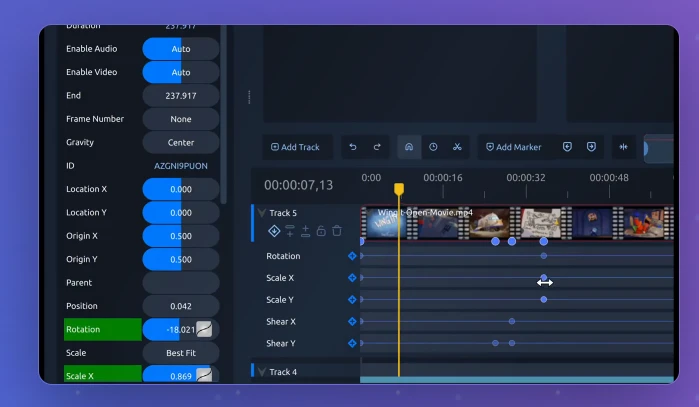
Free, and filling in the gaps
The recent major versions have systematically closed the holes that used to define free editing software. Screen and camera recording are built in, so a tutorial or a demo does not need a second program. A colour wheel and a video scope have arrived, which means grading is no longer the exclusive property of paid tools. Speed control, audio detachment and animated three dimensional titles are all present, and exports carry no watermark and no length limit, with the open licence guaranteeing that the freedom does not quietly expire in a future release.
The three desktop platforms are covered, releases come from a community rather than a marketing calendar, and this year brought a milestone version that long time users should look at again. Performance is the honest caveat: a big project on modest hardware will want proxy media, so the editing files stay light while the final render uses the originals. That setting exists for a reason and it is worth learning before a timeline grows to hundreds of clips.
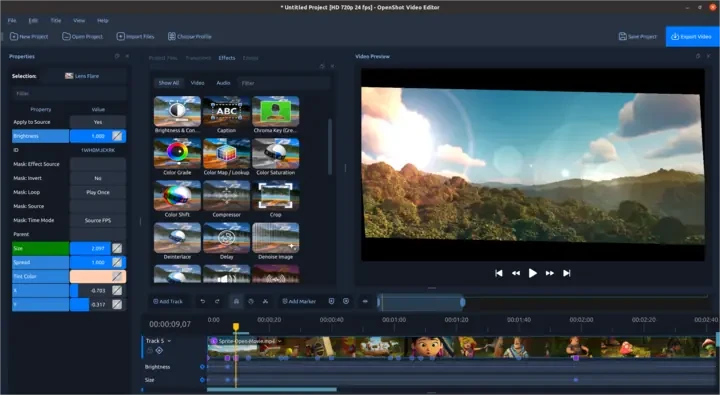
Sound is the part newcomers underestimate. A clip that looks fine will feel amateur the moment the dialogue level jumps between shots, so use the audio panel to even out volume before worrying about effects, detach the sound from a clip when a track needs its own timing, and burn subtitles into the picture only if the destination cannot handle a separate track. These steps cost minutes and change how finished the result feels far more than another transition does.
OpenShot keeps the original promise of open source editing: creation should not have an entrance fee. Lower the threshold, and more people end up telling their stories.
A route that avoids the usual frustration
Save the project file early and often, and give each version a different name rather than overwriting, because the one crash that matters always arrives after an hour of unsaved work. Import footage into a folder before starting rather than pulling files from random places on the disk, and pick a project resolution that matches the footage instead of letting the default decide. Those three habits prevent most of the complaints that appear in support threads.
Know when to stop, too. Multi camera work, precise colour matching and heavy title design are where a general purpose editor stops being the efficient choice, and moving up to a specialist program at that point is sensible rather than disloyal. For the journey from raw footage to a finished clip that people will actually watch, this program already covers the distance, and it does so without asking for a subscription or leaving a logo in the corner.