
Meetily 0.5: minutes drafted on your own machine
Summary
Meetily 0.5 records, transcribes and summarises meetings on your own machine, with Whisper or Parakeet, no bot in the call and no audio leaving the disk.
Recommend- Name
- Meetily
- Version
- 0.5
- Open source
- Open source
- Operating system
- WindowsmacOSLinux
- Website
- https://meetily.ai/
- Updated
- 2026-11-15 12:09
Record the call, push the file up, wait for a transcript, ask for a summary: that path has been around for years, and it is convenient. The price is that the meeting leaves your computer. For a session about a contract, a hiring decision or a client list, plenty of people will not accept that price. Meetily walks the other way. Recording, transcription and summary all happen on the machine, and version 0.5, published on November 14, carries that road onto Linux.
What it actually does on the machine
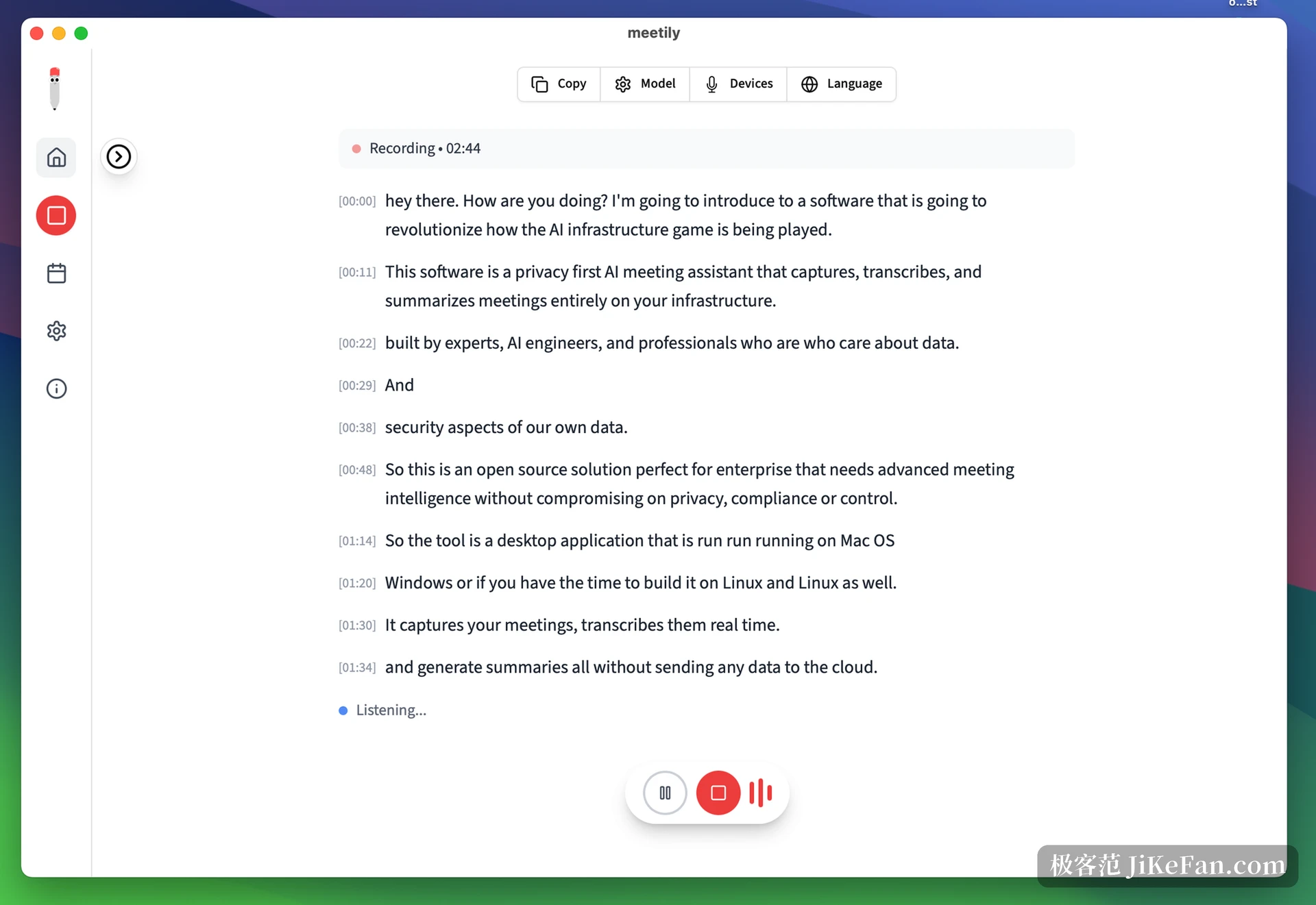
Open it and a plain window appears: recording controls, a list of past meetings and settings down the left, a transcript scrolling in the middle with a timestamp on each block. Meetily takes microphone and system sound together, so text arrives while people are still talking rather than after the file is closed. Transcription runs on models that live locally, Whisper or Parakeet among them, and the vendor claims more than ninety languages with Chinese included. Nothing touches the network, and no copy is filed in a cloud account, which is the real difference from a shelf of online meeting helpers.
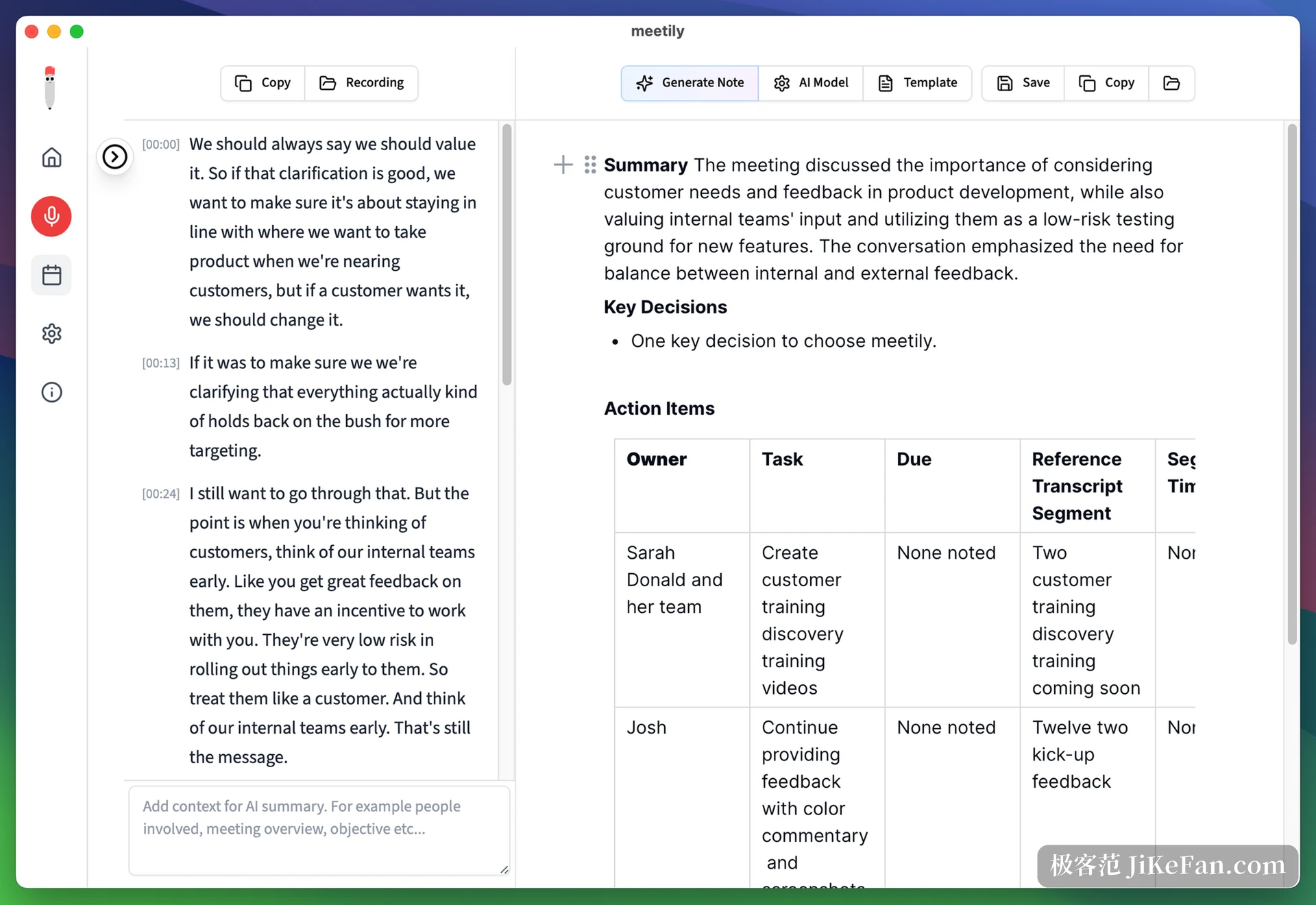
Then comes the summary. This step can stay entirely offline, driving a small model through a local Ollama install; or you can paste in your own API key and let a cloud model write it, in which case only text travels and the audio stays behind. One layer further, minutes can be generated from a template after the meeting, with decisions and to-dos split into a table that names an owner, a due date and the matching stretch of transcript, then exported as Markdown or a document.
Old recordings can be worked over again. An existing audio file can be imported and transcribed, or the same recording rerun with a different model or language, which means a rough draft made quickly with a small model can be redone later for accuracy. Speaker separation is maturing along that line: the community edition tells voices apart in a basic way, the paid one puts a name on each. No bot has to be invited into the call; people keep the meeting software they already use, and the record is made on their own machine.
Version 0.5 is mostly about Linux
Earlier releases looked after Windows and macOS only, leaving Linux users to compile it themselves or give up. Version 0.5 fills that gap with native system audio capture over PipeWire and PulseAudio, so the detour through a virtual sound card is gone. The app now tells audio devices apart by their Pulse identifier, which stops two devices sharing a name from being confused. This build also fixes a run of recording failures caused by ALSA being grabbed first, and the pipeline now builds a signed Linux package.
The rest is repair work. Meetily fetches the Parakeet v3 model from a public repository, with the request carrying an identifier so it is not turned away as a crawler. Local diagnostic logs became persistent with a ceiling, enough to read after a failure without filling the disk. Interface details and the stability of switching recording devices were cleaned up. The vendor states the aim of the release plainly: Linux support and recording reliability.
Free, paid, and where the boundary sits
The community edition of Meetily is MIT software and free, and it holds the core: recording, local transcription, a basic summary, audio import and re-transcription. The paid edition is ten dollars per user per month billed yearly, and adds speaker names, PDF and Word export and automatic meeting detection. The vendor quotes enterprise pricing separately, sold on self-hosted deployment, central management and compliance paperwork.
One thing needs saying: local is not absolute here. Pick a cloud model for summaries and the text does leave the machine. Going fully offline means accepting what a small local model manages on a long meeting. That is not a defect but a trade, and it is better made before the meeting than after.
A simple test before installing anything: if this recording leaking would put you in a corner, keep it on the machine.
Who ends up using it
The clearest fit is a role where the content is sensitive and a record is still required: legal interviews, medical notes, hiring interviews, project reviews touching undisclosed data. In those rooms handing over audio is a compliance question, not a preference. Next come people on poor networks, or in meeting rooms where the outside line is unreliable enough that a local run is the only one that finishes.
Anyone who simply wants weekly minutes written faster, and does not mind the content going up, is better served by an online tool and should not trade accuracy for privacy. Meetily earns its place by drawing a clear boundary: data staying put is the default rather than an option. The price is preparing the models and carrying the compute, and that bill is worth working out first.