
Huorong Security 6.0.13: quieter blocks and cleaner scans
Summary
Huorong Security 6.0.13 for Windows lets blocked URLs log silently, keeps junk items you skip, and turns the monitor exclusion list into a searchable window.
Recommend- Name
- Huorong Security
- Version
- 6.0.13
- Pricing
- Free
- Open source
- Proprietary
- Operating system
- Windows
- Website
- https://www.huorong.cn/person
- Updated
- 2026-11-15 12:09
Huorong Security is an endpoint protection tool for Windows, and the personal edition 6.0.13 arrived at the end of October 2026 with virus definitions dated November 6. It splits itself into separate entries for scanning, the protection centre, access control, security tools, an app store and settings, and updates tend to follow that same division.
This release adds no new capability. What it fixes are the small frictions that never quite go away: whether a blocked address should raise a popup, whether junk cleanup can remember what it should not scan again, and how the exclusion list for realtime monitoring gets filled in. They look scattered, yet all of them are touched every day.
A blocked address can stay quiet now
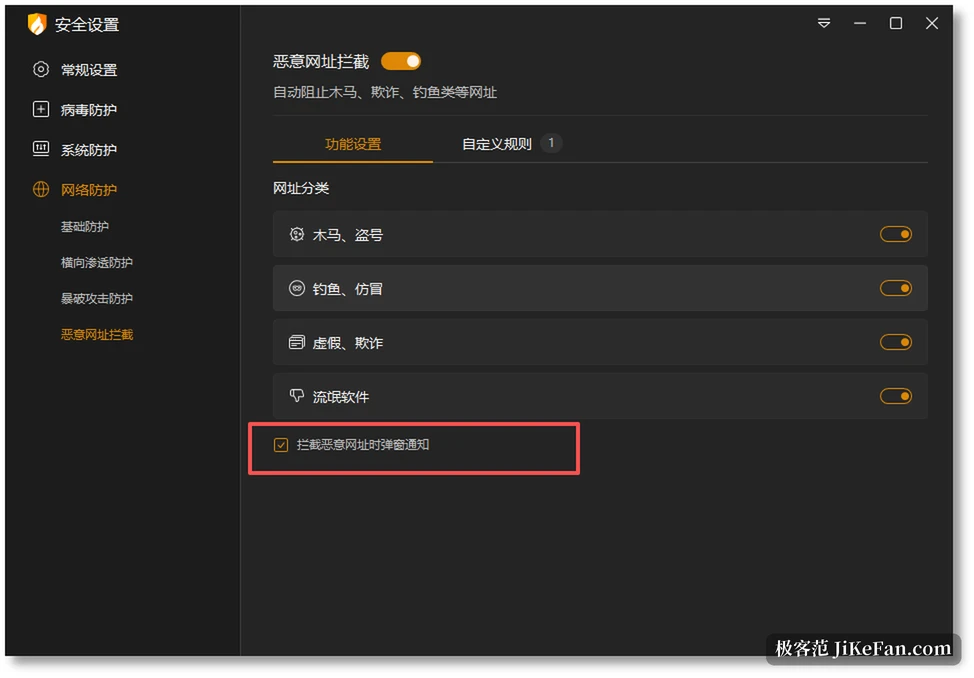
Huorong Security 6.0.13 gives the malicious address blocking and the website content control a switch for popup notices. Before this, opening a site judged to be a trojan, a phishing page, a fake or a fraud brought a notice in the bottom right corner without fail. Now the block can go into the log alone and the interface stays silent. For anyone running dozens of tabs a day, that switch does more than another rule would, because the blocking itself is unchanged and the announcement becomes your decision.
Junk cleanup loosened by one notch. After a scan, items you do not want cleaned can go into an ignore area and the next scan skips them on its own, so nobody rechecks the whole list every time. Exclusions in realtime monitoring were rebuilt as well. The old entry for actions on specified programs offered nothing but clicking through step by step, and it is now a window of its own where paths can be seen, added and removed, with a search field over the list.
Official notes for 6.0.13 state it plainly: popup notice switches for malicious address blocking and website content control, so a switched off notice only writes the log and stops the corner popup; junk items can be moved into an ignore area that the next scan skips; the window for managing program paths in realtime monitoring supports viewing, adding, deleting and live search; the interface scales on high density screens and follows a move between monitors.
A column of entries on the left, one job each
Down the left side of the main window sit the home page, virus scanning, the protection centre, access control, security tools, the Huorong app store and settings. The home page offers a few suggestions based on the state of the machine, switches between them when several appear, and lets an unwanted one be closed outright.
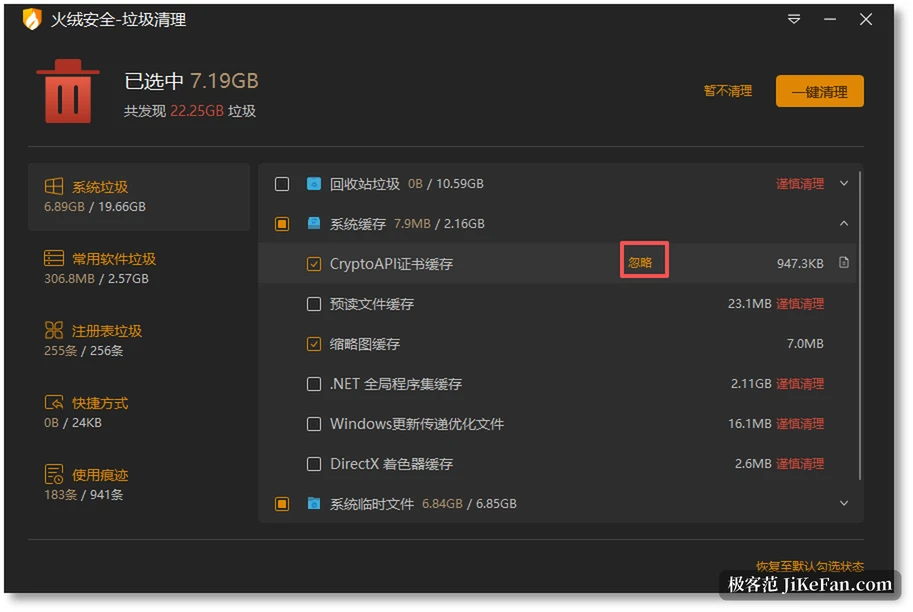
Security tools holds what sees the most use, and junk cleanup is one of them. It sorts findings by system junk, junk from common programs, registry junk, shortcuts and usage traces, lists the single items and their size on the right, and lets them be ticked one by one or cleared in one go. The program marks items that carry a risk for careful removal, so the sweep does not become an all or nothing affair. The app store stays out of the installer and downloads separately, and whether it is installed changes nothing about the main program.
Three ways to scan, two speeds
Scanning offers three entries. A quick scan looks at the sensitive places only and finishes fast, which suits a daily habit. A full scan walks every disk and takes far longer, for a regular sweep or a suspected infection. The custom mode takes any directory you name, and that is what a file of unknown origin deserves.
Speed has a normal and a high setting, where high finishes sooner at the cost of more resources. You can tick a GPU acceleration box during a scan so the engine puts the graphics card to work at a suitable moment, though it asks for DirectX 11 or newer.
Nine protections came with the 6.0 line, most of them optional
The 6.0 line added nine abilities. Memory protection watches obfuscated code and fileless attacks; protection of critical system processes guards key processes, browsers and the file manager against tampering. Monitoring of potentially unwanted programs raises a notice for promotional software.
AMSI advanced scanning works with virtualisation against disguised viruses. Encrypted connection scanning brings SSL traffic into the check.
The last four fill gaps: advanced heuristic scanning targets new and unknown viruses, ransomware bait rolls back altered files once encryption behaviour is seen, microphone and camera calls raise a notice, and USB device control takes in portable devices, wireless adapters, printers and optical drives together. Those switches sit on sub pages of the protection centre and can be turned off when they are not wanted.
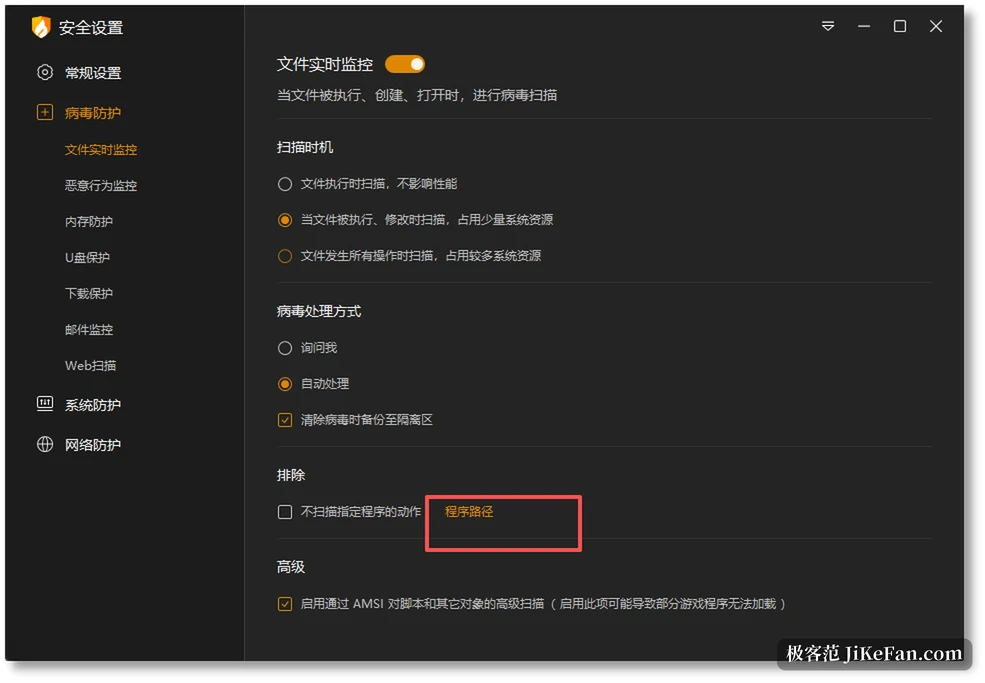
Realtime monitoring is the part this release touched most finely. Three scan timings are offered, scanning only when a file runs, scanning on run and on change, or scanning every operation, with resource use rising in that order. The window for actions on specified programs is separate now, and paths can be searched as they are typed, which saves scrolling down a long list one row at a time.
It can hold a machine back, and it can stay out of the way
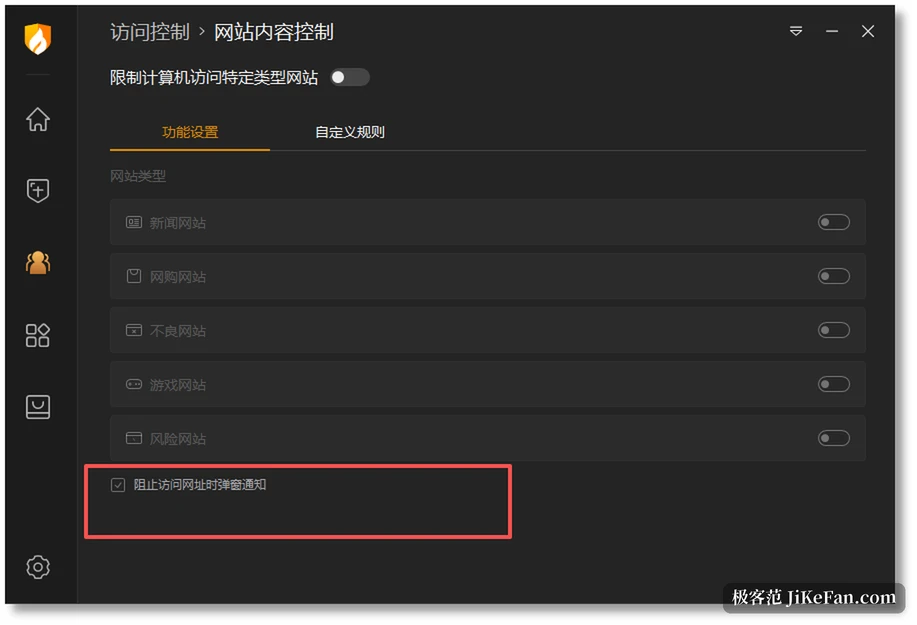
Access control exists for the case where other people use the machine. It sorts websites by kind, with switches for news, shopping, harmful sites, games and risky sites, and it can limit the hours online and the use of USB devices. With a child in the house or a machine lent to someone for an afternoon, turning those on costs less than watching the screen. The change here is that website content control can also write a log only, without a popup, when it stops a visit.
How free, and on what machines
The personal edition of Huorong Security costs nothing. The installer sits around 68.6 MB and comes in three builds: X86 32 bit, X86 64 bit and ARM 64 bit. System support runs from Windows 7 to 11, and since October 2026 the x64 and Arm64 versions of Windows 11 26H2 are covered by the patch work. The interface speaks Simplified Chinese, Traditional Chinese and English, switchable in the settings at any time. Logs and quarantine take a storage threshold, and the oldest records are dropped once it is passed, so the disk does not fill up.
The weak spots are on the table as well. Huorong Security is Windows only, with no macOS, no Linux and nothing for a phone; the protection is fine grained, and the price is a long list of settings that can leave a newcomer lost inside the protection centre; the built in rules lean on the network conditions of mainland China, so features that never apply have to be switched off one by one. Treating it as a standing guard for one machine, running the defaults, and stepping into the settings now and then is the way it feels most comfortable.