
G HUB puts one console behind every Logitech gaming device
Summary
G HUB replaces the old gaming software and manages mice, keyboards, headsets and wheels from one console, with per game profiles, DPI tuning and synchronised lighting.
Recommend- Name
- G HUB
- Version
- 2026.6
- Pricing
- Free
- Open source
- Proprietary
- Operating system
- WindowsmacOS
- Updated
- 2026-10-05 09:14
One console instead of four utilities
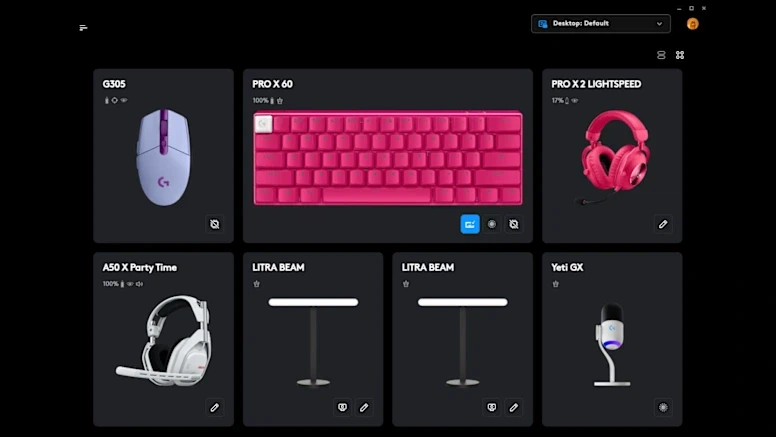
Buying peripherals from the same brand usually means installing the same software several times over the years, and the old gaming tool that handled a mouse from 2016 is not the one that handles a keyboard from 2024. G HUB is the current answer from Logitech G: one console that sees the mouse, the keyboard, the headset and the wheel together, and treats them as parts of one setup rather than four unrelated devices.
The list of things it can change is long and mostly expected. Sensitivity stages and DPI values, button and key remapping, polling rate, equaliser and surround settings on supported headsets, lighting effects, and per game profiles that switch automatically when the right application takes focus. The value is not that any single item is unusual; it is that all of them live in one window instead of four.
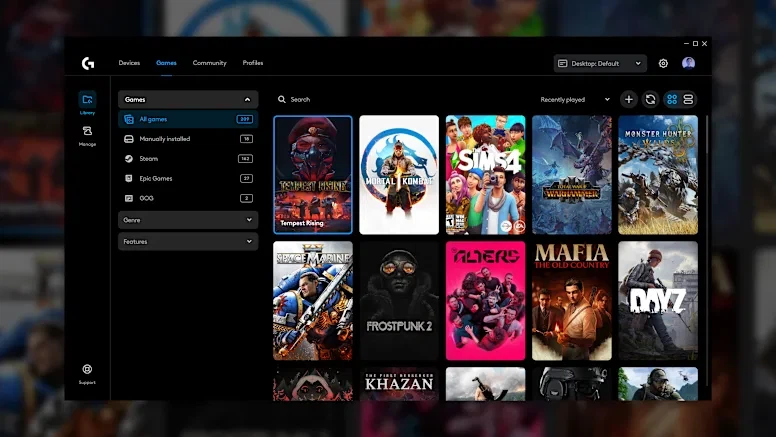
What the profile system is actually for
Per game profiles sound like a marketing line until a person has a mouse with more buttons than a game has actions. Assign the side buttons to inventory, map and push to talk for one title, save it as a profile, and the same buttons do something else in the next application without any manual switching. That is the feature people notice after a week, not on the first day.
Lighting follows the same logic. LIGHTSYNC can synchronise colour across devices, react to what is on screen in supported titles, or hold a single restrained tone for a desk that is not trying to look like a cockpit. Whether that is worth anything is a matter of taste, but the option is there and it does not require a second program.
The complaints, stated fairly
G HUB is not a light piece of software. Installation is slow, the first launch after an update occasionally asks for a restart, and on a machine that is already struggling the background service is one more thing to keep running. The historical reputation for reliability problems is mostly attached to the early versions, but the memory of it is why some users still avoid updating.
Older devices are the other edge. Hardware from before the transition is handled by the previous gaming software rather than G HUB, so a desk with a new keyboard and a 2015 mouse can end up with both programs installed, which is exactly the situation the console was supposed to end.
The version number 2026.6 arrived in 2026-09 and follows the pattern of recent releases: device support, stability, and small interface corrections rather than a new headline feature. For software that sits between a person and their hardware, that is the right kind of update.
One detail matters for anyone coming from the older tool. The predecessor, still known by the initials LGS, continues to exist for hardware that predates the change, so it is worth checking which program a specific device belongs to before blaming the console for a missing setting. And for mice with a dozen side buttons, the kind sold for MMO play, the remapping screen is where most of the value sits: a row of actions saved as a profile turns a wall of buttons into a small keyboard.
Where the software is weakest is the first hour. A new device is recognised, sometimes a firmware update is offered, and the settings that matter are a few clicks deeper than they should be. Spend those minutes once, save the profile, and the console can be forgotten for months, which is the correct fate for this category.
G HUB is the practical choice for anyone with more than one device from the same brand: settings, profiles and lighting in one place, at the cost of a heavy installation. Nothing here is exciting, and that is the point of a driver console.