
Libre Hardware Monitor: free open source sensor readings, and a library
Summary
Libre Hardware Monitor is a free open source hardware monitor for Windows under the MPL, reading temperature sensors, fan speeds, voltages, load and clock speeds, and shipping both a desktop program and a C# library.
Recommend- Name
- Libre Hardware Monitor
- Version
- 0.9.6
- Pricing
- Free
- Open source
- Open source
- Operating system
- Windows
- Updated
- 2026-10-06 20:41
Libre Hardware Monitor is a free open source hardware monitor for Windows, released under the MPL, with its source in a public repository and the code written in C#. The repository has gathered roughly 9,100 stars and 1,000 forks, which for a utility of this kind says a fair amount about how many people needed exactly this. Its stated purpose is plain: read the temperature sensors, fan speeds, voltages, load and clock frequencies inside a computer. For anybody trying to work out how hot a machine really runs, or why a fan never seems to stop, that is foundational ground rather than a luxury.
The devices it covers
The repository lists what it can read: motherboards, processors from the two main vendors, graphics cards from three of them, mechanical and solid-state and NVMe drives, and network cards. Put another way, everything from processor temperature to drive health, from graphics card power draw to network throughput, is inside the range. Nothing exotic is promised, and that is the point: the sensors people actually want to look at are the ones covered.

One thing to know before complaining that a sensor reads nothing: some of them need administrator rights to be read at all. The documentation sets aside a section for this, suggesting either that the program be restarted with elevated rights or that the project be given a manifest requiring them. Without that, the reading simply does not appear, and it looks like missing support rather than missing permission.
A desktop program and a library, two ways in
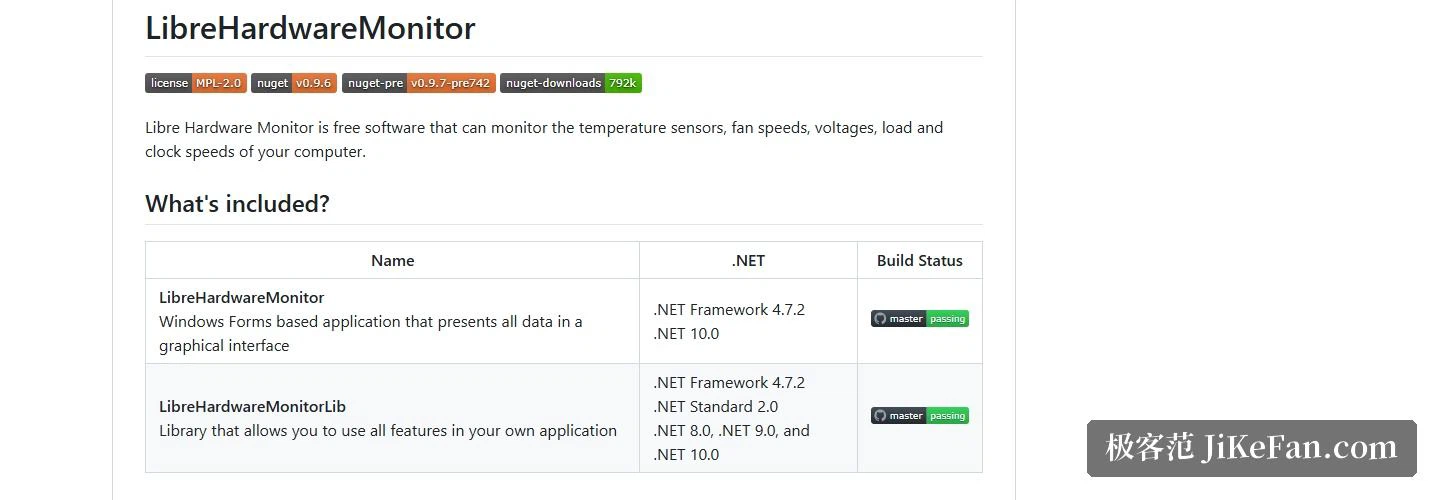
The project comes in two parts. One is the desktop program, built on Windows Forms, which puts every reading into a graphical window. The other is a class library that exposes all of the same functionality to your own code, brought in as a package from the usual registry. That split is what separates this project from the many monitoring utilities that stop at a window.
The two do not target quite the same runtimes. The desktop program aims at .NET Framework 4.7.2 and .NET 10. The library casts wider: besides .NET Framework 4.7.2 it offers .NET Standard 2.0, plus builds for .NET 8, .NET 9 and .NET 10. The documentation carries a short sample: create a computer object, switch on monitoring for the processor, graphics card, memory, motherboard, controller, network, storage and power, then walk the hardware and sensor tree with an update visitor, printing the name and value of every item it meets.
Version and where it comes from
The current version is 0.9.6, released on 2026-02-14. The release page offers two portable archives: the main one at about 6.6 MB, and a build aimed at .NET 10 at about 8.9 MB. The changes in 0.9.6 are mostly hardware support and dependency updates, including a refreshed toolchain for disk information, added controls for an older entry-level board, support for a family of fan controllers, and recognition of a newer board that carries a wireless module. Anyone who wants support for recent hardware before it reaches a release can take a nightly build, downloaded with an account on the hosting site.
One security note deserves repeating. The documentation carries a warning saying the project has no connection at all to a similarly named third-party site, and suggests avoiding that site for safety. Downloads should come from the release page of the official repository, and nowhere else.

On licensing, the project is published under MPL 2.0 and is properly open source. The same documentation notes that some included parts carry different terms, itemised in a separate notices file kept in the repository. Because the library can be embedded, a developer who wants a hardware monitoring panel inside their own tool has a legitimate route to one rather than a reason to write sensor code from scratch.
What Libre Hardware Monitor is worth having for is that it collects readings scattered across a dozen sensors into one place: the desktop build shows them once it runs, and the library build can be folded into your own program. MPL 2.0, distributed as a portable archive, and a sensible starting point when a temperature or a power draw needs investigating.