
HandBrake: Transcoding Is a Trade, and the Presets Hide It
Summary
HandBrake is a free open source transcoder for Windows, macOS and Linux. Its usefulness is not that it converts video — everything does — but that it lets you see and change the trade between quality, size and time that a preset would otherwise decide for you.
Recommend- Name
- HandBrake
- Version
- 1.11.1
- Pricing
- Free
- Open source
- Open source
- Operating system
- WindowsmacOSLinux
- Website
- https://handbrake.fr/
- Updated
- 2026-10-09 22:00
Three quantities, and you cannot have all of them
Every transcode is a negotiation between three quantities: how good the picture looks, how large the file is, and how long the machine spends working on it. Pick two and the third is decided for you. This is not a limitation of any particular program; it is what compression means. What differs between programs is how honest they are about the negotiation, and how much of it they hide behind a menu labelled with a device name.
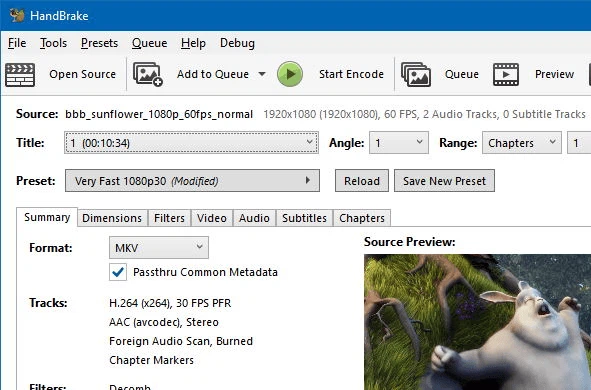
HandBrake is a free open source transcoder for Windows, macOS and Linux, and its distinguishing quality is that it does not hide much. The window presents source on one side and destination on the other, and between them sits every decision that matters: which encoder, what quality target, which filters, which audio tracks, which container. Presets exist, and they are the right place to start, but they are visible as presets rather than presented as the only way.
Why the presets are worth understanding rather than just using
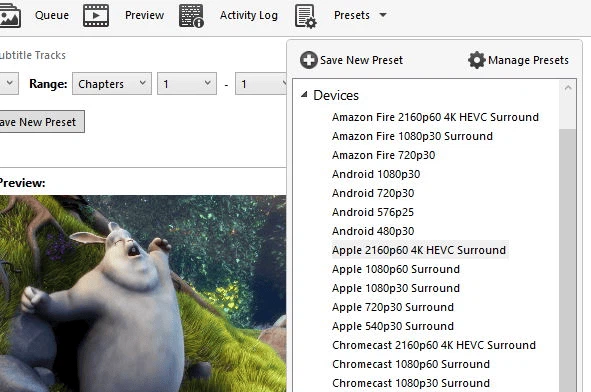
A device preset is somebody else's answer to a question you have not asked. It encodes at a resolution and a quality level chosen to look acceptable on a particular class of screen, and for the common case it is exactly right — which is why the feature exists and why most people should start there.
The trouble begins when the preset is right for the device and wrong for the material. Footage that is mostly static needs far less data than footage full of motion, and a preset tuned for the general case will either waste space on the quiet parts or lose detail in the busy ones. That is not a flaw to be complained about; it is the reason the advanced controls are there. The useful mental model is that a preset is a starting position, and the question worth asking is always the same: what is this file for.
The controls that actually change the outcome
Resolution is the first and the most consequential. Reducing it saves more than any other single setting, and it is also the one people are most reluctant to touch, because it feels like admitting defeat. For a video that will be watched on a phone, admitting it early is simply correct.
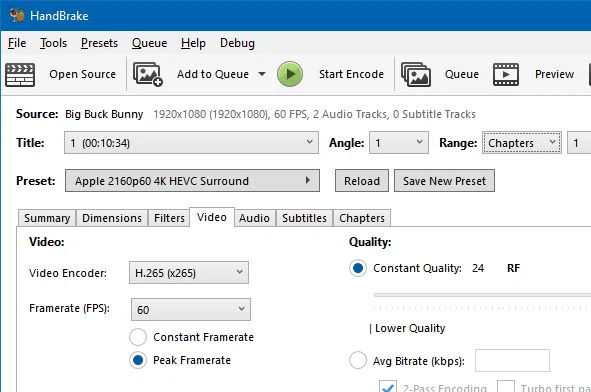
Frame rate is the second. Keeping the source rate is usually right, halving it is occasionally right for material that was shot at a high rate for no reason, and changing it carelessly produces judder that no amount of bitrate will repair. The quality target is the third, and the most misunderstood: a constant quality setting spends data where the picture needs it and saves it where it does not, which is why it usually beats a fixed bitrate for anything with varying content.
Then there is audio, which is routinely ignored and routinely the reason a file is bigger than it needs to be. A film with several surround tracks in several languages does not need all of them if you are going to watch it in one language on a laptop. Dropping the tracks you will never select is free savings, and it is the first thing worth doing before touching any video setting.
Filters, and the temptation to overcorrect
Denoising and colour adjustment are genuinely useful and genuinely easy to overdo. Grain in a source is often information rather than damage, and a denoiser tuned too aggressively removes detail along with it, leaving a picture that is clean and lifeless. The same applies to sharpening, which cannot create detail that was not captured and can only exaggerate edges that are already there.
The discipline is to compare against the source rather than against an expectation, and to make one change at a time. This is the same discipline the whole program rewards: understand the trade, change one variable, look at the result, and only then change another. Everything about the interface supports that method, which is more than can be said for most encoders.
Batch work is where the time is saved
Converting one file is a task. Converting the forty files from a holiday, or the archive of a project that has to be delivered in a uniform format, is a different problem, and it is the one that separates a tool people keep from a tool people try. A queue that accepts many sources, applies one set of settings and runs unattended is worth more than any individual option, because the alternative is an afternoon of sitting and watching a progress bar.
The counterweight is that a mistake in a batch is also multiplied. A wrong preset applied to forty files is forty files to redo, so the sane procedure is to convert one, watch it, and only then commit the rest. That advice is dull and it has saved more people than any advanced setting.
Open source, stated without romance
Being free matters for the obvious reason, and being open source matters for a less obvious one: the encoder is a piece of infrastructure that people build habits around, and habits outlive companies. A tool whose source is public can be rebuilt by somebody else if the original stops being maintained, and a format library that is auditable is a different kind of promise from a vendor saying it is fine.
The cost is the familiar one: no support contract, an interface designed by people who understand the domain rather than by people who understand first-time users, and a learning curve that is real. The community and the documentation absorb most of that, and the periodic updates keep the format support current, which for a transcoder is the feature that matters most over years.
Verdict
HandBrake is the right tool for anyone who has video that needs to become smaller, more compatible or more uniform, and who is willing to spend twenty minutes learning what the three quantities are. Start from a preset, drop the audio tracks you do not need, look at one result before queueing forty, and change one setting at a time. Used that way, it converts a chore into a decision you actually control — which is the whole point of a transcoder that shows you its settings.