
FurMark 2: push the GPU to its limit, then read the numbers
Summary
FurMark 2 is a free stress test and benchmark for graphics cards, rebuilt as a cross-platform tool. It lists OpenGL and Vulkan tests, puts the familiar fur-covered ring on screen and loads the GPU far beyond any game, with live charts for temperature, clocks and usage. Windows, Linux on x86_64 and ARM64, and a command-line mode for automated runs.
Recommend- Name
- FurMark 2
- Version
- 10.2
- Pricing
- Free
- Open source
- Proprietary
- Operating system
- WindowsLinux
- Website
- https://geeks3d.com/furmark/
- Updated
- 2026-10-06 23:10
The name people use for a stress test
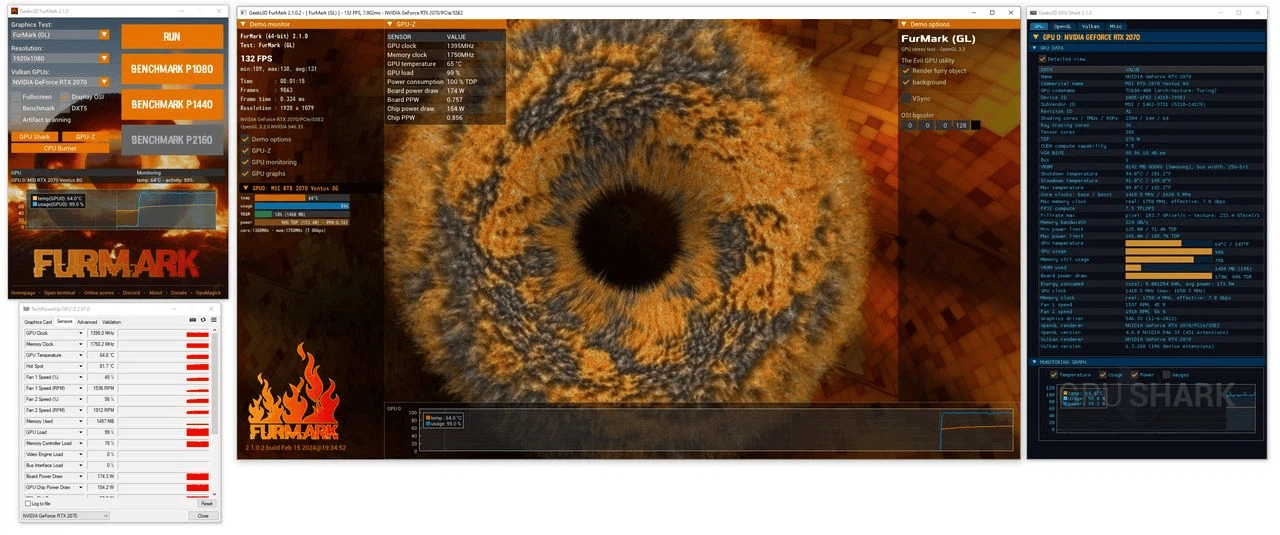
Any discussion about graphics card cooling or stability reaches this tool sooner or later. It is a free stress test and benchmark in one program, and the second generation was rebuilt as a cross-platform tool: the interface lists OpenGL and Vulkan test scenes, you pick a resolution, start it, and the screen fills with the fur-covered ring that has become the standard picture of a card under load. The demand it places sits well beyond anything a game asks for, which is exactly the point of a stress test.
Because the load is so far outside normal use, the results read differently from a game benchmark. You are not measuring how fast a scene renders, you are measuring whether the cooling can carry the heat away and whether the clocks stay where the card says they will. That is why the tool is usually the first thing run after a new build, a cooler swap or a change to the overclocking settings.
Stress test or benchmark
The program offers two ways to work, and they answer different questions. In the stress test the GPU is held at full load for as long as you let it run, and the interesting part is the shape of the curves: a temperature that keeps climbing, or a clock that keeps dropping, tells you more than any single number at the end. In the benchmark mode a run finishes with a score, and the vendor keeps an online comparison list where you can see roughly where your card lands against others of the same model.
Live charts are built in, so temperature, clocks and load are visible while the test runs instead of afterwards. A small helper for reading card details is bundled with it, which saves opening a second program to check the model, the memory size or the current driver before comparing results.
Which systems it runs on
Windows is the obvious target, but it is not the only one. Builds are provided for Linux on x86_64 and for ARM64, so small single-board machines of the kind used as media boxes or home servers can be put under load as well. Cards from the three main chip makers are all handled by the same program, which matters when a workshop has mixed hardware.
A command-line mode exists for automated runs. Anyone who validates a batch of machines, or who wants a stress run scheduled after a driver update, can call it from a script instead of clicking through the interface every time.
Version and two habits worth keeping
The current version is 10.2, and support for newly released cards tends to arrive quickly, which is the main reason to keep it updated rather than sitting on an old copy.
Two pieces of common sense go with the tool. First, it loads the graphics card and nothing else: processor, memory and power supply stability have to be checked with other programs, so a clean run here is not a verdict on the whole machine. Second, the load is genuinely extreme. Watch the temperature reading while it runs, change overclocking settings in small steps rather than one large jump, and stop immediately if a reading looks wrong. A card that survives an hour of this is a card you can trust in a long gaming session.
How to read a run
Getting something useful out of the numbers takes a little patience. Values settle only after a while, so the comparison worth making is between the start, the plateau and the end of a fifteen or twenty minute run, and it should ideally happen at the same room temperature as the previous one. A cooler swap that pulls the plateau down by several degrees is a clear result. A run in a warm room in summer cannot be placed next to one from winter.
Notebooks and small single-board machines need more care. Their cooling headroom is limited, so a few minutes at full load may already push them into a thermal limit and a lower clock. That does not mean the device is broken, only that it is not built for sustained full load. A desktop tower is where this tool belongs.
After a new build, a new cooler or a new overclocking profile, one run of the ring is the standard way to confirm the card is stable. Free, small and unambiguous in its verdict, it is still the default answer for that step.