
fd 10.5: command line file search that behaves the way you expect
Summary
fd is a file search tool for the command line, written in Rust and built around sensible defaults: smart case, coloured output, parallel traversal and automatic respect for ignore files. Results can be filtered by type, size, time or owner, and a single flag runs a command against every match. Dual licensed, packaged for the usual systems, currently at 10.5.
Recommend- Name
- fd
- Version
- 10.5
- Pricing
- Free
- Open source
- Open source
- Operating system
- WindowsmacOSLinux
- Website
- https://github.com/sharkdp/fd
- Updated
- 2026-10-06 22:34
File search from a terminal should feel obvious
The classic search command can do nearly anything, and that is half the problem: the syntax has to be learned before the first useful query, and an afternoon can vanish into a manual page. This tool takes the opposite position. You type its name and a fragment of what you are looking for, press enter, and the matches are on screen.
Smart case is on by default, so a lowercase query matches in any case while a query containing a capital letter becomes case sensitive without any flag. Output is coloured by file type. Traversal runs on several threads, which is where the difference becomes obvious: in a repository with tens of thousands of files, a parallel walk finishes while a single-threaded one is still thinking about it.
The program is written in Rust, carries more than forty-three thousand stars on the code hosting site where it lives, and ships as a single binary, so there is nothing to configure before the first search.
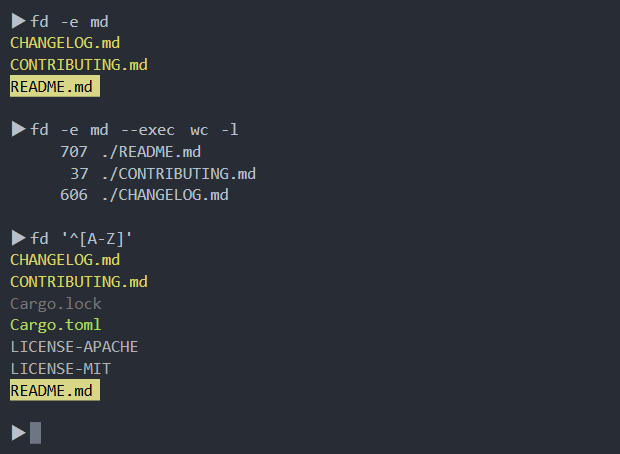
Built so the common case needs no flags
Most of what makes the tool pleasant is what it does without being asked. Ignore files are respected automatically, including the one maintained by the version control system and two variants of its own, so a build directory or a folder of downloaded dependencies never floods the results. Hidden files are skipped unless the restriction is lifted explicitly. Patterns are regular expressions by default, one flag switches to glob matching when that reads more naturally, and another treats the pattern as a literal string for names full of punctuation.
Filters reach past the name. Results can be limited by file type, by extension, by size range, by modification time and by owner, which turns a vague search into a precise one without piping through three other commands first.
The flag that changes daily habits is the execution one. It runs a command once per match with the path substituted in, and the capitalised variant collects every match and hands the whole list to a single command. A large share of the shell loops people write — rename these, inspect those, convert the rest — collapses into one line each, and the placeholder syntax means the path can be placed anywhere in the command rather than only at the end.
Ecosystem and licence
It is released under a dual licence, permissive enough for any use, and packaged for the major Linux distributions as well as the usual package managers on macOS and Windows, so installation is one command on almost any machine. Completion scripts for the common shells can be generated by the program itself, which matters for a tool whose whole value depends on being typed quickly.
It also pairs well with an interactive fuzzy selector: run a broad search, pipe the list in, pick with the keyboard. That combination is common enough in terminal setups that it has become close to a default way of working, and it is one of the reasons the two tools are usually installed together.
Version
Version 10.5 arrived on 26 August 2026. It adds exact full-name matching and an option that stops a search from climbing into parent directories, and it hardens the handling of terminal escape sequences in file names. That last point rarely gets attention until something hostile arrives in a download folder and starts rewriting the prompt.
Moving over from the old command costs almost nothing and pays back immediately: fewer flags to remember, fewer quotes to escape, output you can read at a glance. On an old server without it the classic command is still the fallback, but on a working machine this one deserves a place in the path.