
Free Video Compressor: Make a Video File Small Enough to Send
Summary
Free Video Compressor is a lightweight tool that shrinks video files in almost any common format by setting a video and an audio compression rate, free for personal and non-commercial use.
Recommend- Name
- Free Video Compressor
- Version
- 20230213
- Pricing
- Free
- Open source
- Open source
- Updated
- 2026-10-06 19:45
One number stands between a file and a message
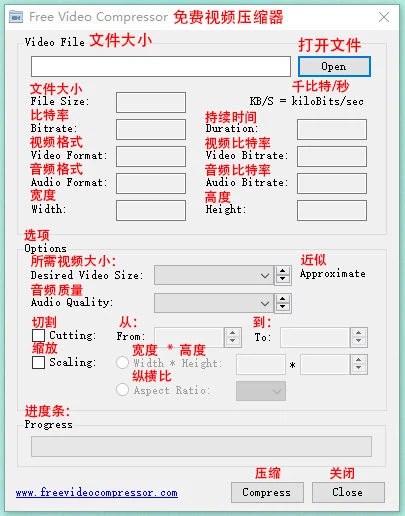
Free Video Compressor exists for a problem that is easy to state: the video is fine, the file is too large. Too large for an attachment, too large for a chat window, too large for the storage on the phone it was recorded with. The program is lightweight, free for personal and non-commercial use, and it answers with two settings rather than a timeline of options.
The formats it accepts cover almost everything a person is likely to have collected: MP4 in its MPEG4 variety, MPG, AVI, FLV, F4V, M4V, WMV, MOV, MKV, ASF, and RMVB or RM. That list is the practical part of the promise. A compression tool that only accepts one container is a tool that fails on the third file in the folder.
Two rates, and what they actually do
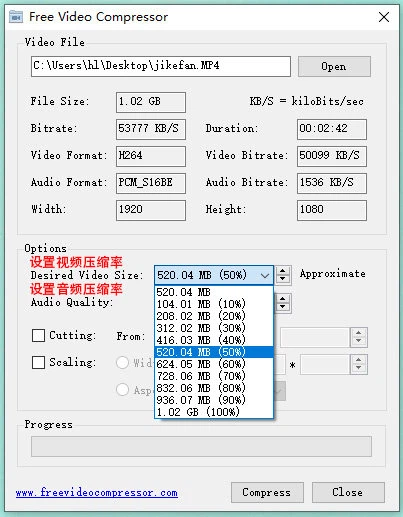
Video compression is not a matter of magic: it is a matter of how many bits per second are spent on each second of picture. Spend fewer, and the file gets smaller; spend too few, and the result becomes visibly soft in exactly the places that cost the most to encode — moving water, falling leaves, crowds, confetti. The setting exposed here is that rate, and the whole craft of using such a tool is choosing the lowest rate that still looks acceptable for the content at hand.
Audio has the same logic and much less tolerance. Speech survives a surprisingly low rate; music does not, and a concert recording squeezed to the level of a phone call is unpleasant in a way that is hard to mistake for anything else. Having a separate control for it is the difference between compressing a video and ruining its soundtrack.
The workflow is a circle, not a line
The file is imported, the interface reports what it found inside it, both rates are set, and the compression starts. What the description leaves out is the part that matters in practice: the result has to be watched. A rate that looked reasonable for a talking-head recording will show its seams on a screen recording of code, and the only way to know is to look at the output rather than at the percentage.
That is also why the two-case situation is normal with this kind of tool: one pass to see where the limit is, a second pass at a rate slightly above it. Since the operation is short, the second pass costs little, which is the whole advantage of a dedicated compressor over an editor that can also do it.
Why the size still matters
Compression is not only about saving space. A file small enough to travel is a file that can be sent, and a file that can be sent is a file that gets looked at. The same recording at a quarter of the size, watchable on a phone, reaches somebody who would never have waited for a download; the same demonstration, small enough to attach, arrives in a message instead of a folder that nobody opens.
Where it fits
The honest summary is narrow, and that is the point. This is not an editor, it does not cut, it does not grade and it does not stabilise. It takes a file that is too big and returns one that is not, using the two parameters that control that outcome. For a job that comes up once a week and never at a convenient time, a small tool with two sliders is a better answer than a large one with forty.