
FluxDown 0.6.6: A Free, Open-Source Rust Download Manager for Windows and macOS
Version 0.6.6
Summary
FluxDown is a free, open-source download manager that runs six protocols through one Rust engine, splits segments while a transfer is running and keeps downloading after the window is closed.
Recommend- Name
- FluxDown
- Version
- 0.6.6
- Open source
- Open source
- Operating system
- WindowsmacOSLinuxAndroid
- Website
- https://fluxdown.com/
- Updated
- 2026-11-05 21:20
FluxDown is a free, open-source download manager for Windows, macOS and Linux that puts six transfer protocols behind a single engine written in Rust. The interface is a thin layer on top; transfers themselves run in another process, so closing the window does not interrupt them.
Downloads are usually scattered across tools. Direct links go to the browser, torrents to a dedicated client, streaming segments to a parser, and ed2k links to whichever program still accepts them. Speed limits, history and save folders end up in four places, and moving to a new machine means setting all of it up again. FluxDown collects that work into one queue.
On 2026-11-02 the current build is 0.6.6, published under AGPL-3.0. Desktop versions cover Windows, macOS and Linux, and there is an Android client plus a headless server build. Local use needs no account.
Six protocols, one queue
Each protocol has its own handler, but the handlers share the engine: one queue, one speed limit, one retry policy, one set of categories, one resume state. Pasting a link into a new task does not require knowing which kind it is. Magnets, ed2k links and plain addresses are recognised on their own, and a multi-line paste creates the whole batch at once.
- HTTP and HTTPS
- Range requests with segments that can change while the transfer runs, plus cookies, custom headers and a proxy.
- FTP
- Traditional file servers keep resume support and are scheduled in the same queue as everything else.
- BitTorrent
- Magnet links and torrent files over DHT and UPnP, with per-file selection inside a torrent.
- eD2K
- A server list plus the Kad network for finding sources, with hash verification built in.
- HLS
- Pick the quality, pull segments in parallel and decrypt AES-128 before merging.
- DASH
- Audio and video tracks download separately and are merged when both have finished.
Speed control uses a token bucket with a global ceiling in KB/s, which keeps browsing and calls usable while a transfer saturates the line. Integrity checks are configured per task: paste an expected MD5 or SHA-256 value and the file is compared as soon as it completes.
Segments are decided while the transfer runs
The common multithreaded design cuts a file into a fixed number of segments when the task starts and lets each one run on its own, so a single slow connection holds back the whole progress bar. FluxDown decides at runtime instead. The number of connections climbs gradually and only grows while the server keeps up. When a connection finishes early, an idle one splits the largest segment still in flight and takes the second half. Long connections are reused between segments, and the limit for each host is remembered so the next task starts from a sensible number.
The effect shows up on slow mirrors: when one file is spread over several nodes and one of them keeps stalling, the task is no longer tied to that node.
The window is a shell around the engine
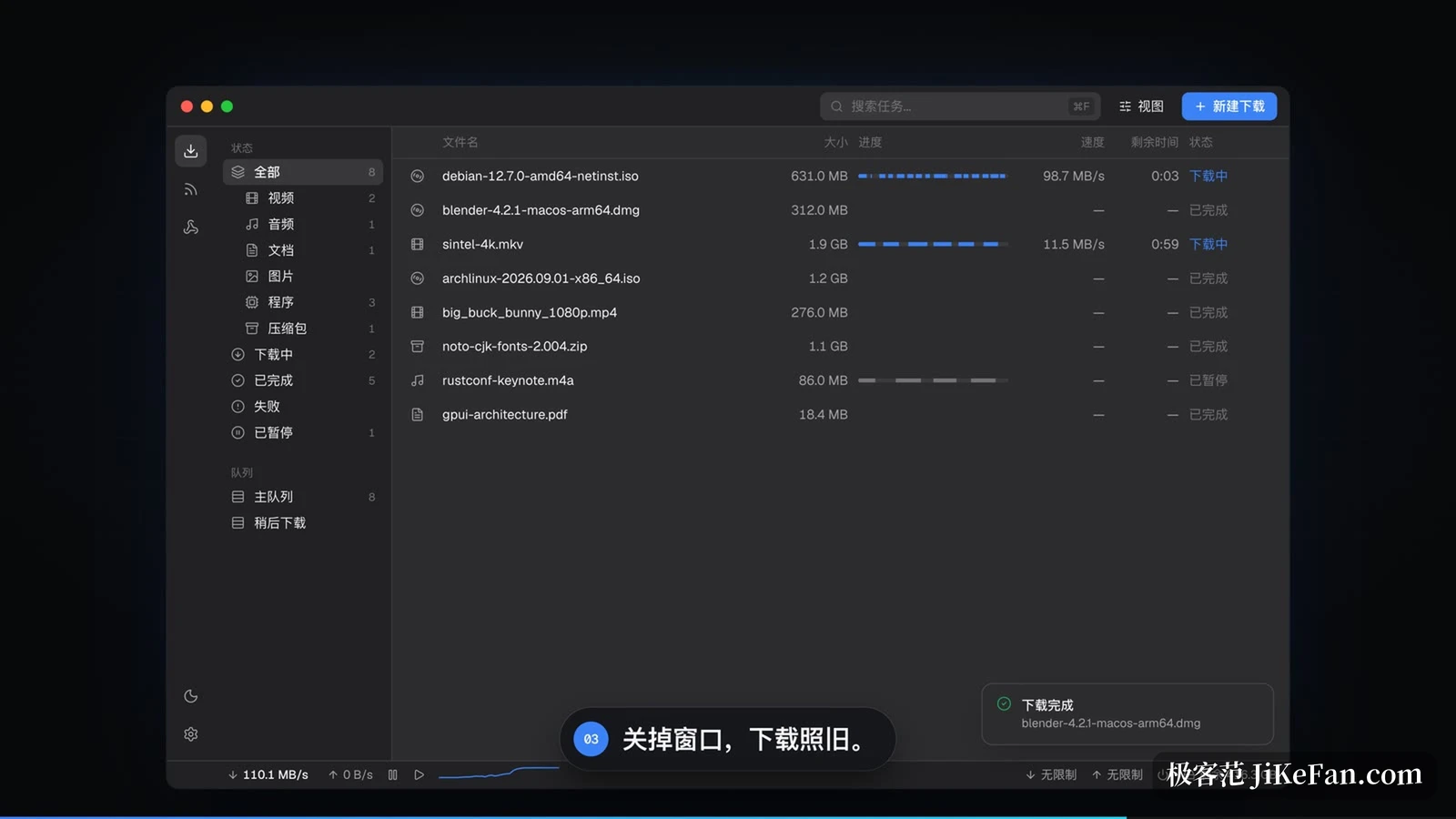
The process is split into four layers. The interface starts on demand, draws its window through the GPU and exits when closed. The gateway stays resident and handles the tray icon, browser capture, the clipboard and calls to the local interface. The daemon owns tasks, queues, scheduling, RSS, plugins and webhooks. The engine does protocols, segmentation and persistence. Because transfers never live inside the interface process, reopening the window shows live state immediately.
Progress is not buffered and written on a timer. Every byte range lands in SQLite with write-ahead logging enabled, so a power cut, a crash or a forced kill costs only the work in flight. The task continues from the last stored range instead of starting over.
Browser capture
Extensions for Chrome, Edge and Firefox stop a request before the browser saves the file and pass it, together with cookies and the referring page, into the new-task dialog. Detection runs on three levels: response headers, filename patterns, and a fallback listener that catches what the other two miss. Video, audio, HLS and DASH streams are sniffed per tab. Holding Alt while clicking a link bypasses capture for that one request. Addresses copied to the clipboard and links that begin with the fluxdown scheme open the same pre-filled form, and a userscript can hand tasks to the local interface when extensions are not an option.
Running headless on a NAS
The headless build drops the desktop interface and keeps only the gateway and the daemon. Its web interface listens on port 17800 and asks for an access key the first time it is opened. A Docker image is published, along with packages for Synology, QNAP, OpenWrt, Unraid and CasaOS. Beyond the web page there is a REST interface, an aria2-compatible JSON-RPC endpoint, a command line client and a Model Context Protocol endpoint, which lets an AI client create tasks, check progress, pause and resume them.
The plugin market carries parsers and hooks. Transcoding pulls ffmpeg and yt-dlp on demand and runs them in an isolated environment. RSS feeds are filtered by rule and downloaded unattended, named queues can start and stop on a daily schedule, and task events can be pushed to a webhook of your own.
Who it suits
For a file of a few dozen megabytes now and then, the browser is enough and a separate download manager is one more thing to maintain. The value appears when protocols are mixed and tasks pile up: system images next to torrents, a streaming segment pulled off a page, or a machine that has to keep downloading around the clock, 24 hours a day. Being open source and local-first means the download history is never uploaded and no account is created. The trade-off is that the installers carry no code signature, so Windows and macOS show a warning on first launch that has to be cleared by hand.
Six protocols in one queue, segments split after the transfer has started, and progress that outlives a closed window: FluxDown rearranges what a download manager is supposed to do, for people who keep a dozen tasks running at once.