
FluxDown Puts Every Download Protocol Behind One Rust Engine
Summary
A download manager built on an asynchronous Rust engine that measures the connection before deciding how many segments to use, covers ten protocols from plain links to peer-to-peer and encrypted streaming segments, and takes over downloads from the browser.
Recommend- Name
- FluxDown
- Version
- 0.2.1
- Pricing
- Free
- Open source
- Open source
- Operating system
- WindowsmacOSLinuxAndroidiOSWeb
- Website
- https://fluxdown.zerx.dev/
- Updated
- 2026-10-18 22:00
Why downloading ends up needing several programs
Downloading looks like one activity and is really several. A large file from an ordinary link, a torrent that needs a peer-to-peer client, a video that streams in fragments rather than existing as a file, a share on a machine in the next room. Each has its own protocol, and because each protocol grew up with its own tool, the habitual answer is to keep four programs installed and remember which one applies to which address. Nothing is broken in that arrangement; it is simply the cost of history, and the cost is paid every time a link arrives and the first decision is not what to download but what to open. The idea here is to put the protocols behind a single engine so that the decision disappears.
Measure first, then decide how to split
The engine is written in Rust and built on an asynchronous runtime, with network input and output as well as disk writes all happening on that side. That matters because the interesting part is not raw speed but what the program does before it starts: instead of dividing every file into a fixed number of segments, it first sends a small probe request to measure the actual bandwidth available, then combines that measurement with the size of the file and the number of processor cores to choose a segment count.
The rules behind that choice are the interesting part, because they encode experience. Files below a few megabytes are not segmented at all — a single connection is faster than the overhead of coordinating several. Larger files keep each segment above a minimum size, specifically so that a mechanical disk is not hammered with random writes from a dozen positions at once. The practical effect is that a fast connection gets the full benefit of parallelism while a slow one, or a small file, is not made slower by enthusiasm. And none of it requires the user to know any of it: there is no segment count to tune.
Ten protocols in one place
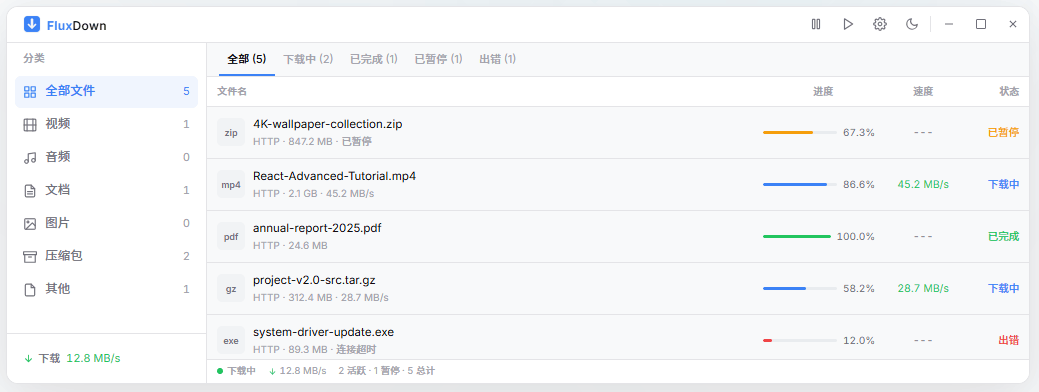
This is where the tool separates itself from a single-purpose downloader. Ordinary direct links over the two web protocols are the baseline. Storage reachable over the web-based file protocol, in both its plain and secured forms, is covered. So is traditional file transfer in both forms, the encrypted shell-based variant, and the file-sharing protocol used inside local networks. Peer-to-peer is present both as the BitTorrent protocol and as magnet links, and the older peer-to-peer link format is supported through an external client that has to be present. Streaming manifests — the format that delivers video as a numbered sequence of short fragments rather than as one file — are handled too, including the decryption of segments protected with the standard cipher. The distributed storage protocol completes the list, which is an unusual inclusion and a welcome one.
Two of those are worth a sentence more than the rest. Streaming capture is where most single-purpose tools stop, because a manifest is not a file and the segments are frequently encrypted; handling the decryption properly is the difference between a tool that captures video and a tool that captures unplayable fragments. And the older peer-to-peer link format survives in archives and old forums, so supporting it is a matter of reaching material that would otherwise be inaccessible rather than a matter of completeness for its own sake.
The browser hands the work over
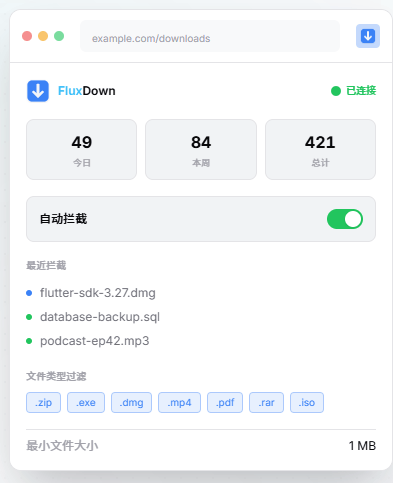
An extension exists for the two major browsers, and it does two distinct things. The first is takeover: a download started in the browser is passed to the manager instead of being handled by the browser, so the copy-the-link-and-paste-it-elsewhere routine disappears. Which sites are taken over and which are left alone is configurable, which matters because nobody wants every trivial file diverted.
The second is detection. While a page is open, the extension looks for the addresses of video streams behind it — usually the manifest format — and offers them for download with a single action. Anyone who has spent twenty minutes in a browser's developer tools hunting for the right request in a list of two hundred will recognise why this is the feature that gets used daily rather than occasionally.
One engine, several faces
The architecture is the argument for consistency. The desktop applications on the three systems are built as a shell around a web-technology interface, the mobile applications for the two mobile systems use a cross-platform toolkit, and both sit on the same Rust engine. A separate command-line tool exposes the engine on its own, with queue management, concurrency control and resumption of interrupted transfers — which is what makes the engine useful to someone automating downloads rather than clicking them.
Because the engine is shared rather than reimplemented per platform, behaviour does not drift: the segmentation logic, the protocol support and the resume handling are the same whether the task was started on a laptop, a phone or a script. That is the quiet benefit of putting the hard part in one place, and it is the reason the protocol list can be trusted to mean the same thing everywhere.
What this does is unglamorous and overdue: it puts the download needs that normally scatter across several tools into one program, with an engine that decides its own settings. Free, open, without advertising, with a browser extension that takes over and detects — and no parameters to tune before it works well.
The honest assessment
The interesting engineering is all in the parts a user never sees: a probe before a decision, a floor on segment size for the sake of the disk, decryption of stream fragments done properly, one engine shared by five platforms and a command line. None of it makes a screenshot more attractive, and all of it is the reason the program behaves sensibly on the first attempt rather than after a session of adjustment. For anyone whose downloads currently require remembering which of four programs handles this particular kind of address, that is a real improvement, and it is the kind that stops being noticed within a week — which is the highest compliment a utility can receive.