
EteDrop review: big files skip the cloud and land straight in a browser
Summary
EteDrop opens a direct WebRTC channel between sender and receiver so the file never sits on a server, and the person receiving it only needs a browser plus a pickup code; on one subnet it switches to the local network by itself.
Recommend- Name
- EteDrop
- Version
- 1.0.4
- Pricing
- Free
- Open source
- Open source
- Operating system
- WindowsmacOSLinuxAndroidiOSWeb
- Website
- https://etedrop.com
- Updated
- 2026-11-03 20:22
A file transfer tool that squeezes upload and download into a single direct pass: the file never lands on somebody else's server, and the person receiving it does not install anything.
First, what it is actually doing
EteDrop is a cross-platform file transfer tool with a plain idea: if the transfer can avoid a server, avoid the server. It uses WebRTC to pull a direct channel between the sender and the receiver, and the server keeps to three jobs, helping two devices find each other, handing out the share page, and exposing an interface for the running state. The file itself does not enter the server, and it is not parked in third-party storage either.
That is quick to say, but the difference shows in the experience. Uploading a file somewhere and then letting the other side download it means the same file crosses the link twice; a direct connection crosses once. The official blog does the arithmetic: a 5GB file over a 50Mbps connection takes about 14 minutes the long way and about 7 minutes direct. The numbers move with the network, but the gap between one pass and two is structural.
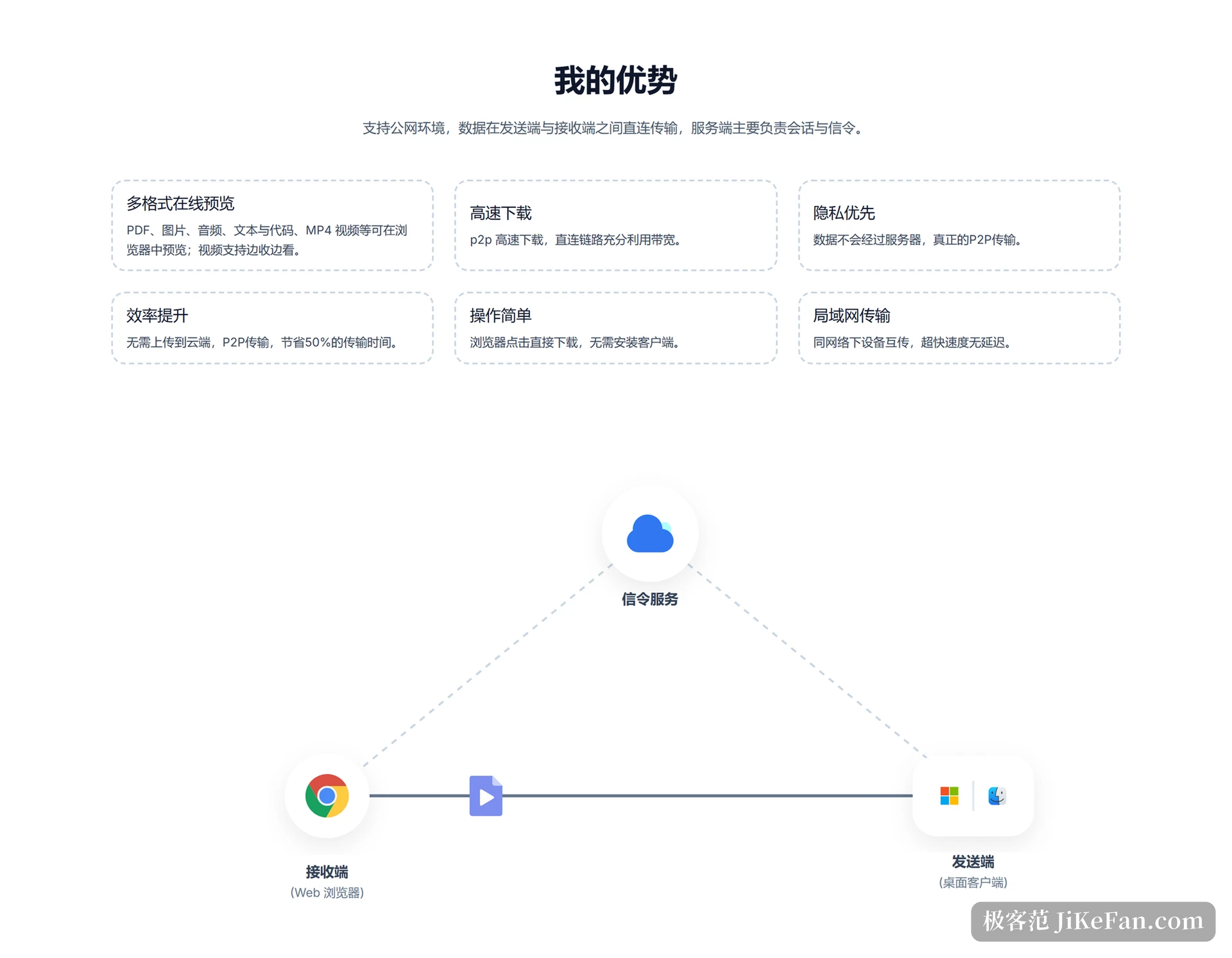
Over the public internet: no landing, no relay
Sharing works with a link plus a pickup code. You send the link out, the receiver opens it and enters the code, and then sees the file and takes it. The link can be forwarded as often as you like, while the code keeps the file for the right person, and that layer of access control is something a transfer mode built on automatic discovery inside one subnet cannot offer.
Across networks it relies on NAT traversal through WebRTC. The figure in the official FAQ is that roughly 80% of user networks support a P2P transfer. In the remaining cases the direct path cannot be opened, so the tool is picky about network conditions. That is not a hidden clause; it is written on the front page FAQ.
LAN mode: same subnet, switched automatically
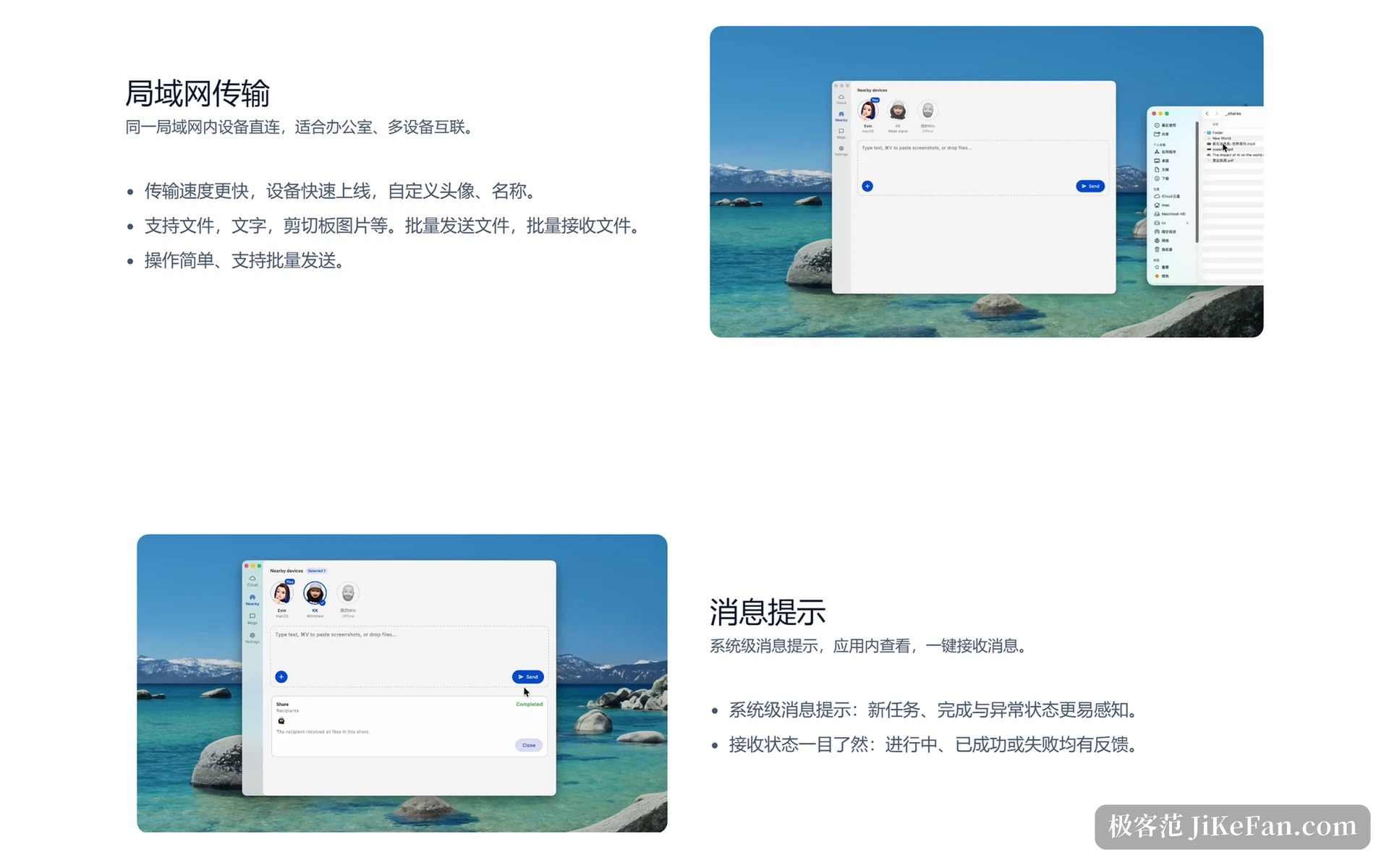
When both devices hang off the same router, EteDrop goes over the local network instead of routing through the public internet. Speed then depends on the router and the network card, and in practice it approaches the hardware ceiling of the local network. Shuttling material between office machines, or between a few devices at home, mostly takes this path.
LAN mode can send to several devices at once and receive in batches. Besides files, text and images on the clipboard go the same way, which removes the step of saving something as a file first. This path does not need the public network at all, so it still works with the connection down.
Zero install on the receiving end is underrated
The real friction in a transfer tool is rarely speed; it is whether the other person has the thing installed. EteDrop turns the receiving end into a web page: the sender runs a client, the receiver needs a browser. Whether the other side sits at Windows, a Mac or a phone makes no difference.
So you no longer ask someone to register an account, install a client, wait for an update and then open it, just to receive a 300MB video. Send the link, they open it, type the code, and the job is done.
Look first, then download
The share page has preview built in: PDF, common images, audio, plain text and code files with syntax highlighting open straight in the browser, and MP4 video can be watched while it arrives. Once this version looks right, you download it.
That detail earns its keep with large files. Finding out that a 500MB asset was the wrong version after the download finishes leaves an expensive redo; one look beforehand removes the detour.

Open source, and you can host it yourself
The project is open on a code hosting platform under the MIT licence. The repository splits along responsibilities: a multi-platform client written in Flutter, a signalling service in NestJS, a share page in React and Vite, and a site built with Docusaurus. Anyone who wants an internal instance will find documents for deploying the server and for packaging the desktop and mobile builds.
The stack holds no surprises: Flutter and Dart carry the cross-platform client, NestJS with TypeScript carries signalling and the interface, and media handling depends on FFmpeg. The author keeps a separate document listing third-party components and licence obligations, and whoever redistributes the build has to check the FFmpeg options themselves; independent projects willing to write that down are not common.
Where it fits, and where it does not
Both sides online, a large file that has to reach someone right now, or a preference for leaving no copy on somebody else's disk: that is the comfortable case. The reverse is when the receiver is away and the file is meant to sit until tomorrow, which still needs a service with storage. P2P has no asynchronous delivery.
The official notes are explicit as well: an interrupted transfer starts over, because there is no resume yet. Above 10GB, a stable wired link or strong Wi-Fi is the recommendation. These are trade-offs rather than defects; a direct connection removes the server, and the price is exactly the guarantee the server used to provide.
EteDrop takes an old problem back to its plainest shape: a file goes from A to B with no third party in between. The cost is that both ends must be online and the network has to let the connection through; what comes back is a shorter wait and the certainty that the file never sat on somebody else's machine.