
CrossDriver Files: A Free Mac File Manager With Windows 11 Habits
Summary
CrossDriver Files is a free file manager for macOS that rebuilds Windows 11 Explorer tabs, right-click menu and shortcuts, and unpacks RAR or 7z archives without another app.
Recommend- Name
- CrossDriver Files
- Version
- 1.1.57.6696
- Pricing
- Free
- Open source
- Proprietary
- Operating system
- macOS
- Website
- https://files.crossdriver.com/
- Updated
- 2026-11-04 21:58
A free file manager for macOS that keeps the layout and keyboard habits of Windows 11 File Explorer.
CrossDriver Files is a file manager for macOS 12 and later, distributed at no cost. It rebuilds the parts of File Explorer that people miss after switching: tabs across the top, a navigation pane on the left, a details pane on the right, and the Windows 11 right-click menu. It does not replace anything in the system, and it runs next to Finder rather than in place of it.
The layout you already know
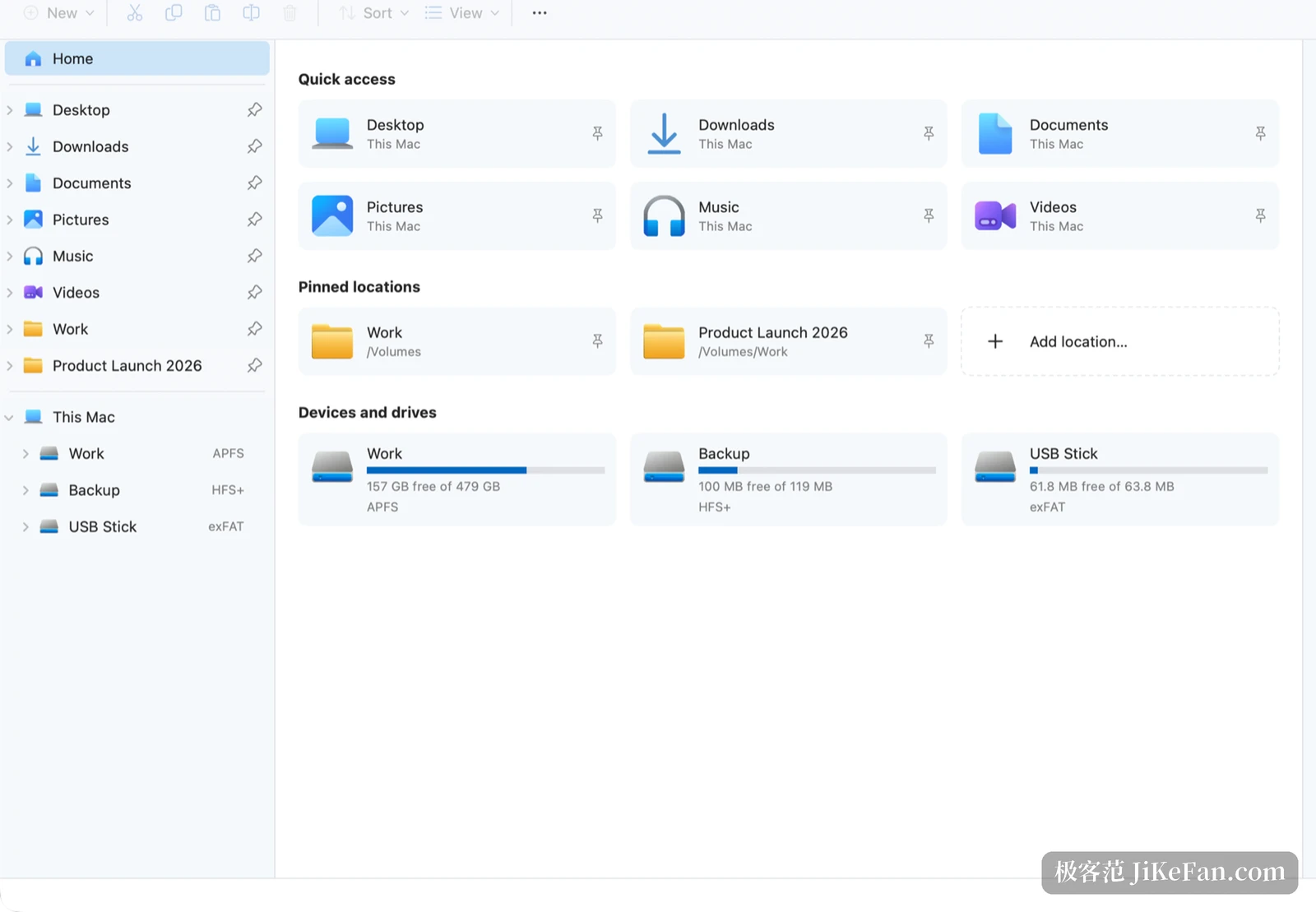
The window follows Windows 11 File Explorer closely. Tabs sit at the top: Ctrl+T opens one, Ctrl+Tab cycles through the open tabs, Ctrl+1 through Ctrl+9 jump straight to a numbered tab, and a middle-click on a folder opens it in a new one. The address bar reads as a path such as This Mac, Work, Project; click any segment to jump to that level, or type a full path into it. The left pane holds Home, Desktop, Downloads, Documents, pinned locations and every mounted drive. The right pane reports size, location, creation and modification dates and permissions, while a command bar stays above the file list.
A context menu in the Windows 11 order
Right-clicking produces a row of icon commands above a layer of text commands, ordered the way Windows 11 orders them, with Show more options at the bottom holding the rest. Cut, Copy, Rename and Delete take the top row, everyday commands sit in the middle, and Copy as path, Show in Finder, Open in Terminal, Copy to and Move to are grouped separately.
Creating documents works properly. Choosing Word, Excel or PowerPoint gives a blank file that office software opens, not a placeholder, and dropping your own templates into the templates folder makes them appear in the New menu.
Extract and compress without a second app
RAR and 7z are not formats macOS opens on a double-click, so the first move is usually installing an archive utility. CrossDriver Files moves that job into the right-click menu. Extract All calls the archive tools built into macOS, so nothing else needs to be installed, and ZIP, RAR, 7z, tar, tar.gz, xz, cpio, cab and lha are covered.
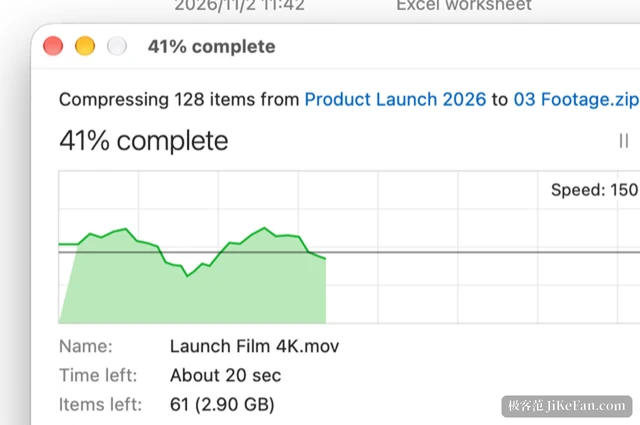
Extracted files land in a new folder named after the archive; when the name is taken a number is appended and nothing is overwritten. Large archives get a progress window with a speed graph, pause and cancel, and cancelling removes the half-extracted folder. Entries that try to write outside the target folder are refused.
Compression involves one decision worth explaining. While testing with a 5 GB file, an archive built with the ditto tool unpacked fine on the same Mac, yet a standard ZIP reader stopped at 1 GB with a CRC error because the ZIP64 size fields were missing. The tool therefore picks by size: under 4 GB it uses ditto and keeps Mac extended attributes, and at 4 GB and above it writes standard ZIP64 so Windows machines read the result correctly. Archives are written under a hidden temporary name and renamed only when complete, so a failed run never leaves half a file behind.
Password-protected RAR and 7z archives, and multi-part RAR, are not supported yet and return an error.
Undo that reaches back fifty steps
Undo covers copy, move, rename, delete, new items, extraction and compression. The last fifty steps go back with Ctrl+Z and forward again with Ctrl+Y, and every window shares the same history. Undoing a delete brings files out of the Trash to where they were, even if the containing folder no longer exists.
Overwriting is handled with some care. When a name already exists, a dialog offers replace, skip, keep both, or decide file by file, and replacing does not overwrite in place: the old file goes to the Trash first. Moving between drives copies, checks the copy against the original, and only then removes the original. If a cable is unplugged, a disk fills up or a file changes mid-copy, the original stays where it was and the reason is reported.
A read-only look inside an .exe
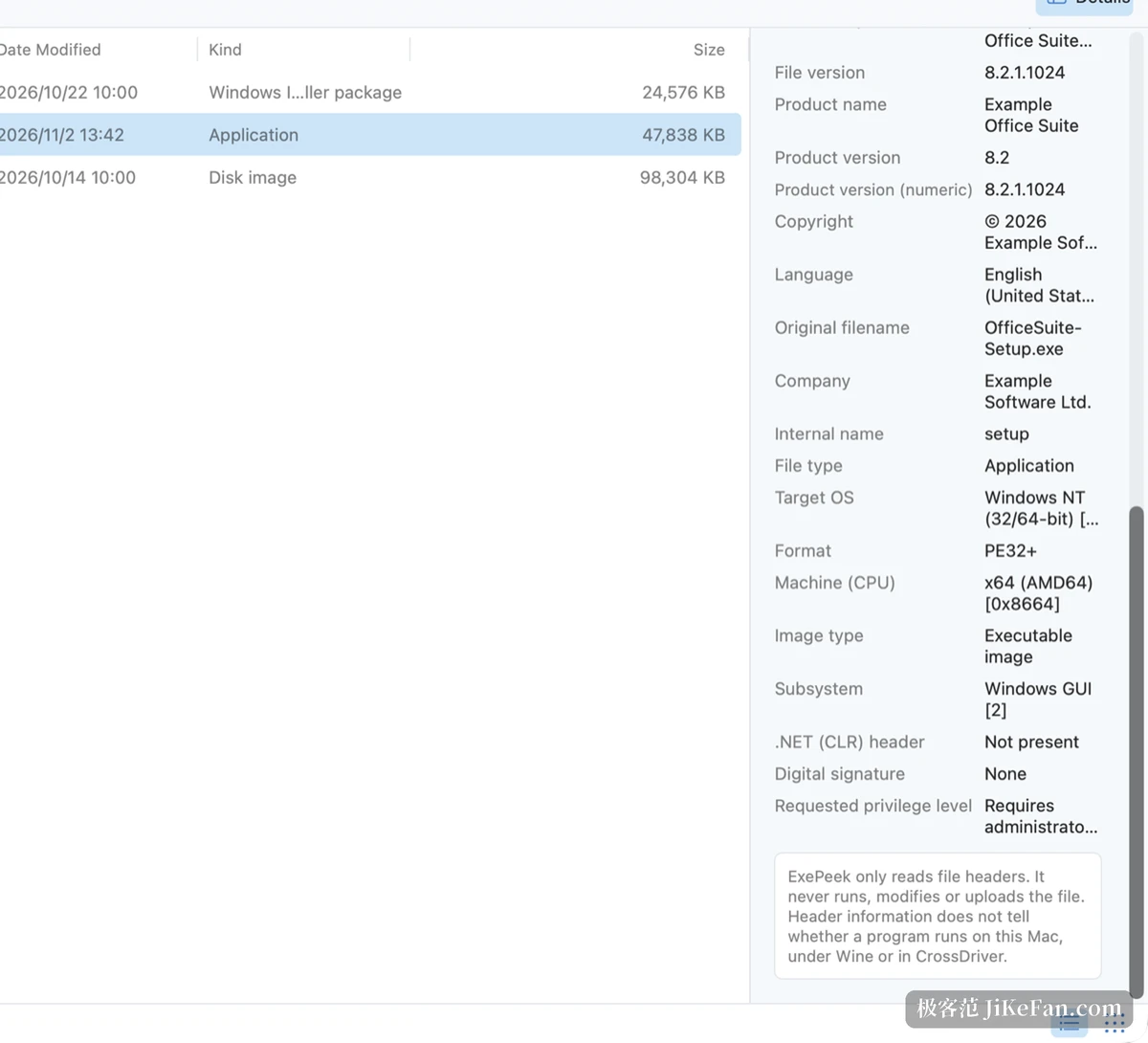
Installers carried over from Windows often arrive as a bare file name with no hint of publisher or version. Select an .exe and the details pane lists company, product name, file and product version, copyright, original file name and language, then whether it is x86, x64 or ARM64, PE32 or PE32+, windowed or console, whether it depends on .NET, whether it requests administrator rights and whether it carries a digital signature.
ExePeek is read-only. Files are never run, changed or uploaded. It reports what a program claims to be and what it asks for, without judging whether the program is safe.
Permissions, languages and licensing
A file manager sees your files by nature, so the permission boundary deserves its own paragraph. The app follows the macOS App Sandbox and opens only folders you authorise; you choose your home folder on first launch and can withdraw access later in Settings without touching the files themselves. File names, paths and contents never leave the Mac, and anonymous usage statistics stay off unless you switch them on.
It does not change system defaults or file associations, so it can be used alongside Finder. The interface ships in sixteen languages with light and dark themes. As of November 2026 the current version is 1.1.57.6696, which requires macOS 12 or later and runs natively on Apple silicon and Intel Macs.
Licensing is simply free: no account, no in-app purchases, no trial period, no third-party advertising, and it works offline.
If you moved from Windows and still click through folders one level at a time, CrossDriver Files deserves one try. It is free, it works offline, it leaves system settings alone, and it hands back F2, Delete, Ctrl+Z and the Windows 11 right-click menu, with RAR and 7z handling thrown in.