
Meitu Xiuxiu turns one product photo set into dozens so listings stop being hand work
Summary
A busy listing day is lost to making one photo set look like dozens. Meitu Xiuxiu for Windows treats each folder as one product, generates variant sets from a single import, and charges cloud work by credits while local edits stay free.
Recommend- Name
- Meitu Xiuxiu
- Version
- 7.5.8
- Open source
- Proprietary
- Operating system
- Windows
- Website
- https://pc.meitu.com
- Updated
- 2026-11-05 23:00
The dullest step in listing a product online is not the photo shoot. It is turning one set of images into dozens, because the same item goes up on different links and different storefronts and each listing needs pictures that look different. Meitu Xiuxiu for Windows has turned that into a production line.
The desktop edition stopped being only about faces and filters a while ago. It splits the heavy work across two entrances: the familiar image editor, and Meitu batch processing, aimed at the repetitive handling of hundreds or thousands of images. The changelog puts the current build at 7.5.8.0, dated 2026-11-01, and almost all of this release lands on batch work.
Two tabs, and the work sits in the second
Open batch processing and there are two tabs at the top: basic editing and e-commerce retouching. Basic editing covers the old ground, cutout and background replacement, AI erase, AI sharpen, watermarking, crop, rotate and resize, image compression, format conversion and renaming, plus the layout tools for text, stickers, effect filters and light effects. These used to be scattered across separate programs; now they sit on a single grid, where you drag in a batch of images, pick one item, and the whole batch takes the same rule.

E-commerce retouching is the other tab, and three things hang under it: variant retouching, AI product sets and bestseller replication. The names sound like marketing, but they answer three different output needs, turning an existing set into several versions, feeding in a single original and letting it complete the whole detail-page set, and taking one reference bestseller so your own product inherits that layout and colour scheme.
One folder is one product
The variant retouching screen states the rule plainly: open folders in bulk, and each folder is recognised as one product set. That means the sorting happens before import. White-background shots, detail shots and model shots go into the same folder, and once imported they are processed as a unit with a consistent style inside the set.

After import the only choice is similarity, in a high and a low grade. Set high and the product itself barely moves while the AI swaps the background, the copy and the model, which suits small adjustments that follow a bestseller in the same category. Set low and the composition is rearranged further, colour and elements shift more visibly, and the output differs most. The split is practical: when one item is spread across several links, what you need is precisely that it reads as the same thing while never being the same picture.
What dozens of sets look like side by side
The task list is where the scale becomes visible. Each row is one product set, with the image count under the thumbnail on the left, and a row of dropdowns on the right for country, language, aspect ratio, similarity grade and model tier. Below that sits a text field for this round's specific instructions, such as pushing the selling points toward fashion, adding labels, or keeping the in-stock shipping note.
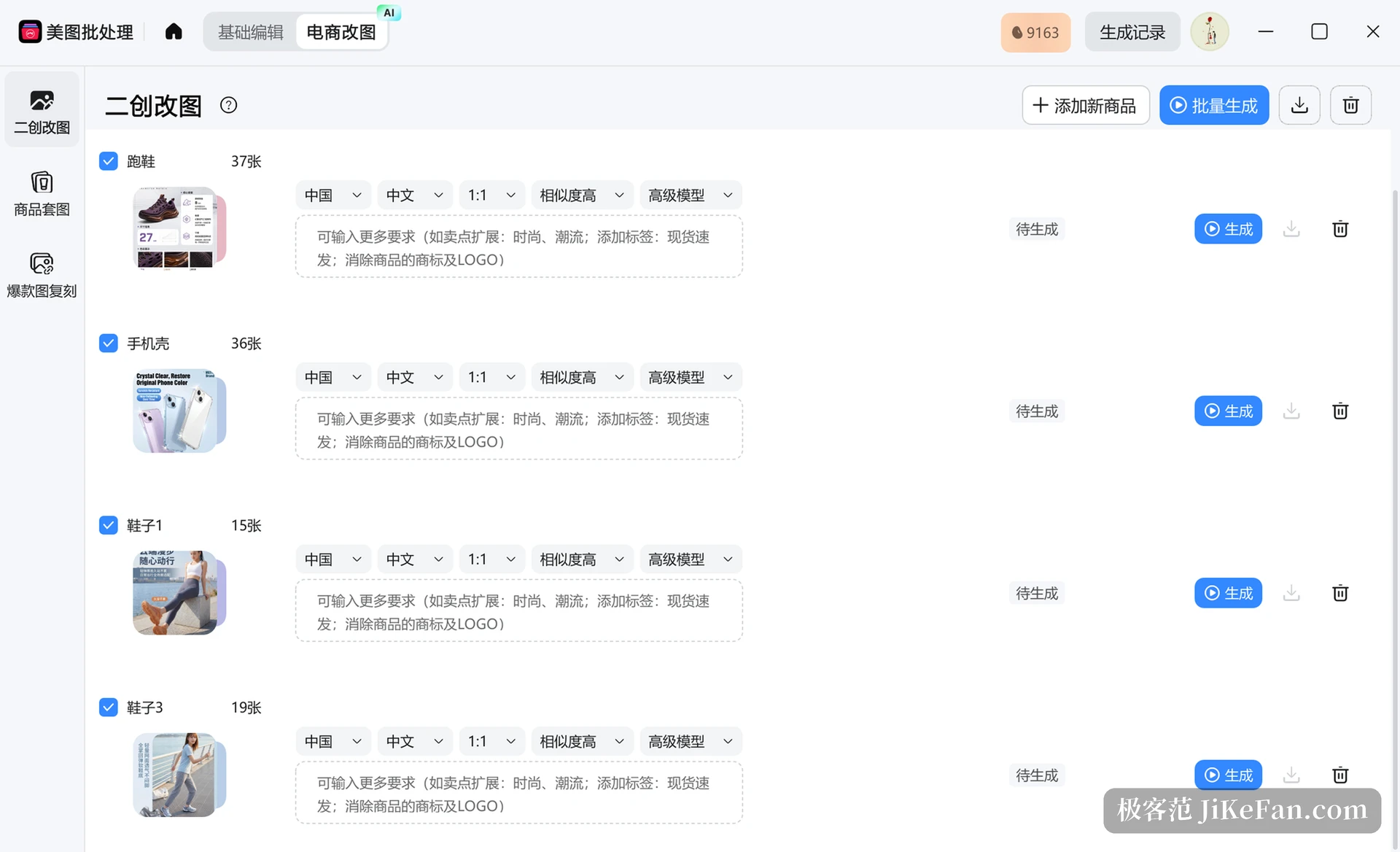
In the screenshot the four groups are running shoes at 37 images, phone cases at 36, shoes at 15 and another at 19, all parked at waiting to generate with a button on the right of each row. In real use the list can hold dozens of rows, and one submission after ticking them returns dozens of finished sets that differ from each other, with a bulk save that writes straight to the local disk. Measured against opening, editing and exporting one at a time, what is saved is the whole afternoon.
What changed in 7.5.8.0
The changelog lists five items, two of them tied directly to output quality. The smart cutout algorithm was upgraded, the official wording being finer hair and cleaner, more complete object edges. Edges have always been the hard part of cutout, especially fur, stray hair and semi-transparent material, where a slightly weaker algorithm shows up as a white fringe. The other item adds a basic mode to batch product sets and bestseller replication, faster to generate and suited to work that needs volume more than precision.
The remaining three lean on process: batch processing gains bestseller retouching, so importing a bestseller product set allows fast secondary creation; bestseller replication handles several sets at once and carries the reference layout and colour scheme across in one go; and the AI retouching agent side gains an AI team mode that can also upload and generate decks. That last one says something. Tools of this kind are moving from retouching a picture to finishing a whole set of materials.
Useful, with the bill worked out first
One warning about the pricing logic. Cropping, compression, format conversion, renaming and watermarking are purely local actions that do not consume compute, and those basics are free. Cutout, erase, sharpen, variant retouching, product sets and replication all run in the cloud and consume credits. The number in the top right corner of the screenshot is the account balance, and it drops faster than expected when dozens of sets run in a batch; before a real launch, put two or three sets through first and find out roughly what one set costs.
The other matter is the material itself. Bestseller replication performs style transfer: it learns composition, colour scheme, typography and mood from the reference and does not copy somebody else's product shots directly, which is clear by design. Copyright in product images, authorisation for a model's likeness and each platform's rules on text in the main image still have to be checked by the person using the tool. A tool can do the work; it cannot carry the responsibility.
This update makes no grand claims. It just makes one very concrete problem go more smoothly: a single item has to reach dozens of links, and the pictures have to differ from one another. For people selling online, that kind of change matters more than a few extra filters.