
TeleAgent: a desktop agent that asks before it acts and works across Excel and Word
Summary
Most agents fail because they never understood the request. TeleAgent asks who the report is for, plans the steps, then drives Excel and Word on your own machine with per-folder permissions and a stop button that always works.
Recommend- Name
- TeleAgent
- Version
- 2.7.1
- Open source
- Proprietary
- Operating system
- WindowsmacOSLinuxAndroid
- Website
- https://www.teleai.com.cn
- Updated
- 2026-11-05 23:00
A desktop assistant proves itself with a simple test: hand over a task, and it does not make you carry the data across yourself. That is the claim TeleAgent leads with, where the number you finished in Excel lands in Word without a copy-and-paste step in between.
It is an AI office agent built by China Telecom on its own Xingchen model, released in April 2026 according to a Beijing Daily report, and positioned as an executor for everyday work rather than a chat window. It installs locally, sees the files on your disk and can drive the software already on the machine, and that is the whole difference from an assistant that lives in a browser tab.
It asks before it starts
Spend time with tools like this and the pattern shows up: failure usually comes from a task that was never understood, not from a model that was too weak. Ask for a quarterly report and a generic template arrives, well styled and full of text you have to rewrite.
TeleAgent turns that around by asking about the vague parts first. In the screenshot it receives the instruction to write a quarterly report and immediately asks who the audience is, offering three options, a direct manager, a top executive or a cross-department review, each with a line underneath about what the choice emphasises: execution quality and manageability, business value and strategic contribution, or coordination value and work across departments. Only after the pick does it move on. The exchange looks slow at first glance, but wherever a document is actually delivered, aligning once beats redoing it three times.
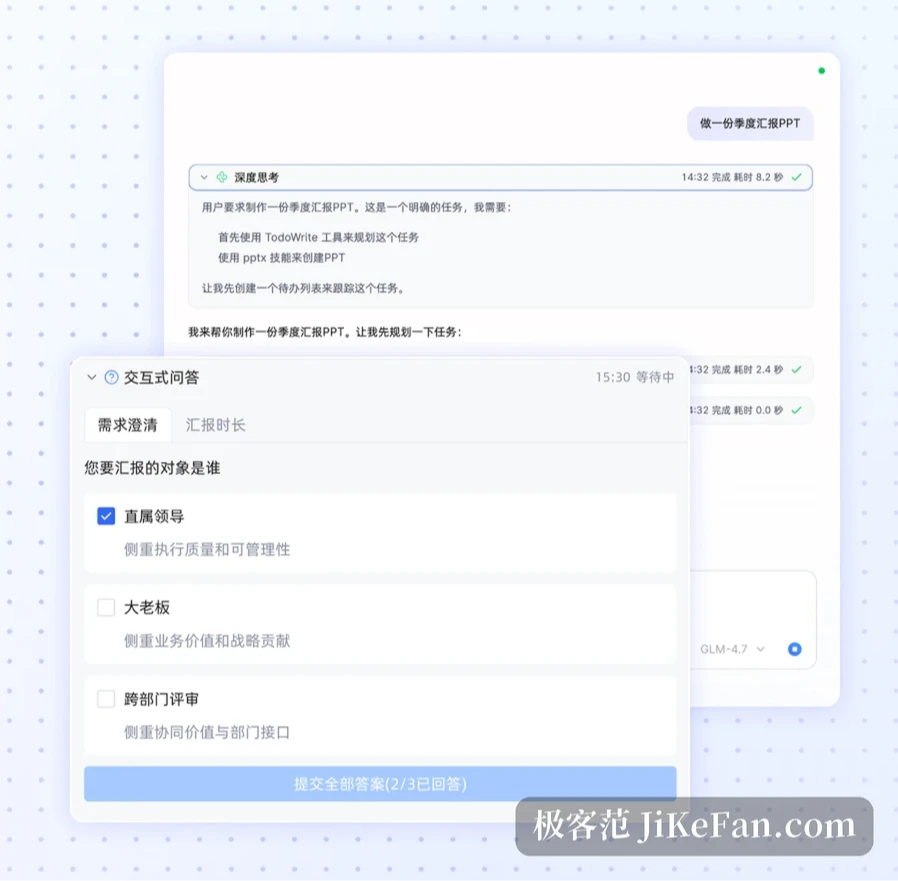
Once the questions are done it enters a deeper thinking stage, breaks the work into executable steps, drafts an internal to-do list and works down it item by item. What the user sees is a process unfolding, not forty seconds of a blank screen followed by a finished file.
Crossing applications is the dividing line
The official phrasing is moving freely between applications: search the web for material, calculate in Excel, then place the results precisely into a Word document. It reads like marketing copy, but as actual actions those are three different jobs, finding information in a browser, computing in a spreadsheet and laying out a document, and normally a person carries all three with constant switching and pasting.
What stitches them together is that the agent takes over the operation itself instead of offering advice. A planning panel lists the steps: build the monthly chart, implement the user authentication logic, write unit and integration tests, update the documentation. Every line is a concrete action, and a start button waits at the bottom. The user keeps the switch for starting and stopping, which matters in office work: nobody wants to release a machine that can edit files and then lose control of it.

Permissions laid out in the open
An assistant that can operate local software has to answer the security question first. TeleAgent closes permissions layer by layer: file processing happens entirely on the local computer and is not uploaded; reaching a folder needs a separate authorisation and no full-disk scan happens on its own; changing system settings or installing a program is announced beforehand; anything needing administrator rights must be confirmed by hand; and a running task can be stopped at any moment.
None of this is radical, and for daily use it is enough. Archiving material, reconciling accounts, sorting contracts, the fear in all of it is a tool that decides on its own to touch what it should not. Authorise one folder and that folder is the whole of its reach, boundaries clear and responsibility clear with them.
It remembers some work and starts on schedule
Repetitive work has another property: the rule is fixed, and it has to be spoken again every time. Persistent memory stores requirements, habitual templates and common processes, so a workflow taught once does not need repeating. The official name for it is internalising the routine, which in plain terms means the assistant gradually learns how you work.
Below that sits scheduling. It can take over part of the repetitive load and start at the appointed time, with built-in skills covering the usual ground, weekly news digests, contract review and data analysis, ready without setup. The cards in the screenshot are the kind of thing it handles regularly: a daily report filed by date, author, department and core task; an expense sheet laying out receipt type, amount, count and archive status; a trend curve that draws several months of numbers so the direction is visible at a glance.

How long the free points last
The model today is free registration plus points: a new account gets 3000 points valid for three months, then 3000 more for each monthly login, with 100 for a daily check-in. For occasional use that covers light tasks; run long workflows every day and consumption climbs quickly, and once the points are gone the arithmetic is yours.
Platforms cover Windows 10 64-bit and above, macOS 13 and above, plus a Linux build for certified domestic IT environments and an Android client, with coordination across devices. That combination suits government and enterprise buyers, who do not have many options inside a certified environment.
What makes TeleAgent worth a try is not whether it can write a document. It is that it is willing to ask one question before acting and to lay every step out afterwards. In office work, controllable beats clever: only a machine that knows where its edges are earns a permanent place on your computer.