
FastStone Image Viewer 8.5 keeps viewing, tuning and batch work in one window
Summary
A long standing Windows viewer that also does the processing: it opens almost every common picture format and the raw files from major camera makers, and bundles colour adjustment, scaling, side by side comparison and slideshows. Version 8.5 adds SVG, and personal use costs nothing.
Recommend- Name
- FastStone Image Viewer
- Version
- 8.5
- Open source
- Proprietary
- Operating system
- Windows
- Updated
- 2026-10-06 04:35
One window from looking to batch work
FastStone Image Viewer rests on a single organising decision: looking at a picture and changing a picture should not require two programs. The window is divided the way a file manager is divided, a folder tree and thumbnails down the left, the right hand side given over to whatever the moment asks for, a preview, an editor or a batch tool. Reaching for a colour adjustment therefore stops being a decision to go and launch something else. Version 8.5 arrived on 24 June 2026 and brings support for SVG files, lets a WebP image be rotated with one click and saved straight back, adapts the built in PDF reader to the dark theme, and adds switches for automatic import and for handling duplicate names in the tool that pulls in photos and video. The layout keeps the habits a file manager user already has, so arriving from another viewer costs almost no relearning.
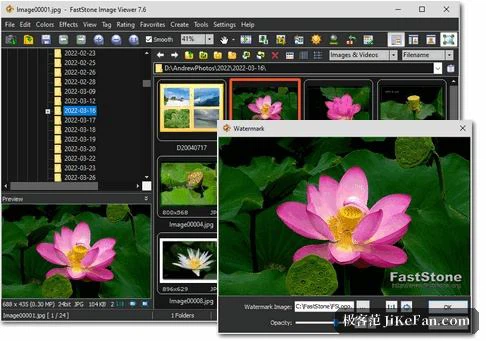
Full screen browsing and panels that follow the edge
The design people single out is the full screen mode. Move the pointer to any of the four screen edges and the matching panel slides out: the folder tree on the left, a strip of thumbnails along the top, editing and colour tools on the right, folder switching at the bottom. Shooting data, a histogram and a count of colours are read from that same set of panels, so none of it eats space in the ordinary window. A magnifier can be summoned at the cursor with a magnification of your choosing, and the slideshow carries more than 150 transitions, plays background music from MP3, WMA or WAV files, spans two displays, and accepts click, swipe and pinch on a touchscreen. Three colour schemes are offered, bright, grey and dark.
Editing, adjusting and annotating
Everyday adjustment covers scaling with resampling, rotation and flipping, cropping, sharpening and blurring, then lighting, colour, curves and levels. When scaling, one of 11 resampling methods can be picked, and that choice is what keeps an enlargement from turning into a staircase of jagged edges. Effects include greyscale, sepia, negative and adjustment of the red, green and blue components, plus drop shadow, framing, emboss, sketch, oil paint and lens effects. A drawing board takes text, lines, highlights, rectangles, ellipses and speech bubbles, and pairs with a clone stamp and a healing brush for local repair. Red eye removal comes out unusually natural, and multi level undo keeps experiments cheap. The compare tool puts up to four images side by side, which turns the job of sorting a folder of rejects into a quick pass, and the save as dialogue lists picture quality against file size for several compression settings at once, so the trade can be judged before committing. One keystroke hands the current picture to an external editor of your own choosing.
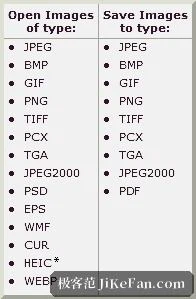
Format coverage and batch conversion
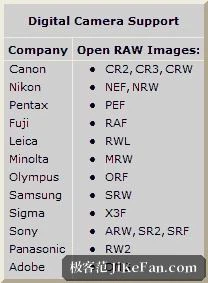
Common bitmap formats are nearly all on the list: BMP, JPEG, HEIC, WEBP, GIF, JXL, PNG, PCX, PDF, PSD, EPS, SVG, TIFF, WMF, ICO, CUR and TGA. Camera originals are covered too, from CR2, CR3 and CRW through NEF, NRW and PEF to RAF, RWL, MRW and ORF, and on to SRW, X3F, ARW, SR2, SRF, RW2 and DNG. The batch tools convert and rename whole folders by rules set up once, and can lay the results out as a contact sheet; a scanner can be driven for batch scans that land directly as PDF, TIFF, JPEG or PNG. Screen capture is included as well, and a portable build can be carried on a memory stick and run without installing anything.
Licensing and system requirements
On licensing, personal use is free, educational use is free as well, and commercial use requires a licence bought from the vendor. The download page states that the program carries no promotional software and no component that collects information about the user. Requirements are modest: Windows 10 and Windows 11 both run it, and HEIC depends on the image codec that ships with the system while every other format is parsed by the program itself. The installer is small, and even on an older machine the response stays close to the hand.