
Dio: timers, sticky notes and a desktop pet in one free tool
Summary
A free Windows utility that bundles scheduled shutdowns and reminders, sticky notes that live on the desktop, an animated desktop pet, video wallpaper, a floating launcher and a countdown timer into one small program instead of seven.
Recommend- Name
- Dio
- Version
- 20260614
- Pricing
- Free
- Open source
- Proprietary
- Operating system
- Windows
- Website
- https://www.diodio.cn/
- Updated
- 2026-10-23 22:00
None of these needs is large enough to justify its own application. That is precisely the argument for putting all of them in one.
Seven small utilities is a bad trade
A note that stays on the desktop. A shutdown timer for the evening. A countdown for the kitchen. A reminder that next Tuesday is someone's birthday. Taken one at a time, each is a trivial requirement, the kind that barely deserves installing anything. Taken together they are a nuisance, because the honest way to satisfy them is to install seven unrelated programs written by seven different people, each with its own tray icon, its own update mechanism that stopped working years ago, and its own idea of what permissions it needs.
The premise here is aggregation. One small program contains a scheduling module for shutdowns, reminders and launching other applications at a fixed time, a sticky-note layer that sits on the desktop, an animated pet, video playback used as wallpaper, a floating quick launcher, folder locking and a countdown. It is not trying to do any of those things better than a specialist would. It is trying to make the decision to have them at all cost one installation instead of seven, and on its own terms that trade is sound.
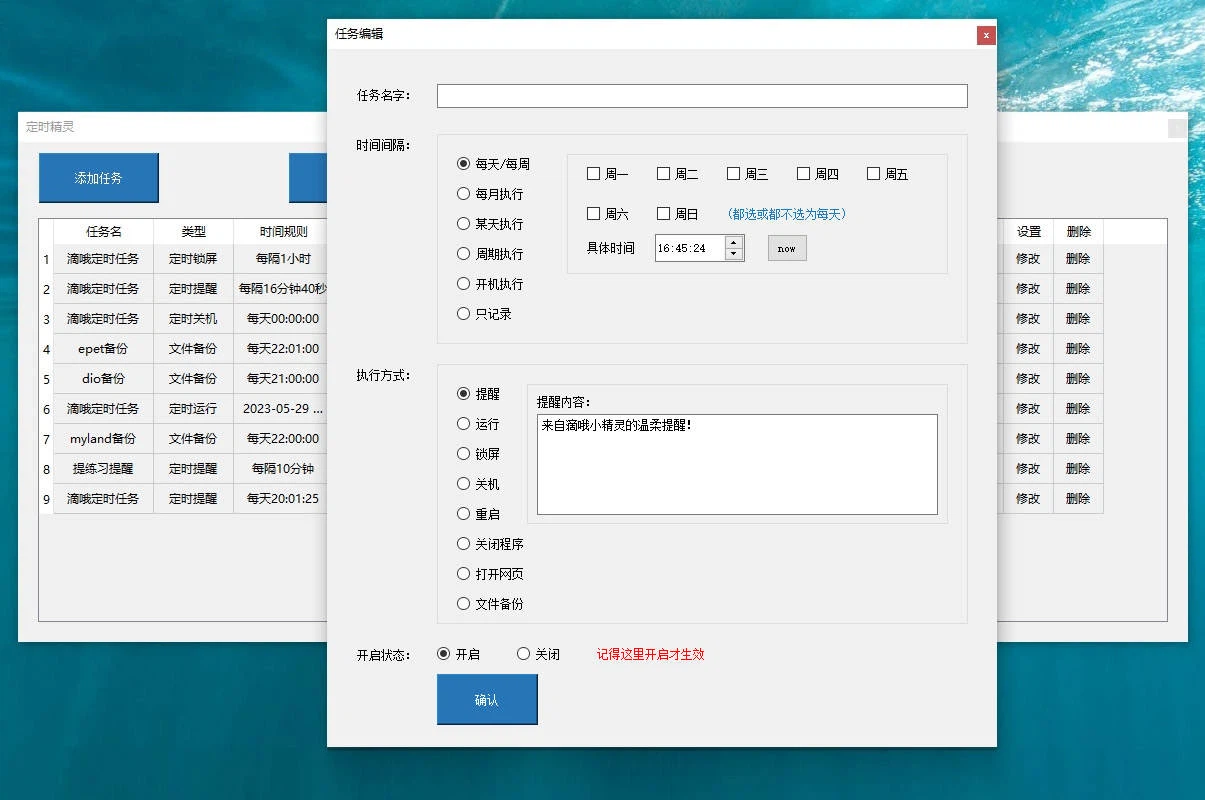
The scheduler is the module most people will actually use
Two useful scenarios make the case for a shutdown timer. A long render or a download finishes at two in the morning and there is no reason to stay awake to press a button afterwards. Or the opposite: the machine should not be permitted to stay on past a certain hour, because the person using it will not stop voluntarily. Both are one rule.
Reminders are the part that quietly changes behaviour. Setting one to repeat every forty-five minutes is a crude but effective answer to sitting still for four hours. Setting one at nine in the morning to launch the work application removes the small daily friction of opening it by hand, and setting one at ten in the evening to force a browser closed is a blunt instrument for going to bed, which is exactly why it sometimes works.
Notes, and the things that are merely pleasant
The note module supports several notes at once, each draggable, resizable and colourable. It has none of the structure of the heavyweight note services, no databases, no linking, no graph view, and it is not trying to. For a shopping list, a phone number, or a paragraph pasted out of something else, the absence of structure is the feature: the note is on the desktop, visible without opening anything.
The animated pet belongs to the category of features that are pleasant rather than necessary. A small creature walks around the desktop and responds when clicked. Either that appeals or it does not, and there is no argument that will change it. The video wallpaper belongs to the same category and comes with an honest limitation: compared to the elaborate wallpaper engines it is very simple, with no interaction, no workshop of shared scenes and no support for anything but local video files. It is also free and barely uses any resources, which for a background that nobody looks at directly is the relevant measure.

Cost, platform, and what it is not
The program is free, contains no advertising and bundles nothing else with the installer. It runs only on Windows; the same author has separate mobile tools for notes and diary keeping, but those are different products rather than versions of this one.
This is not a productivity tool and installing it will not make anyone more efficient. It addresses the small, scattered requirements that cost nothing to live without but are convenient to have solved: a reminder so you stand up occasionally, a note that is already on screen, a pet to glance at. The value of a collection like this is simply that you install fewer things.