
ES File Explorer: phone storage, shared folders and cloud drives in one place
Summary
An Android file manager that puts local storage, shared folders on the same network, remote servers reached over file transfer protocols and several cloud accounts behind a single entry point, with a text editor and archive handling included.
Recommend- Name
- ES File Explorer
- Version
- 20260614
- Pricing
- Free
- Open source
- Proprietary
- Operating system
- AndroidmacOSiOS
- Website
- http://www.estrongs.com
- Updated
- 2026-10-23 22:00
A phone accumulates files from four different directions at once, and the system's own file browser only knows about one of them.
Four habits, one entry point
On a phone, storage is not one place. There is the local storage, which is the only part the built-in browser really understands. There is a computer on the same network whose shared folder holds the files that would be easier to move over the air than through a cable. There is a remote server that can be reached with an address and a password and behaves like a directory tree. And there are two or three cloud accounts, each with its own application, each application wanting its own login, its own notifications and its own several hundred megabytes of updates.
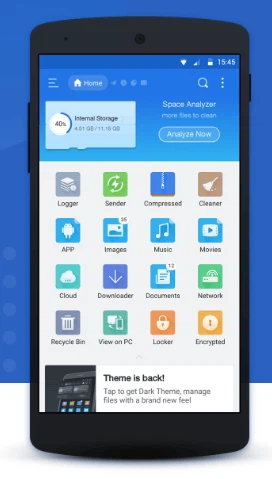
What this program does is put all four behind one screen. It is an Android file manager with local browsing as its base and the other three as additional sources hung off the sidebar. The download count reported by app stores is well past a billion, which says something about how ordinary the underlying need is: almost everyone who uses a phone seriously has, at some point, wanted to move a file between two devices without thinking about it.
The phone reading the computer
The local network feature is the one that changes daily habits fastest. On the same wireless network, opening it lists the shared folders of the computer, and files move between the two devices by dragging rather than by finding a cable, plugging it in and waiting for a driver to be recognised. For anyone who transfers photographs or documents between a phone and a desktop regularly, the cable stops being part of the routine within a day.
The remote side is just as direct. Given an address, a user name and a password, the program lists the directories of a server and opens images or video from it as though they were local. The distinction between local and remote stops mattering for reading, which is the point: nobody wants to copy a folder down in order to look at one file inside it.
Cloud accounts in one sidebar
Several cloud storage accounts can be signed in simultaneously and switched between from the sidebar with a single tap. That sounds like a small convenience and is in practice the difference between checking three places and not checking them at all. Files move in both directions, so a document on the phone can be pushed into a cloud folder without going through the cloud application's own upload flow, and a file sitting in the cloud can be pulled down, edited and sent back.
The ordinary file operations are not neglected
Multiple view modes, selection of many items at once, a clipboard for moving and copying between folders, renaming, and a properties panel are all present, which for a file manager is the minimum rather than a feature. What raises it above the minimum is the text editor built in, capable of opening a script or a configuration file and saving it back in place, and archive support covering the three formats that account for almost every compressed file anyone encounters. Extracting an archive on the phone and reading what is inside without a detour through a computer is the kind of small capability that gets used weekly once it exists.
The tools bundled alongside
A package manager lists installed applications and can install, remove or back up their installation files. With elevated permissions granted on a modified device, the system directories become browsable and their permissions editable, which is a capability for people who know why they want it and a source of damage for people who do not. File encryption protects a folder behind a password. A storage analyser shows which directories are consuming the space, which answers the question that actually gets asked when a phone reports it is full. Video tools convert a clip to an animation format, join segments, and attach subtitles or a background track.
What to expect from it
The program is free and its primary platform is Android, with companion versions elsewhere. It is not elegant, the interface carries the accumulated weight of many years of features being added, and it will not teach anyone anything about file management they did not already know. What it does is remove the need for four separate applications and one cable. For anyone who regularly moves files between a phone and a computer, or keeps more than one cloud account, that is the whole argument, and a billion installations suggest it is a common argument.