
ManicTime Pro: a timesheet that fills itself in
Summary
Software that records which window held your attention and for how long, then lets you label the recorded blocks afterwards. No timer to start, data kept in a local database, reports exportable without exposing the raw timeline.
- Name
- ManicTime Pro
- Version
- 20260614
- Open source
- Proprietary
- Operating system
- Windows
- Website
- https://www.manictime.com/
- Updated
- 2026-10-22 22:00
Most people cannot say where their working day went, and the reason is not dishonesty. Nobody is taking notes while it happens.
The number you write in a weekly report
A report says fifteen hours were spent on a particular project this week. Asked how that figure was obtained, the honest answer is usually that it felt about right. Between opening the machine, reading mail, looking things up, writing code and answering messages, the day dissolves into a sequence that nobody reconstructs afterwards. Which share went to work applications and which to a browser is genuinely unknown, and the guesses people make about that split are consistently wrong in the same direction.
What this program does is unglamorous. It watches which window is in front, records how long it stays there, and draws the result as a timeline. A given day becomes a row of blocks: this application from this moment to that one, this document opened inside it, this page visited in the browser. Nothing is inferred and nothing is scored. It is a record of attention, and the value comes entirely from what you do with it afterwards.
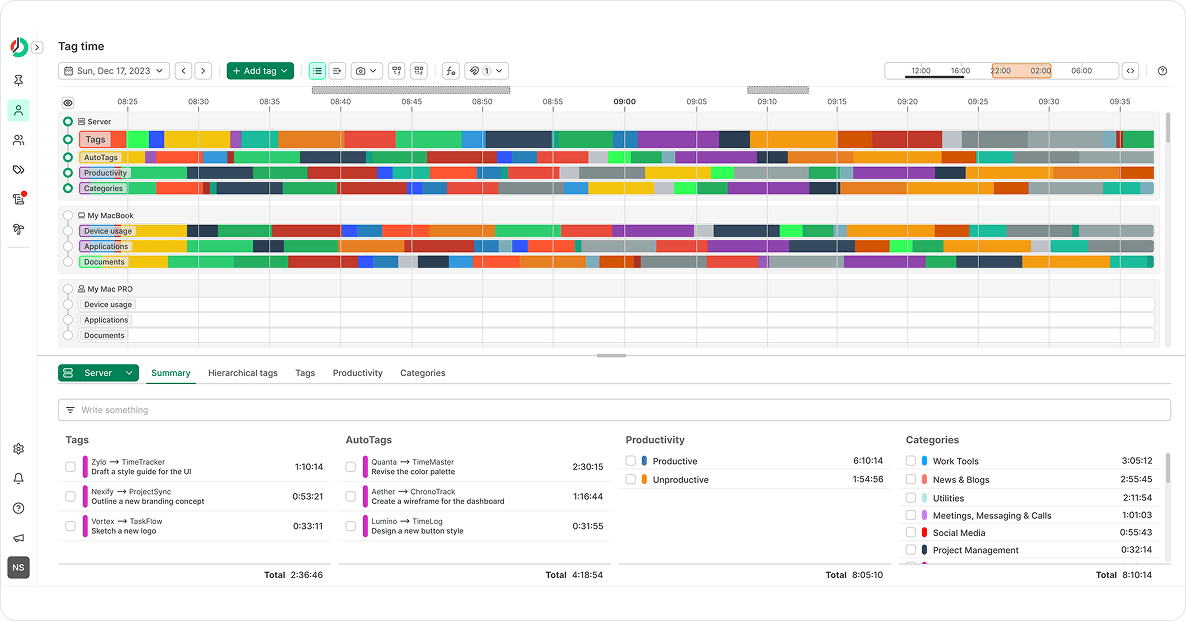
Record first, classify afterwards
The important design decision is the order of operations. Conventional time trackers, the kind that live in a browser tab or a menu bar, require a decision before the work begins: choose a project, start the timer, remember to stop it. That model fails in a specific and predictable way. You forget to start, or you forget to stop, or you switch between three tasks within one timer interval and afterwards cannot remember the proportions. The instrument becomes another thing to manage, and the record gets cleaned up from memory at the end of the week, which reintroduces exactly the imprecision it was meant to remove.
Here the recording happens whether or not you think about it, and the classification is a separate, later activity. At the end of the morning you look at the blocks and label them: these two hours on the development environment belong to one project, this hour in the browser was research for the same project, this half hour of messaging belongs to nobody and should not be billed. Because the raw material is already recorded, a forgotten label costs a few seconds of scrolling rather than an entire lost afternoon. For anyone who bills by the hour, that difference is the whole product.
Where the data lives
The timeline is stored in a database file on the local disk. Nothing is synchronised to a server by default, which puts it in a different category from the services built for managing distributed teams, where a screenshot and an activity log travel to a central system and the person being measured has no say in it. For a freelancer whose client merely wants to know how many hours were spent, there is no reason to hand over a minute-by-minute account of which pages were open.
The reporting side reflects that. Exports produce a document in one of the common formats, or a spreadsheet, or a web page, showing totals and labels rather than the raw timeline. What the client receives is a summary of billed work, not surveillance footage. For a solo practitioner the distinction is not ideological, it is a matter of what is appropriate to send.
Editions, platforms and the honest caveats
There is a free edition that covers basic recording and reporting, and a paid edition that adds custom labels, rules for automatic tagging and reporting across a team. The platform situation is simple and worth stating plainly: the program is a Windows application, and a test version exists for Linux. Anyone working primarily on another desktop system is not the audience, and the marketing language about being cross-platform should not be read as a promise.
This is not a tool for everyone. If you do not bill by the hour, do not charge per project and have no curiosity about where the day goes, it will record faithfully and you will never open it. If any of those applies, it is among the least intrusive ways to find out the truth about your own working hours.