
Core Temp 1.20.1: watching the temperature of every core
Summary
Core Temp 1.20.1 is a small free processor temperature monitor for Windows that reads the digital thermal sensor built into the processor itself, showing each core separately on any x86 chip.
Recommend- Name
- Core Temp
- Version
- 1.20.1
- Pricing
- Free
- Open source
- Proprietary
- Operating system
- Windows
- Website
- https://www.alcpu.com/CoreTemp/
- Updated
- 2026-10-06 19:44
Core Temp is a processor temperature monitor for Windows, currently at 1.20.1 with a date of 2026-05-02, and free for personal use. Its position is narrow and clearly stated: small, sufficient, light on resources, there to watch the processor temperature and a handful of other key figures. For anyone trying to confirm that a cooler is actually coping, or that a fan curve is doing what it claims, this is the kind of utility you run without a setup ritual.
How it reads the temperature
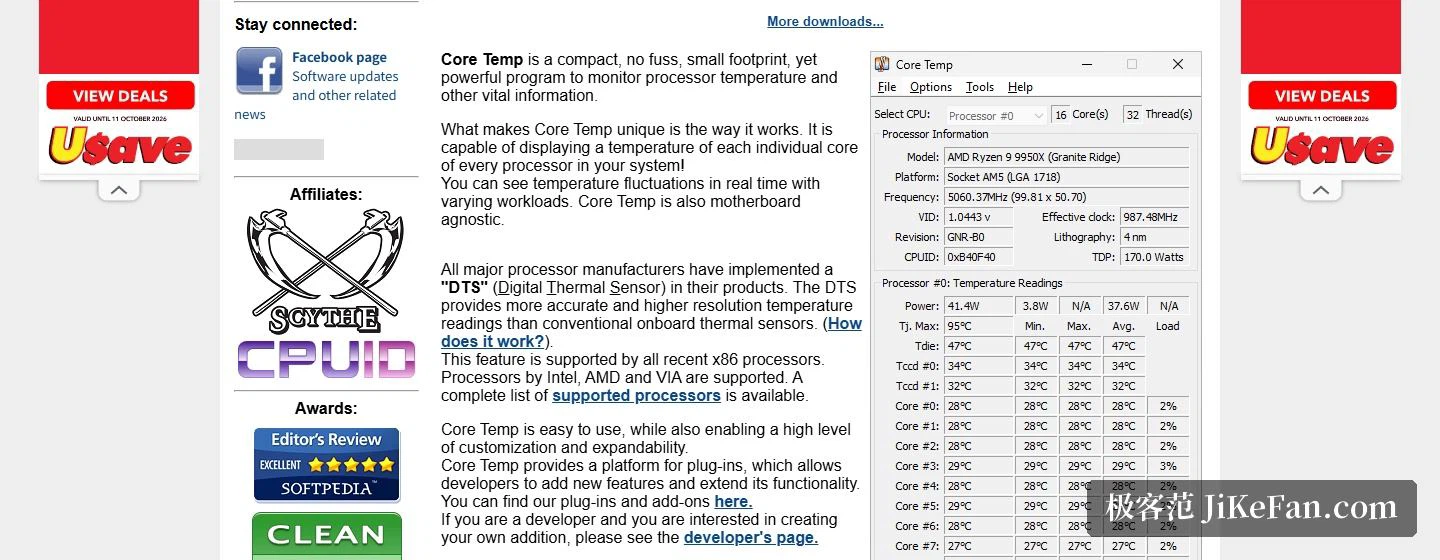
What sets it apart is where the number comes from. It does not read the probes sitting on the motherboard; it reads the digital thermal sensor built into the processor, which the mainstream chip makers integrate into their parts. According to the documentation, a reading from that sensor is more accurate and finer in resolution than what a traditional board sensor produces, and recent x86 processors generally expose it.
The consequence is that every processor in the system, and every core within it, can be shown with its own temperature, and the movement under different loads can be followed as it happens rather than inferred from a single number for the whole socket. The other practical point is that it does not care which motherboard it sits on: so long as the processor is an x86 part from one of the three vendors that make them, it works. A full support list is published for checking, and there is a separate page explaining how the sensor works, which is worth reading against your own processor model before a build.
Easy to use, and open to extension
The documentation discusses ease of use and customisability in the same breath: the interface can be changed a good deal, and room has been left for it to grow. A plugin platform is provided so that developers can add functions and extend what the program does, and there are separate pages for add-ons and for developers. A desktop gadget and a plugin for a media centre shell are also offered, so processor and memory usage can be watched from that kind of surface. Beyond the desktop, a companion app shows the same readings on two mobile platforms, which is how somebody away from the machine can still keep an eye on it.

Version and downloads
The changes in 1.20.1 are all repairs. It fixes cores failing to show or update their temperature after a restart or a sleep on one family of current processors, fixes the program becoming unresponsive during or shortly after startup, and corrects the maximum junction temperature being reported in Fahrenheit to shared memory and to plugins. The previous release, 1.20 from 2026-04-04, was a larger step: notification area configuration, a battery state indicator in the notification area, a refreshed mini mode, scaling settings for the main window, and repairs to several detection problems on two processor platforms.
For downloads, the site offers portable packages in both a 32-bit and a 64-bit build, and every file comes with a checksum so the copy can be verified. There are also more than thirty language packs, Simplified and Traditional Chinese among them, plus a translation tool for the people who maintain them. The stated requirements run from Windows 11 all the way back to XP and include several server releases; the processor has to be an x86 part from one of those three vendors.

Free at home, licensed at work
For an individual, Core Temp costs nothing. A business is a different matter: there is a dedicated commercial licensing page, the licence is counted by physical machine, pricing starts at 25 US dollars for a single unit and falls as the count rises, and anything past a thousand machines goes to the vendor for a quote.
The value of Core Temp is that it makes one question small and precise: how hot is each core right now. It reads the processor's own digital sensor, shows the cores separately, updates live, ignores the motherboard, and arrives as a portable package with a checksum attached. Free for individuals, tiny in size, and a sensible thing to leave running in the background as a temperature board when a cooling problem needs chasing.