
browser-use 1.0 drops its action list for model-written code
Version 1
Summary
browser-use 1.0 throws out four fifths of its own code: the model writes Python against the page instead of picking actions from a list, cheaper per task.
Recommend- Name
- browser-use
- Version
- 1
- Open source
- Open source
- Operating system
- WindowsmacOSLinux
- Website
- https://browser-use.com/
- Updated
- 2026-11-15 12:09
Hand a job to an AI and let it open a browser, press buttons, fill forms and bring the answer back: plenty of tools tried this in the past year, and the developers who ran them daily know the weak spot. Each step needed a snapshot of the page squashed into text, then one action picked out of a long menu, with two layers of translation in between. browser-use 1.0, released on November 10 for Windows, macOS and Linux, takes both layers away.

Eighty per cent of the code, deleted
The first line of the release notes is a number: 136,866 lines removed, four fifths of the library thrown away and written again from scratch. The replacement lets the model write code inside a Python environment that stays alive, driving the page over the browser debugging protocol. No page snapshot is produced, and no action list is kept. The team sums the idea up in one blunt phrase: nothing sits in the middle.
The old loop ran observe, encode, decode, act, and the model waited while the page was described to it once more after every move. One layer is all the new loop has: whatever the model wants done, it writes as a few lines.
Code written while the page is open
A run looks like this. The model receives a task in plain language and writes a short script: open a new tab, click the element numbered forty-one, run one statement to read the cart count. That code executes in the browser at once, the output comes back, and the model decides what to write next, until it calls done and hands over the result. One loop, no translation step anywhere in the chain.
Dropping that layer buys accuracy. Elements on a page already carry identifiers and attributes, so the model can write against them directly instead of guessing whether the twelfth clickable item in a compressed tree is the submit button. The published figures: with the same model, up to thirty-three points more on the benchmark, cost lower by a factor of 2.7 to 5.2, and runs two to three times faster.
Defaults moved as well
What bites on upgrade is rarely a new feature but a default. In browser-use 1.0, leaving out the browser argument gets a browser running in the cloud; running locally now needs the local engine named explicitly. The step ceiling per run fell from five hundred to one hundred, with a timeout of 1,700 seconds. One step is one model request, so that ceiling decides whether a long task stalls halfway through.
Of the tuning switches from the old series, the ones no longer used are ignored after a single warning, while the ones the new version cannot honour raise a type error naming the replacement. A module that was removed raises an import error that points at the new name and the migration page. The notes stress that all of this happens before the browser starts, never halfway through a run.
One line worth keeping: the engine changed, the defaults changed with it, and old code will not keep running quietly.
What else came along
Structured output is the practical addition. Attach a data model to a task and the run returns a parsed object instead of a paragraph you have to pick fields out of. Files got a proper home too: hand over a working directory before the run, and anything downloaded lands in a downloads folder inside it, with the paths listed in the result. Values marked as secret are masked in logs, checkpoints and the final result.
Domain rules are complete now: allow and block lists apply to local and cloud browsers alike, and blocking a domain takes its subdomains with it. Web search arrives as an optional capability, billed per call and counted into the cost of the task. The command line and MCP entry points stay, so anyone already running a coding agent can hand it the browser.
Scores, and the bill
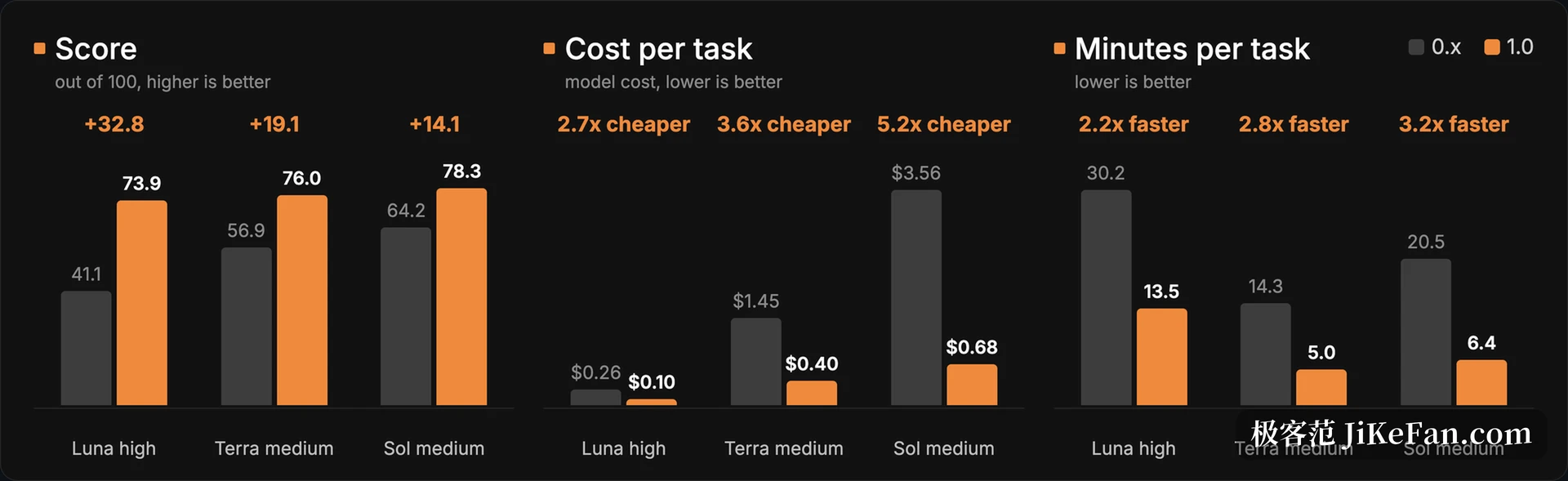
The team ran sixty tasks three times each. browser-use 1.0 scored 62.5 in ultrafast mode at seven cents and 650 seconds per task, against 56.3 for its own other agent in the same window. A model provider happened to fail during those days: the rival lost eighteen runs, 1.0 lost one, and the team says plainly that the gap was widened by it. Once vendor errors are stripped out the two sit 1.1 points apart, which is noise. The durable edge is money and time, 1.3 cents and 114 seconds saved per task.
Cloud billing runs by the hour at two cents, with proxy traffic counted apart. The open library itself costs nothing; model tokens are the expense. Keep the two accounts apart, or a free library gets mistaken for a free run.
Where to hold off
Version 1.0 pins every dependency to an exact version and commits the lock file. Upgrades therefore land on a combination that was tested, at the price of a fight when another corner of the project needs a different one. The team lists this among known issues and says outright that some installs will fail because of it.
Captchas are another edge. Locally there is no extra machinery, so the run stops and waits for a person; only a cloud session carries built-in handling. Long, twisted processes are better split up in advance, since a hundred steps is all a run gets and going over means starting again.
For anyone already on the old series this is not a feature release but a new engine. The migration page maps each old option to its new spelling, yet the call sites scattered through a project, the way success is checked and the shape of returned errors all moved. Push one small task through first, then touch production code. browser-use stays an MIT library; the cloud side is a separate account, and the two can be used apart.